
Your agency wants to try sprints. You have heard that agile teams ship faster, adapt quicker, and waste less time in meetings. But then you look at Jira. Backlogs, story points, velocity charts, burndown reports, epics, sub-tasks, custom workflows. It feels like you need to learn an entirely new discipline just to organize two weeks of work.
This template takes a different approach. Instead of giving you a blank board and assuming you know scrum, it includes four guide cards that walk your team through the sprint process step by step: pre-planning, work breakdown, KPIs, and retrospective. The board itself is simple: Backlog, To Do, Doing, Done. But the methodology is built in.
What is in this template
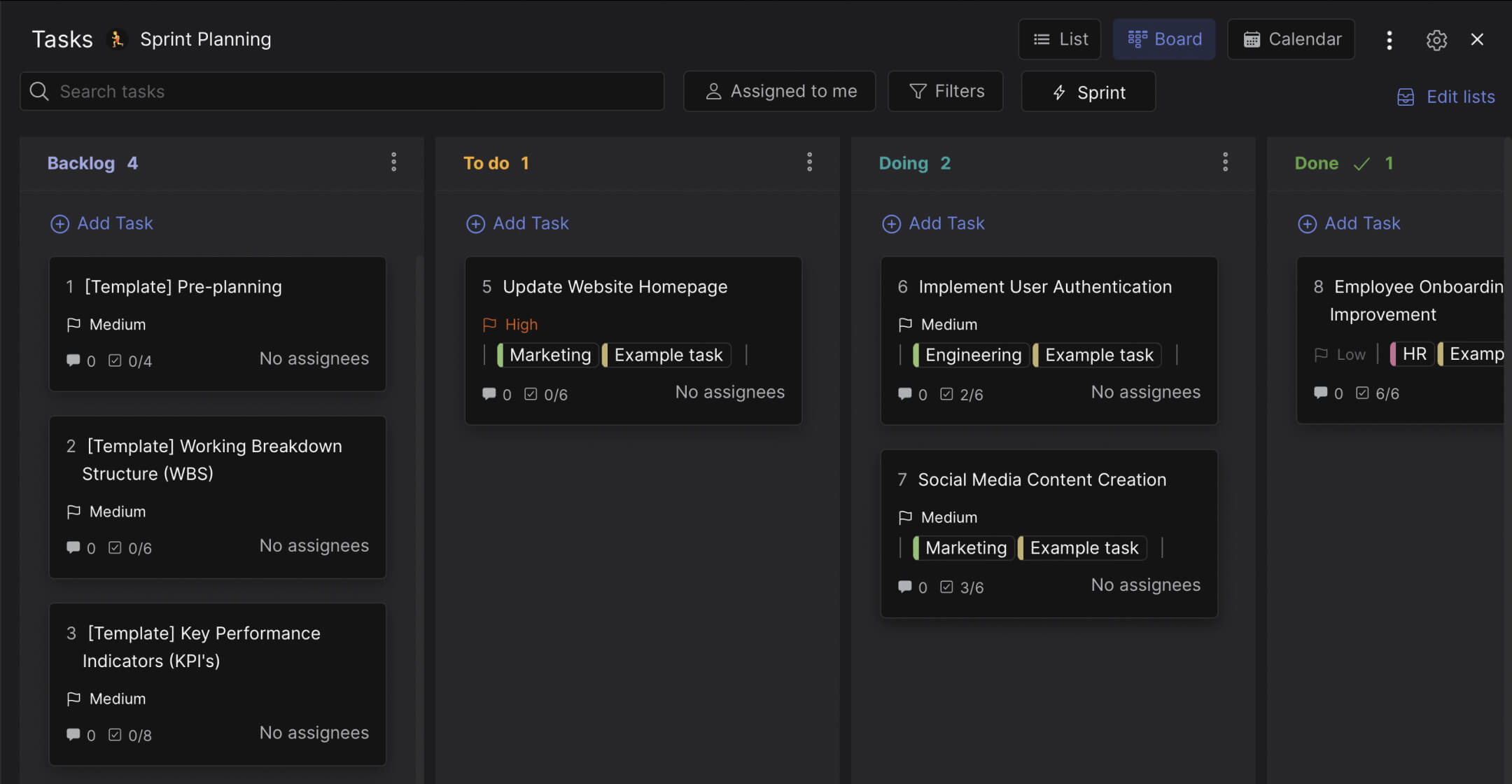
The board has four columns with sprints enabled. What makes it different from a generic kanban board is the four template guide cards that live in the Backlog.
Preview: Agile Sprint Planning Board
This is what the template looks like in Rock. Drag cards between columns to try it.
Drag cards between columns or add your own
Tap a card, then tap a column header
Pre-planning. Before you start a sprint, you need to define what you are trying to accomplish. This guide card walks you through four steps: define sprint goals, establish timelines (most teams start with 2-week sprints), allocate resources based on team availability, and set a budget. Each step has a checklist item so your team can track progress.
Work Breakdown Structure (WBS). Once you know the goals, break them into deliverables. This card guides you through: define project objectives, identify deliverables, decompose them into smaller tasks, organize tasks hierarchically, assign responsibilities, and estimate durations. The WBS is what turns a vague sprint goal into actionable work.
KPIs. Most sprint templates skip measurement entirely. This card covers eight steps: define objectives, align with business goals, identify key performance areas, select relevant KPIs, establish targets, communicate them to the team, monitor during the sprint, and analyze results afterward. It even includes examples by department: conversion rate for marketing, velocity for engineering, time-to-fill for HR, revenue for sales.
Retrospective. The sprint is not done when the work is done. It is done when the team reflects on what worked and what did not. This card has a 10-step retrospective process: schedule the meeting, gather data, set the agenda, create a safe environment, discuss what went well, identify areas for improvement, brainstorm solutions, prioritize actions, assign responsibility, and follow up.
Beyond the guide cards, the template includes example sprint tasks with labels for Marketing, Engineering, and HR. These show that sprints are not just for developers. A marketing team can sprint on a website homepage redesign. An HR team can sprint on improving the onboarding process.
"Agile is not a methodology for software developers. It is a way of thinking about work that applies to any team trying to deliver value in short cycles." - Jeff Sutherland, Co-creator of Scrum
Why this is not just another sprint board
Every project management tool offers a sprint template. Jira, ClickUp, Monday, Asana. They all give you columns and tell you to fill them. The problem is that they assume you already know how to run a sprint. If your team has never done agile before, a blank board does not help.
According to the State of Agile Report, 58% of organizations have adopted agile practices. But adoption does not mean mastery. Many teams set up sprint boards and then run them like regular task lists, missing the planning, measurement, and reflection that make sprints effective.
What we do at Rock: the sprint board lives in a space with built-in messaging. When a developer moves a card from "Doing" to "Done," the team sees it in the same chat where they discussed the task. The retrospective guide card lives right in the backlog as a permanent reminder. And because Rock is not a dev-only tool, your designers, writers, and account managers work in the same sprint without needing a separate tool. The benefits of agile apply to the whole team, not just engineering.
"The most common mistake I see teams make is treating sprints like deadlines instead of learning cycles. If you skip the retrospective, you are just doing waterfall with a two-week cadence." - Marty Cagan, Author, Inspired
Who this template is for
Best for: Agencies trying agile for the first time. Development teams that find Jira too heavy for their actual workflow. Cross-functional teams where marketing, design, and engineering work in the same sprint. Teams of 5-15 people who want structure without enterprise complexity.
Skip this if: You are already deep in the Jira or Azure DevOps ecosystem and need SAFe-level scaling. Or if your team is 1-2 people and a simple to-do list does the job. This template assumes you have at least a small team running time-boxed work cycles.
Tips for getting started
Start with 2-week sprints. The template supports any duration, but two weeks is the most common starting point. It is long enough to complete meaningful work and short enough to course-correct quickly. Once your team has run 3-4 sprints, you can decide if shorter or longer works better. For more on choosing the right agile approach, compare it with traditional project management.
Keep the guide cards in the Backlog permanently. Do not delete them after the first sprint. They serve as a reference checklist for every sprint planning session. Over time, your team will internalize the process and check the cards less often, but having them there prevents steps from being skipped.
"Plans are useless, but planning is everything." - Dwight D. Eisenhower. The same applies to sprints: the sprint plan will change, but the planning process is what keeps the team aligned.
Run the retrospective every single sprint. According to the Standish Group CHAOS Report, agile projects are 3x more likely to succeed than waterfall projects. But agile without retrospectives is just waterfall with shorter deadlines. The retrospective is where learning happens.
Use labels to separate departments. The template includes Marketing, Engineering, and HR labels. This lets you filter the board by team when planning capacity. If engineering has 8 cards in "Doing" and marketing has 2, you know where the bottleneck is before the standup meeting.


