
Running a marketing campaign for a client involves at least five types of work: planning the resources, building the website assets, creating the campaign content, setting up the channels, and reporting on results. Most agencies manage each of those in a different tool. The budget lives in a spreadsheet. The creative brief is in a Google Doc. The ads are tracked in the platform. Feedback happens in email. And the monthly report is assembled manually from four different dashboards.
This template puts the entire campaign lifecycle in one board. Seven columns cover everything from defining the budget and stakeholders to submitting the quarterly report. Your team and your client can see exactly where the campaign stands at any point.
What is in this template
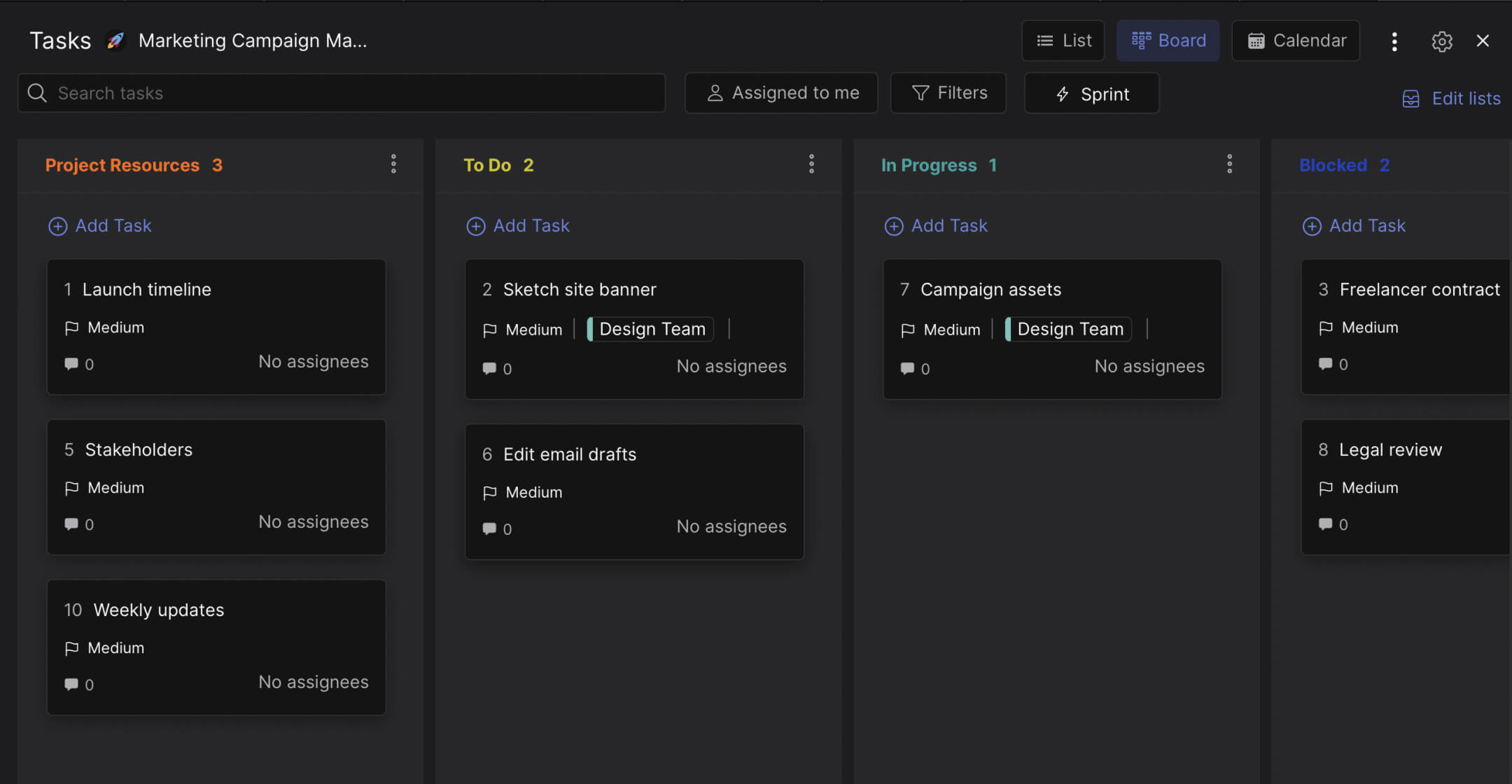
The board follows a full campaign lifecycle with seven columns. Each column represents a phase, and each card represents a specific deliverable or task.
Preview: Marketing Campaign Board
This is what the template looks like in Rock. Drag cards between columns to try it.
Drag cards between columns or add your own
Tap a card, then tap a column header
Project Resources. Define the foundation before any work starts. This column holds three cards: launch timeline, budget, and stakeholders. The stakeholders card includes a checklist for identifying who needs to approve what. Getting this right upfront prevents the "who signed off on this?" conversations later.
Website. Campaign landing pages and website banners live here. Each card has a detailed checklist: write headlines and CTAs, sketch the layout, send to design, add tracking codes, build the thank-you page. The landing page card alone has eight checklist items covering copy, images, build, and UTM tracking.
Campaign Assets. This is where the creative work happens. Four types of assets get their own cards: gated content and lead magnets, digital ads, automated drip emails, and blog and social posts. Each card includes checklists for the full production process. The digital ads card covers writing ad copy, selecting images, briefing the design team, and reviewing the final proof. The drip email card covers creating the workflow, writing the content, selecting images, and building the automation in your marketing platform.
Campaign Setup. Once the assets are ready, channels need to be configured. Three cards cover: setting up campaigns on LinkedIn, Facebook, YouTube, and other digital channels (with a checklist for budget allocation, UTM tracking, and per-platform setup), PPC campaign setup (keyword strategy, budget, timeline), and CRM campaign configuration in tools like Salesforce or HubSpot.
Blockers. Not every campaign runs smoothly. Stakeholder dependencies, budget constraints, content backlogs. This column makes problems visible instead of letting them hide in someone's inbox. When a task is blocked, move the card here and discuss it in the next update meeting.
Reporting. The campaign is live, but the work continues. Monthly reports and quarterly reports each get their own cards with due dates. This column is what separates agencies that keep clients from agencies that lose them. Consistent reporting builds trust.
Done. Completed work. Cards move here when a deliverable is finished, approved, and does not need follow-up.
"Marketing is no longer about the stuff that you make, but about the stories you tell." - Seth Godin, Author, Permission Marketing. But telling those stories requires a system. Without one, campaigns launch late, assets go missing, and reporting becomes a scramble.
Why one board beats five tools
The average marketing team uses 12 different tools to manage their work, according to Gartner. For agencies managing client campaigns, that number is often higher because each client brings their own stack of platforms.
The problem is not the tools themselves. It is the gaps between them. A designer finishes the ad creative in Figma but the account manager does not know because the update was posted in a Slack channel they do not check. The drip email is written but nobody set up the UTM tracking because that task was in a different spreadsheet. The monthly report is late because the data lives in four different dashboards and nobody started pulling it until the day before.
What we do at Rock: the campaign board lives in a space where the team also communicates. When the designer finishes an ad, they move the card and leave a comment. The account manager sees it in the same workspace where they chat with the client. No notification lost in Slack. No "did you see my email?" follow-up. Cross-functional collaboration between creative, strategy, and account management happens in context.
"The biggest waste in marketing is not bad ads or wrong channels. It is the time lost coordinating between people who should be working together but are scattered across different tools." - Scott Brinker, Editor, chiefmartec.com
Who this template is for
Best for: Marketing agencies running paid campaigns for clients (PPC, social ads, content marketing). In-house teams managing multi-channel launches with cross-functional dependencies. Any team where the campaign involves more than three people and more than two channels.
Skip this if: You run simple organic-only social media calendars. A simpler content workflow might be a better fit. This template is built for campaigns with budgets, landing pages, and reporting requirements.
Tips for getting started
Customize the checklists per client. The template includes detailed checklists for landing pages, digital ads, and drip emails. Your agency probably has a slightly different process for each client. Edit the checklists to match your actual workflow, not a generic one.
Use the Blockers column honestly. Most teams hide their problems. A designer waiting on brand guidelines from the client does not say anything for three days, hoping it will arrive. Move that card to Blockers immediately. Making problems visible is the only way to resolve them before they delay the launch.
"A blocked task that nobody can see is a guaranteed missed deadline. Make it visible, discuss it, resolve it." - Lara Hogan, Author, Resilient Management
Add weekly updates as comments. The template includes a "Weekly updates" card in Project Resources. Every Friday, add a comment with highlights from the past week and priorities for the next. This creates a searchable history that is invaluable when putting together monthly and quarterly reports.
Invite the client to the Reporting column. They do not need to see every task in Campaign Setup or Blockers. But giving them visibility into the Reporting column (and maybe Project Resources) shows them that work is progressing and builds confidence in your agency.


