
Creative work is messy by nature. An idea starts as a note on someone's phone, becomes a research brief, turns into a draft, needs graphics, gets reviewed, and eventually goes live. Between the idea and the publish button, most agencies lose track of where things are at least once a week.
This template gives your creative team a board that matches how content actually gets made. Seven columns take a piece of content from raw idea to published and promoted. Everyone on the team can see what stage every project is in without asking.
What is in this template
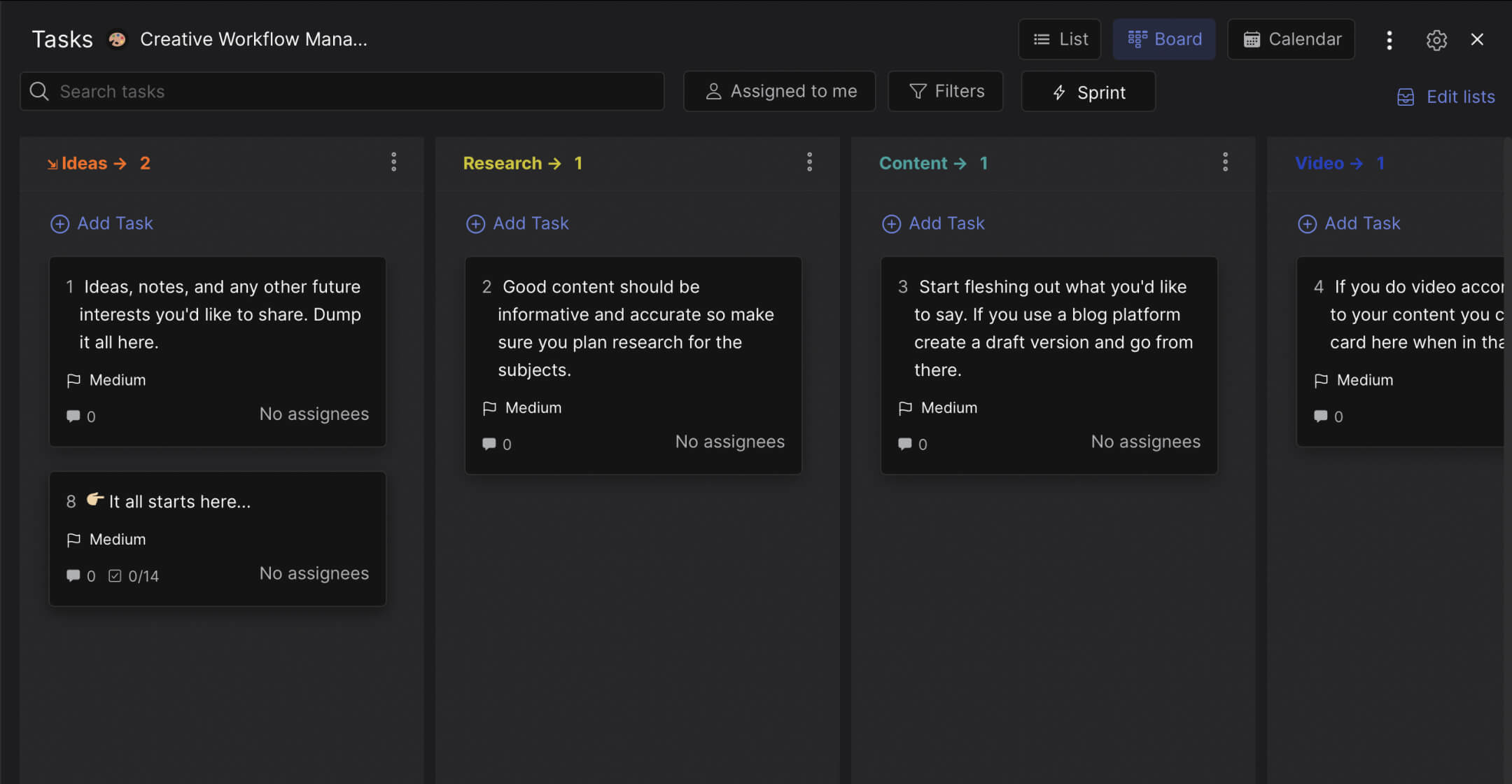
The board follows a full creative production cycle with seven columns. Each column represents a stage, and each card represents one project or content piece.
Preview: Creative Workflow Board
This is what the template looks like in Rock. Drag cards between columns to try it.
Drag cards between columns or add your own
Tap a card, then tap a column header
Ideas. The starting point. Dump every idea here: blog post concepts, campaign angles, video topics, social series. No filtering at this stage. The goal is to capture ideas before they disappear. Each card gets a short description and any relevant notes.
Research. Ideas that are worth pursuing move here. The team validates the concept: Is there search demand? Does it fit the brand? Is it something the audience cares about? Research cards include competitor references, data points, and source links.
Content. Writing and creating begins. The card holds the brief, target audience, word count or format specs, and any brand guidelines. Each card comes with a built-in checklist: draft written, proofread, verified for accuracy. This is where effective feedback between writers and editors happens.
Video. If the content includes video, the card moves here for production. Setup, filming, and post-production each get tracked. Not every card needs this column. Blog posts skip straight from Content to Published.
Published. The content is live. Article uploaded, video on YouTube, landing page pushed. The card confirms everything is publicly accessible and formatted correctly.
Social. Content does not promote itself. This column tracks distribution: LinkedIn post drafted, Instagram reel scheduled, newsletter mention queued. Each platform gets a checklist item so nothing gets missed.
Done. The full cycle is complete: created, published, and promoted. Moving a card here means the team can move on with a clean conscience.
"Creativity without a process is just hope. You are hoping the right person picks up the right project at the right time. A workflow replaces hope with visibility." - Todd Henry, Author, The Accidental Creative
Why creative teams need a workflow board
The biggest bottleneck in most creative teams is not talent. It is handoffs. A writer finishes a draft but the designer does not know. A video is edited but nobody schedules the social posts. Work sits between stages because the next person in line was never notified.
According to Adobe's State of Work report, creative professionals spend only 27% of their time on actual creative work. The rest goes to meetings, emails, and searching for files. A visual workflow does not eliminate all of that, but it makes handoffs visible. When a card moves from "Content" to "Video," the video team sees it.
What we do at Rock: the creative board lives in a space with built-in chat. When a writer moves a draft to the next stage, they can leave a comment on the card and the designer gets notified in the same workspace. No switching to Slack, no email chain. Cross-functional collaboration happens where the work lives.
"The best creative teams I have worked with all had one thing in common: they spent less time talking about work and more time doing it. That only happens when everyone can see where things stand." - Stefan Mumaw, Creative Director and Author
Who this template is for
Best for: Creative agencies, content studios, marketing teams that produce a mix of written and video content, and freelance creators who want to stop tracking projects in their head. Works especially well when multiple people touch each project (writer, designer, editor, social manager).
Skip this if: Your creative output is one format only (just blog posts, just social graphics) with no handoffs. The content funnel or SEO content template might be a better fit in that case.
Tips for getting started
Not every card needs every column. Blog posts might skip "Video" entirely. Social-only content might skip "Content" and go straight from "Research" to "Social." The board is flexible. Move cards through whatever stages apply to that specific project.
Use the checklist on each card to track micro-steps. The template includes items like "draft written," "proofread," "thumbnail image," "share on LinkedIn," "share on Instagram." Customize these for your team's actual distribution channels.
"Distribution is half the creative work. If you publish something and do not promote it, you did half the job." - Ross Simmonds, CEO, Foundation Marketing
Keep the "Ideas" column alive but lean. It should feel like a short list of promising concepts, not a graveyard of half-formed thoughts. Review it weekly: promote the best ideas to "Research" and archive anything that has been sitting for more than a month.
Set a communication rhythm around the board. A 15-minute weekly walkthrough, column by column, replaces the longer creative review meetings most teams run. What moved? What is stuck? What publishes this week?


