
A client sends a revision request over email. Your designer sees it three hours later because they were checking Slack. The account manager asks the client to resend it in the project channel. The client gets frustrated. The revision sits for another day. By the time it is done, the client has already followed up twice and the relationship feels a little colder.
This is not a Zendesk problem. You do not need a ticketing system with SLAs, priority routing, and a knowledge base. You need one place where client requests land, get assigned, and get resolved without falling through the cracks. Three columns. New tickets, Resolving, Resolved.
What is in this template
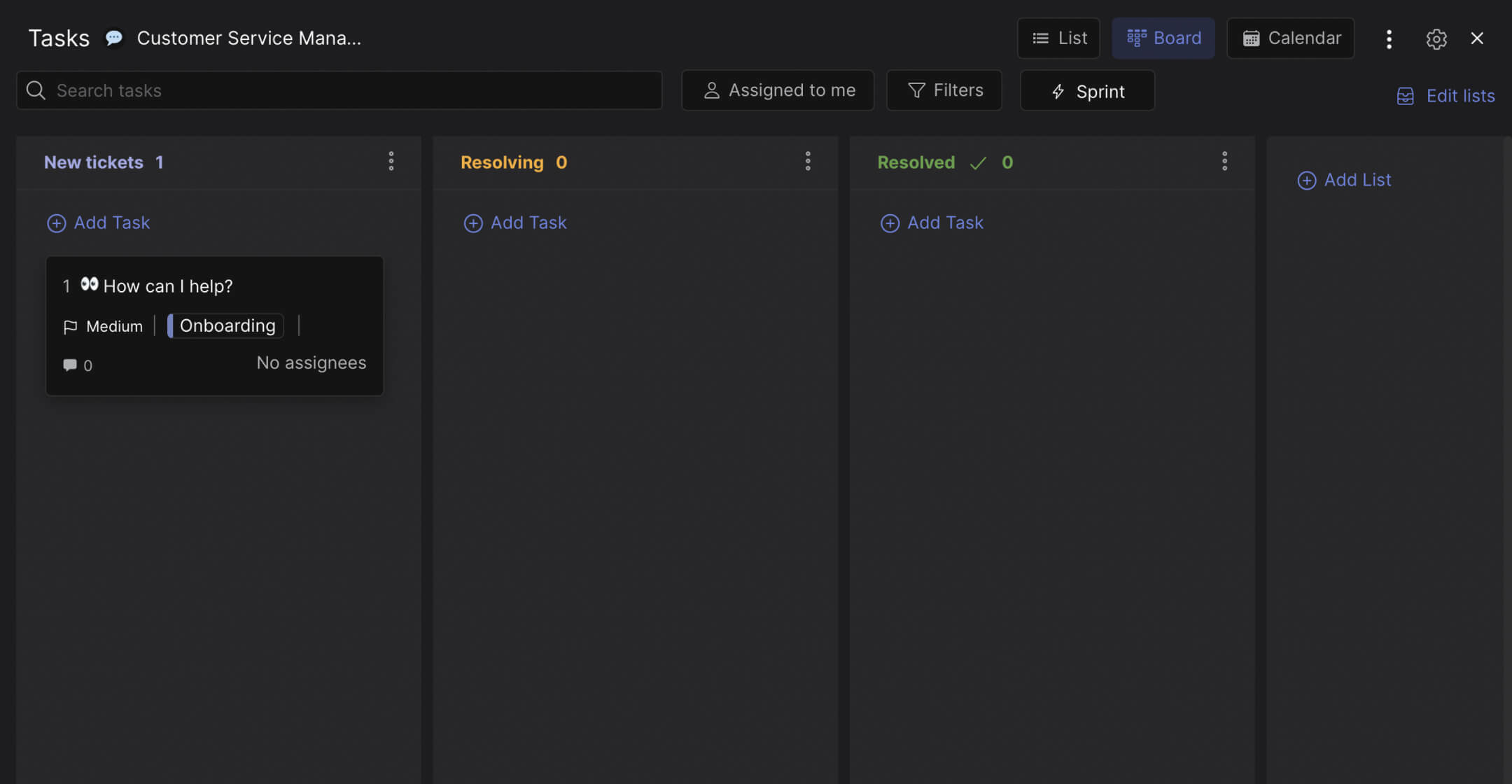
The board is intentionally simple. Three columns that track the lifecycle of any client request.
New Tickets. Every incoming request starts here. A client asks for a banner revision, a copy update, a logo color change, a billing question. Instead of these landing in five different places (email, Slack, WhatsApp, a comment on a Google Doc), they all become task cards in this column. One inbox for everything.
Resolving. A team member picks up the request, assigns themselves, and moves the card here. The rest of the team can see it is being handled. The client can see it too, if you give them access to the space. No more "did anyone look at this?" messages.
Resolved. The request is done. The revision is delivered, the question is answered, the fix is live. Moving a card here means the work is complete and confirmed. This column is your record of everything your team has handled.
"Your most unhappy customers are your greatest source of learning." - Bill Gates. But you can only learn from them if their requests are tracked, not lost in chat threads.
Why agencies need this instead of Zendesk
Enterprise ticketing tools are built for companies handling hundreds of support tickets per day from thousands of customers. Agencies handle a different kind of request: client revision rounds, feedback on creative work, questions about timelines, invoice clarifications. The volume is lower but the stakes per request are higher. Losing a support ticket from customer #4,387 is a metric problem. Losing a revision request from your biggest client is a relationship problem.
According to a Harvard Business Review study, the top reason clients leave agencies is not quality of work, it is communication breakdowns. Requests get lost, timelines slip, and the client feels like they are chasing you instead of the other way around. A visible board where every request has a status fixes that perception.
What we do at Rock: the request board lives in the same space where your team chats with the client. When a designer finishes a revision and moves the card to Resolved, the client sees it in the same workspace where they submitted the request. The conversation about the revision, the files, and the status update are all in one place. No "I sent it by email, did you check?" moments. For more on building strong client relationships through client communication, the principles apply directly here.
"The best agencies I have worked with had one thing in common: I never had to ask for a status update. The status was always visible." - A client quoted in Agency Management Institute research
Who this template is for
Best for: Agencies that handle ongoing client requests (design revisions, copy updates, bug reports, billing questions). Teams where requests currently arrive through email, Slack, WhatsApp, or verbal mentions and nobody has a clear picture of what is open. Works especially well when clients need visibility into what is being worked on without attending status meetings.
Skip this if: You run high-volume B2C customer support with hundreds of daily tickets. That needs a dedicated support tool with automation, macros, and SLA tracking. This template is for agencies managing 5-50 client requests per week, not 500.
Tips for getting started
Use labels to separate clients. When your board has 15 open requests from four different clients, labels like "Client A," "Client B," and "Internal" help you filter. One glance shows you which client has the most open requests and who might need attention.
Set a response time expectation. Not a formal SLA, but a team agreement: new tickets get acknowledged within 4 hours and moved to Resolving within 24 hours. Write this in the space notes so everyone knows the standard. Consistent response times are what build white glove support experiences.
"Speed of response is the single most important factor in client satisfaction for agencies. Not perfection, not price. Speed." - Karl Sakas, Agency Consultant, Sakas & Company
Invite the client to the space. This is the most powerful move. When clients can see their requests moving from New to Resolving to Resolved in real time, they stop sending follow-up emails. The board answers "what is the status?" before they need to ask. For agencies in different timezones from their clients, this is especially valuable because the board updates itself even when nobody is online to respond.
Review the board in your weekly client sync. Instead of preparing a status update, share the board. "These are the 4 requests we resolved this week, these 2 are in progress, and this 1 is new from yesterday." The board becomes the meeting agenda. That replaces the 30-minute status call most agencies run every week with a 10-minute walkthrough that is more informative and requires zero preparation.


