
Your portfolio has been "almost done" for six months. You have the projects. You have the skills. But every time you sit down to build it, you get stuck. Which projects should you include? How should the pages be structured? What should the case studies look like? So you close the tab and tell yourself you will finish it next weekend. Next weekend becomes next month.
This template turns your portfolio from a someday project into a structured workflow. Six phases take you from choosing which work to show through planning the site structure, designing the layout, building it, and launching with a quality checklist. It is the same process agencies use for client websites, adapted for the most personal project you will ever build: the one that represents your career.
What is in this template
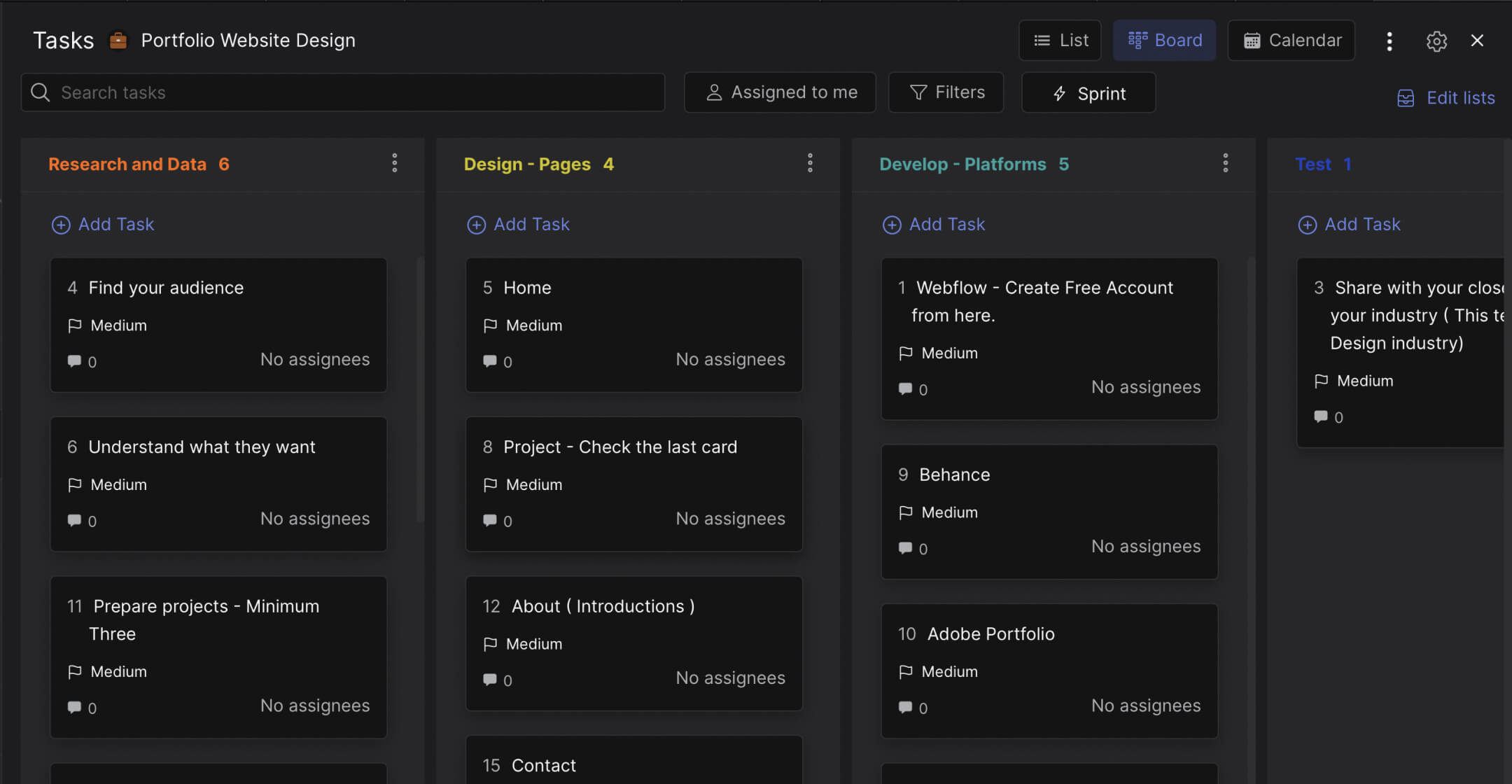
The board has six phases that follow the process of building a portfolio website, adapted specifically for freelancers and creative professionals.
Discovery. Before you open any design tool, answer three questions: what type of website is this (portfolio, portfolio plus blog, portfolio plus services)? What are the goals (get hired, attract freelance clients, showcase a specific skill)? Who is the audience (creative directors, startup founders, agencies looking for contractors)? Then make the hardest decision: which 8-12 projects represent you best? Your worst project kills your portfolio faster than having no portfolio at all.
Sitemap. Plan the page structure. Most portfolios need five pages: home, about, projects (with individual project or case study pages), services or hire me, and contact. The sitemap card has three checklist items: research (look at portfolios you admire), outline (draft the hierarchy), and finalize (confirm before building). Getting the structure right prevents rebuilding later.
Wireframe. Figure out the flow on each page. How does a visitor get from the homepage to your best project? What format do case studies take (problem, solution, results)? Where do testimonials go? The wireframe phase is where you decide whether your portfolio is a gallery (images only) or a narrative (projects with context and storytelling).
Visual Design. This is where personal branding happens. Six decisions: create a visual sketch, choose a color scheme that represents your style, pick fonts, find or customize a theme, match the design to your brand, and gather all project images and screenshots. Your portfolio's visual design is a sample of your work. If you are a designer, the site itself is your best case study.
Development. Build the site. Mobile responsiveness first (most visitors will find you on their phone), then title, header, body sections, and footer. The checklist keeps you from skipping steps when the excitement of "almost done" takes over.
Launch Checklist. Sixteen QA items before you go live: spelling, real copy (no placeholder text), image optimization, contact details, terms, privacy policy, FAQ, copyright, site speed, favicon, responsive testing, logo linking to homepage, working forms, social media links, internal and external link testing, and a 404 page. Every item on this list represents something a freelancer has shipped broken and regretted.
"Your portfolio is your silent salesperson. It works for you 24 hours a day, but only if it actually exists. A half-finished portfolio is worse than no portfolio because it tells clients you do not finish what you start." - Paul Jarvis, Author, Company of One
Why most freelance portfolios never ship
The problem is not skill. Freelancers who build beautiful websites for clients somehow cannot finish their own. The reason is psychological: there is no deadline, no client, and no accountability. A client project has a contract and a launch date. Your portfolio has "whenever I get to it."
According to a Upwork Freelance Workforce Report, 64 million Americans freelanced in 2024. Most do not have a dedicated portfolio website. They rely on platform profiles (Upwork, Fiverr, Dribbble) where they compete on price instead of differentiating on quality. A structured portfolio project with phases and deadlines treats your career marketing with the same seriousness you give client work.
What we do at Rock: the portfolio board lives in a workspace where you can set due dates on each phase. Discovery by Monday. Sitemap by Wednesday. Wireframe by Friday. Treating it like a one-week sprint instead of an open-ended project is what gets portfolios shipped. The board gives you the structure. The deadline gives you the urgency. For more on freelancer productivity, the same principles apply: structure beats motivation.
"Perfectionism is the enemy of the portfolio. Ship it at 80% and improve it over time. A live portfolio that is good enough gets you clients. A perfect portfolio that lives on your laptop gets you nothing." - Jessica Hische, Lettering Artist and Author
Who this template is for
Best for: Freelance designers, developers, photographers, and creative professionals who need a portfolio website but keep putting it off. Career switchers building their first portfolio. Anyone whose current portfolio is more than a year out of date and needs a structured refresh.
Skip this if: You are building a website for a client. The website development template is better for client projects because it includes client-facing phases. This template is for your own site, where the only stakeholder is you.
Tips for building your portfolio
Choose projects that show range AND depth. Most freelancers either show too many projects (30 thumbnails, no context) or too few (2 case studies, no variety). The sweet spot is 8-12 projects: enough to show range, few enough to write meaningful case studies for the best 3-5.
Write case studies, not just captions. A project thumbnail with "Logo design for XYZ Corp" tells the viewer nothing. A case study that says "XYZ Corp needed a brand identity that conveyed affordability without looking cheap. Here is the brief, here is the process, here is the result" tells a story. Stories get remembered. Thumbnails get scrolled past.
"Show your process, not just your output. Clients hire you for how you think, not just what you make. A portfolio that shows the journey from brief to solution is worth ten times more than one that shows polished final images." - Tobias van Schneider, Designer and Founder, Semplice
Launch before you are ready. If you have been "building your portfolio" for more than a month, you are overthinking it. Set a hard deadline: two weeks from today, the site goes live. Use the launch checklist to make sure nothing critical is broken, and ship it. You can always update it later. Working with clients requires a portfolio that exists, not one that is perfect.


