
Most product roadmap tools are built for product managers at companies with hundreds of employees. They give you timeline views, quarterly OKR alignment, stakeholder-specific dashboards, and a three-month onboarding process. If you are a small team building a product, that level of tooling does more harm than good. You spend more time managing the roadmap than building the product.
This template takes a different approach. Five columns track a feature from idea to shipped: Ideas, Design, Estimating, Development, Done. No timelines, no Gantt charts, no quarterly planning ceremonies. Just a visual board that shows what your team is considering, what is being designed, what has been scoped, and what is actively being built.
What is in this template
The board has five columns that follow the lifecycle of a product feature or improvement.
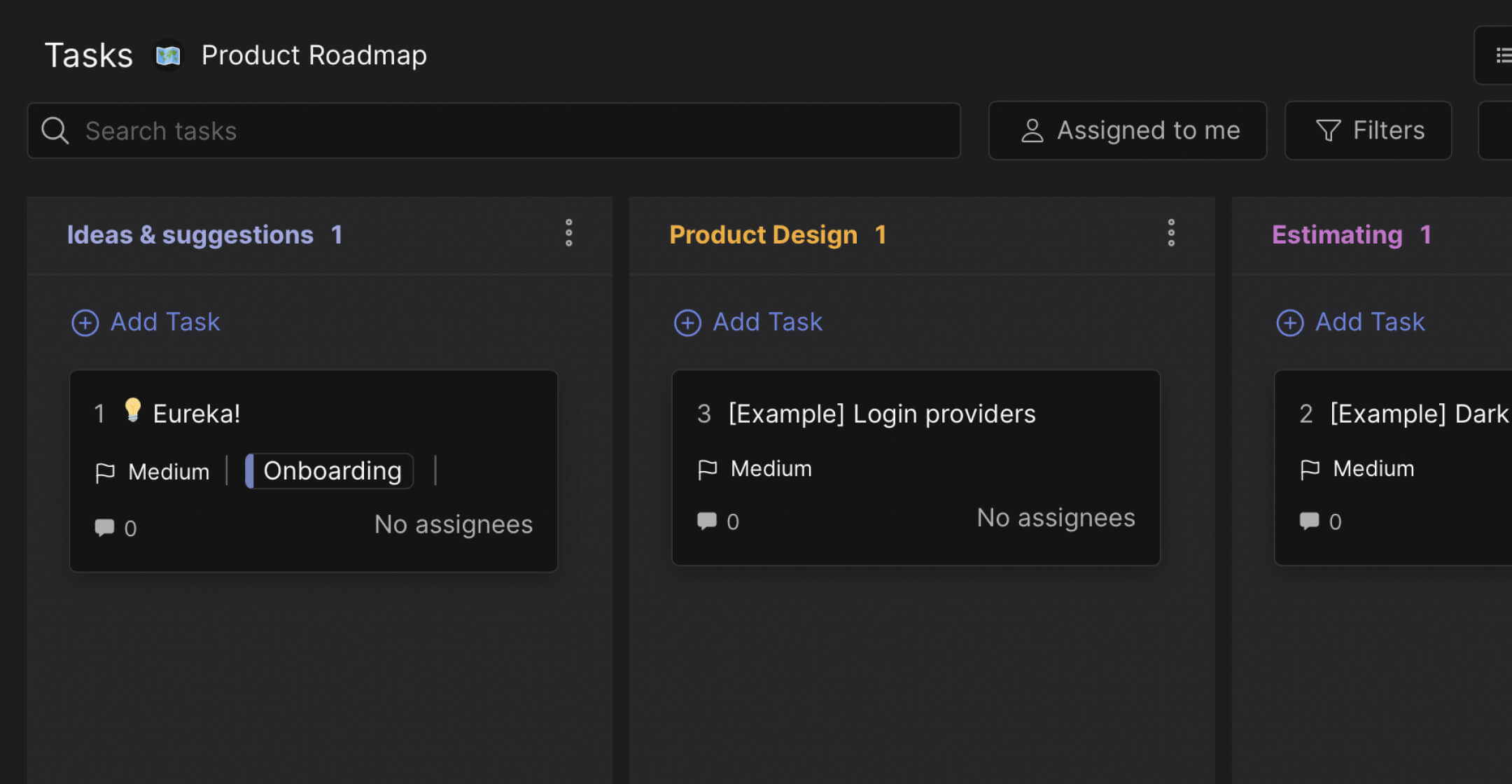
Preview: Product Roadmap Board
This is what the template looks like in Rock. Drag cards between columns to try it.
Drag cards between columns or add your own
Tap a card, then tap a column header
Ideas and Suggestions. Every feature request, bug report, and improvement idea starts here. Internal suggestions from the team, feedback from users, requests from clients. The goal is to capture everything in one place instead of letting ideas scatter across Slack threads, emails, and meeting notes. Not every idea moves forward. That is the point. This column is where you decide what is worth exploring.
Product Design. Ideas that pass the initial filter move here. The team works out what the feature actually looks like: user flows, wireframes, UI decisions. This is where vague ideas like "improve onboarding" become specific designs like "reduce onboarding from 5 steps to 2 steps." A card stays here until the design is clear enough to estimate.
Estimating. The feature is designed. Now the question is: how much effort does it take? The team assigns story points or time estimates, identifies dependencies, and decides whether it fits in the current capacity. This column acts as the gate between "we want to build this" and "we are going to build this." Features that are too large get broken down. Features that depend on other work get flagged.
Development. The feature is scoped, estimated, and approved. The team builds it. Cards here represent active work. This column should stay lean, similar to a prioritized task list: if everything is in Development, nothing is getting finished.
Done. Shipped. The feature is live, the bug is fixed, the improvement is deployed. Cards move here when the work is complete and verified. This column is your record of what you have built.
"A roadmap is not a Gantt chart. It is a communication tool that shows what your team believes is the most important thing to build next." - Marty Cagan, Author, Inspired
Why workflow beats timeline
Traditional product roadmaps are timeline-based: Q1, Q2, Q3, Q4. That works when your company has hundreds of people and needs to coordinate across departments. For a team of 5-20, timelines create false precision. You commit to shipping a feature in March, and when it slips to April, the roadmap needs updating. Then it slips again. The roadmap becomes a document nobody trusts.
A workflow-based roadmap shows where features are in the process, not when they will be done. "Dark mode is in Design" tells the team everything they need to know. Nobody asks "is it on track?" because the board answers that question visually. According to ProductPlan's research, 49% of product managers update their roadmap at least weekly. With a workflow board, updates happen automatically as cards move between columns.
What we do at Rock: the roadmap board lives in a space with built-in messaging. When a developer moves "Two-factor authentication" from Estimating to Development, the product manager sees it in the same workspace where they discussed the requirements. Design feedback, estimation discussions, and development updates all stay attached to the card. No context lost, no "which Slack thread was that in?" moments.
"The best product teams I know do not plan in quarters. They plan in cycles: what is the most important thing we can ship in the next two weeks?" - Ryan Singer, Author, Shape Up
Who this template is for
Best for: Small product teams (3-15 people) at startups or agencies building client products. Teams that want to track features from idea to shipped without the overhead of Jira or ProductPlan. Works well when your "product manager" is also the founder, the designer, or the lead developer.
Skip this if: You need to present a timeline-based roadmap to investors or enterprise stakeholders who expect quarterly commitments. For that, use a project plan template with specific dates. This template prioritizes execution visibility over strategic presentation.
Tips for getting started
Use labels to categorize features. The template supports customlabels like Feature, Enhancement, Bug Fix, and Research. When your Ideas column has 20 cards, labels help you filter. How many bugs are we sitting on? How many new features are in design? Labels turn the board into a dashboard.
Keep Ideas lean. Not every user request deserves a card. Add ideas that have come up more than once, that align with your current goals, or that solve a real problem you have observed. A 50-card Ideas column is a graveyard, not a roadmap.
"If everything is a priority, nothing is. The hardest part of product management is saying no to good ideas so you can focus on great ones." - Des Traynor, Co-founder, Intercom
Limit Development to 2-3 cards per developer. This is the same WIP limit principle that makes task boards effective. If a developer has 7 features "in development," they are context-switching and finishing nothing. Visible limits force the team to finish before starting.
Review the board weekly. A 15-minute weekly review, column by column: what moved? What is stuck in Estimating? What new ideas came in? This replaces longer roadmap review meetings and keeps the board accurate.


