
Most project charter templates are a Word doc your team forgets in a folder. They look good at kickoff. A month later they live in version 4 of project_charter_FINAL_v2.docx and nobody opens them between status meetings. The scope stays in the doc; the team improvises against the inbox.
This template is built differently. The Rock space holds the charter, the kickoff actions, and the sign-off log in one place. The 7-section charter lives as a Note your team and client can both see. The kickoff actions live on a task board next to it. Sponsor sign-off is logged at the bottom of the same Note, with version history visible. For the full step-by-step guide on how to write a project charter, see our project charter guide.
What is in this template
Two notes hold the charter content. One task board holds the kickoff actions. Files holds the budget sheet stub.
Note 00. How to use this template. Orientation: read order, when to do a charter, lean vs full call, who signs off, where to add tasks vs notes. Read this first.
Note 01. The Project Charter. The actual document. Seven sections inside one note: Purpose, Objectives and Success Criteria, Scope, Stakeholders and Roles, Timeline and Milestones, Budget and Resources, Risks and Assumptions. A sign-off section at the bottom for sponsor approval. Pin this note so it stays visible in the project space.
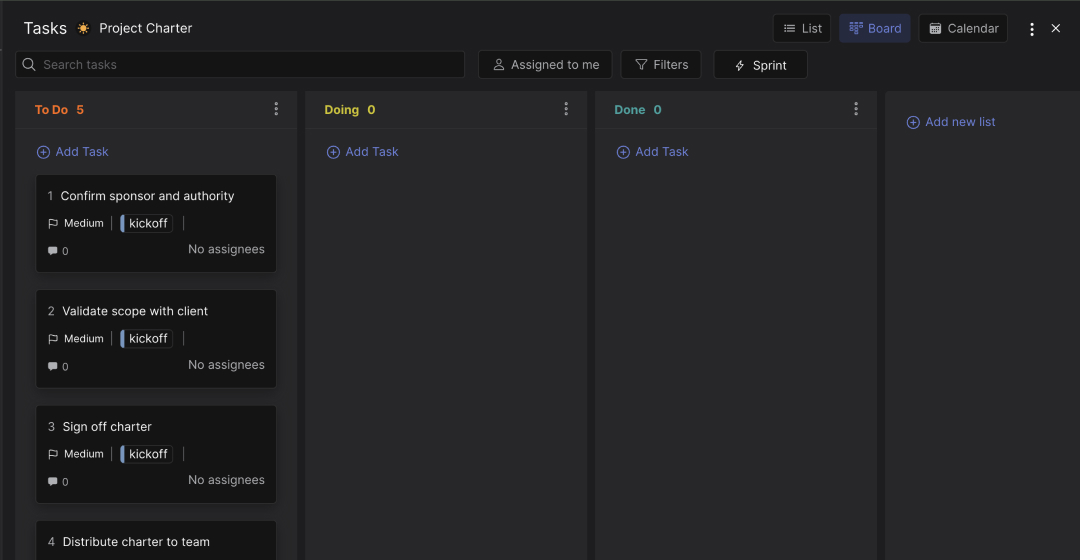
Task board. Five kickoff cards labeled with the kickoff label. Confirm sponsor and authority. Validate scope with client. Sign off charter. Distribute charter to team. Schedule kickoff meeting. Move them across To Do, In Progress, Blocked, Done as the kickoff progresses.
Files. A budget spreadsheet stub. The note holds the headline numbers; the math lives in the sheet. Add other reference docs here as the project starts: scope appendix, contract, market research, anything the charter points to but does not include verbatim.
The 7-section project charter, in one space
Most charter templates ship as a single Word doc. The doc gets written, signed off, and then drifts away from how the team works. The single-Note structure inside Rock keeps the charter connected to weekly execution.
Purpose. Why the project exists in 2 to 3 sentences. The cost of inaction. High-level only. Save operational detail for the project plan.
Objectives and success criteria. Two to four SMART objectives with baselines and targets. Avoid vague goals. Use specific outcomes the team can measure at the end.
Scope. In-scope deliverables and an explicit out-of-scope list. The out-of-scope list is your strongest defense against scope creep. Without it, every new request has to be re-litigated.
Stakeholders and roles. Sponsor, project manager, core team, and approvers. The sponsor signs off. For client work, that is the client lead with budget authority.
Timeline and milestones. Kickoff date, end date, and 4 to 6 major milestones. The spine, not the full plan. The detailed schedule lives elsewhere.
Budget and resources. Headline budget number, internal effort, external costs. The math lives in a sheet in Files. The charter captures the headline.
Risks and assumptions. Top 3 to 5 risks with owner and mitigation. Top 3 to 5 assumptions. If any assumption proves false, the charter likely needs revisiting.
The reason this matters: a charter pinned in the project space gets re-read. A Word doc in Drive does not. Drift between the charter and the work is the warning sign that the project needs a course correction, not the moment to retroactively edit the charter to match what shipped.
"By failing to prepare, you are preparing to fail." - Benjamin Franklin, commonly attributed and verified
Who this template is for
Best for: Project managers and agency leads formalizing a kickoff. Agencies running client engagements that need a written authorization before work starts. Cross-team initiatives where the sponsor, the team, and the client need to agree on scope, timeline, and budget in writing. Anyone who has watched a project drift because nobody could point at the charter when scope creep happened.
Skip this if: You are running a 3-day internal task or a fully automated routine workflow. The charter is overkill for work that does not need formal authorization. A charter is also unnecessary when an existing master agreement or SOW already contains the same elements. In that case, link the SOW from the project space and skip the charter.
Why project charters die in a Word doc
The failure pattern is consistent. The charter gets written at kickoff. It is comprehensive, well-formatted, and signed off. Then it goes into a shared drive. The team improvises against weekly demands. Three months later the charter and the work no longer match each other; six months later, the charter is wallpaper.
The problem is structural, not behavioral. A document in a shared drive is invisible during daily work. The team opens the project channel or the task board, not the charter. Scope creep happens in chat threads where nobody re-reads what was originally agreed. Sign-off becomes a formality at kickoff, not a control through the project.
This template addresses the gap directly. The charter lives where the team already works. The Note is pinned to the project space, visible alongside chat and tasks. The sign-off log is at the bottom of the same Note, so version history and approval are inline with the content. Bringing the client into the space cross-org makes sign-off literal: the client reads the charter, then types their approval on the same Note. No separate email thread, no PDF chasing.
Tips for getting started
Fill the notes top-to-bottom before adding tasks to the board. Note 00 first to understand the structure, then Note 01 section by section. Each section in the charter should fit in 2 to 4 sentences. If a section needs more space, the detail probably belongs in a referenced document, not in the charter.
Pick lean or full before you start writing. Use the lean version (one short paragraph per section, 1 page total) for projects under 8 weeks, under $50K, or with a single client owner. Use the full version (a few paragraphs per section, up to 2 pages) for cross-team initiatives, regulated work, or client engagements over $50K. The wrong choice in either direction wastes effort.
Bring the client into the space before sign-off, not after. Rock allows external users in any space at no extra cost. Adding the client lead during charter drafting catches scope disagreements before they become contract disputes. The team gets one shared source of truth instead of internal and client-facing versions that drift apart.
Schedule the cadence with the sponsor at sign-off. A weekly status note that references the charter, a monthly check-in on milestones, and an explicit re-read of the charter at major milestones. Without scheduled re-reads, the charter goes stale within 90 days even when it is pinned and visible.
Update the charter when scope shifts, not after. Scope creep usually announces itself in a single message: a new request, an unplanned dependency, a stakeholder turning up late. The right response is updating the relevant section of Note 01 and triggering re-sign-off if the change is material. The wrong response is letting the change pass and retroactively rewriting the charter to match what shipped.


