
Your agency is growing. You posted a job opening, shared it on LinkedIn, and sent it to a few WhatsApp groups. Within a week, you have 30 applications spread across email, LinkedIn messages, a Google Form, and direct messages. Some are strong. Some are not. But they are all in different places, and nobody on your team knows which candidates have been contacted and which are still waiting.
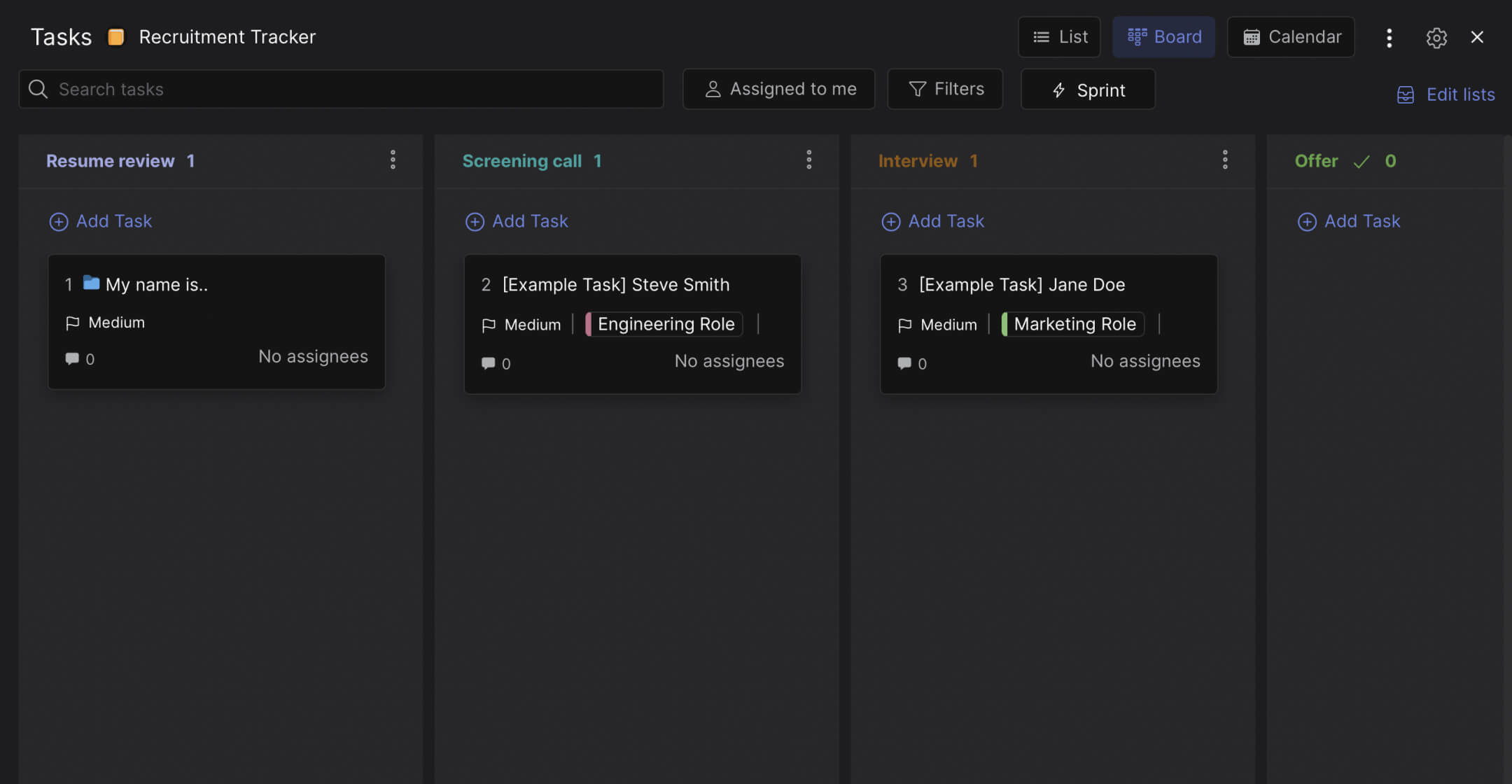
This template gives you a visual hiring pipeline. Every candidate is a card that moves through five stages: Resume Review, Screening Call, Interview, Offer, and Reject. Your whole team sees where every applicant stands without asking.
What is in this template
The board has five columns that follow the hiring process from first contact to final decision.
Resume Review. Every application starts here. One card per candidate with their name, the role they applied for (use labels like Engineering, Marketing, Design, Ops), and a link to their resume in the task description. This is your first filter. Strong candidates move forward. Weak fits move to Reject. The goal is to clear this column within 48 hours of receiving applications.
Screening Call. A 15-20 minute call to check basic fit: salary expectations, availability, communication skills, and genuine interest in the role. Not a full interview. Just enough to decide whether a longer conversation is worth both parties' time. Move the card here when the call is scheduled, and add notes to the task after the call.
Interview. The formal evaluation. Technical assessments, cultural fit conversations, portfolio reviews, or whatever your agency's interview process includes. Each candidate card can have a checklist for interview stages if you run multiple rounds. Comments on the card capture the team's feedback so it is not scattered across Slack threads.
Offer. The candidate passed. You are ready to make an offer. The card moves here while you prepare the terms, send the offer letter, and wait for a response. This column should be small. If you have 10 candidates in Offer, something in your process is broken.
Reject. Most templates hide rejections behind a status field. This board makes it an explicit column. That is intentional. When you can see that 25 out of 30 candidates ended up in Reject, you learn something about your job description, your sourcing channels, or your screening criteria. The Reject column is where hiring gets honest.
"The biggest hiring mistake small companies make is not having a process. They interview whoever shows up and hope for the best." - Laszlo Bock, former SVP of People Operations, Google
Why a board beats a spreadsheet for hiring
Most agencies track candidates in a spreadsheet. Name in column A, status in column B, notes in column C. It works until it does not. When three people on your team are screening candidates simultaneously, the spreadsheet gets out of sync. Someone calls a candidate who was already rejected. Someone else forgets to update the status after an interview. The spreadsheet is always slightly wrong.
A visual board solves this because status is the position of the card, not a text field someone has to update. When a card is in "Screening Call," that is the status. No extra step. According to a SHRM benchmarking report, the average cost per hire is $4,700 and the average time to fill a position is 44 days. A clear pipeline reduces both by preventing the delays that come from miscommunication and lost candidates.
What we do at Rock: the hiring board lives in a space with built-in messaging. When your recruiter moves a candidate to "Interview," the hiring manager sees it in the same workspace where they discuss the role requirements. Interview feedback goes directly on the candidate's card as a comment. Files (resumes, portfolios, test assignments) attach to the card. No "check your email for the resume I forwarded" conversations. For more on building a structured recruitment process, the principles apply directly here.
"Hiring is not about finding the best candidate. It is about having a process that consistently identifies good candidates before they accept an offer somewhere else." - Patty McCord, former Chief Talent Officer, Netflix
Who this template is for
Best for: Growing agencies hiring 1-5 roles at a time. Founders who are personally involved in hiring and need to keep the team aligned on candidate status. Remote teams where the hiring discussion happens across timezones. Any team currently using a spreadsheet or WhatsApp group to track applicants.
Skip this if: You are a staffing agency processing hundreds of candidates per month. That needs a dedicated ATS with automation, resume parsing, and job board integrations. This template is for agencies hiring for their own team, not recruiting at scale.
Tips for getting started
Create one card per candidate, not one card per role. The board tracks people through a pipeline, not job openings. If you are hiring for three roles, all candidates go on the same board. Use labels (Engineering, Marketing, Design) to filter by role.
Add resume links and portfolio URLs to the task description. When your hiring manager needs to review a candidate before an interview, everything should be on the card. No searching through email attachments.
"The best recruiting advantage any company can have is speed. Move faster than the candidate's other options." - Jeff Weiner, former CEO, LinkedIn
After a candidate reaches Offer and accepts, their next step is onboarding. Use a 30-60-90 day plan to structure their first three months. The hiring board gets them in the door. The onboarding plan gets them productive.
Review the Reject column monthly. If 80% of candidates are getting rejected after the Interview stage, your screening process is not filtering well enough. If most rejections happen at Resume Review, your job description might be attracting the wrong people. The Reject column is data, not just an endpoint.
Keep the team engaged in the process. Hiring is not just the founder's job. When team members can see the board, comment on candidates they have met, and track the pipeline, they feel ownership over who joins the team.


