
You sent a pricing update to your biggest client two weeks ago. Did they reply? Who sent it? Was it email or a phone call? If you have to search through Slack, email, and your own memory to answer these questions, your stakeholder communication is not being tracked. It is being hoped.
Most stakeholder engagement templates give you a power/interest grid to map who matters and how much. That is useful for planning. It is useless for execution. This template tracks the actual communications: what needs to go out, what is in progress, what was sent and is waiting for a reply, and what is done.
What is in this template
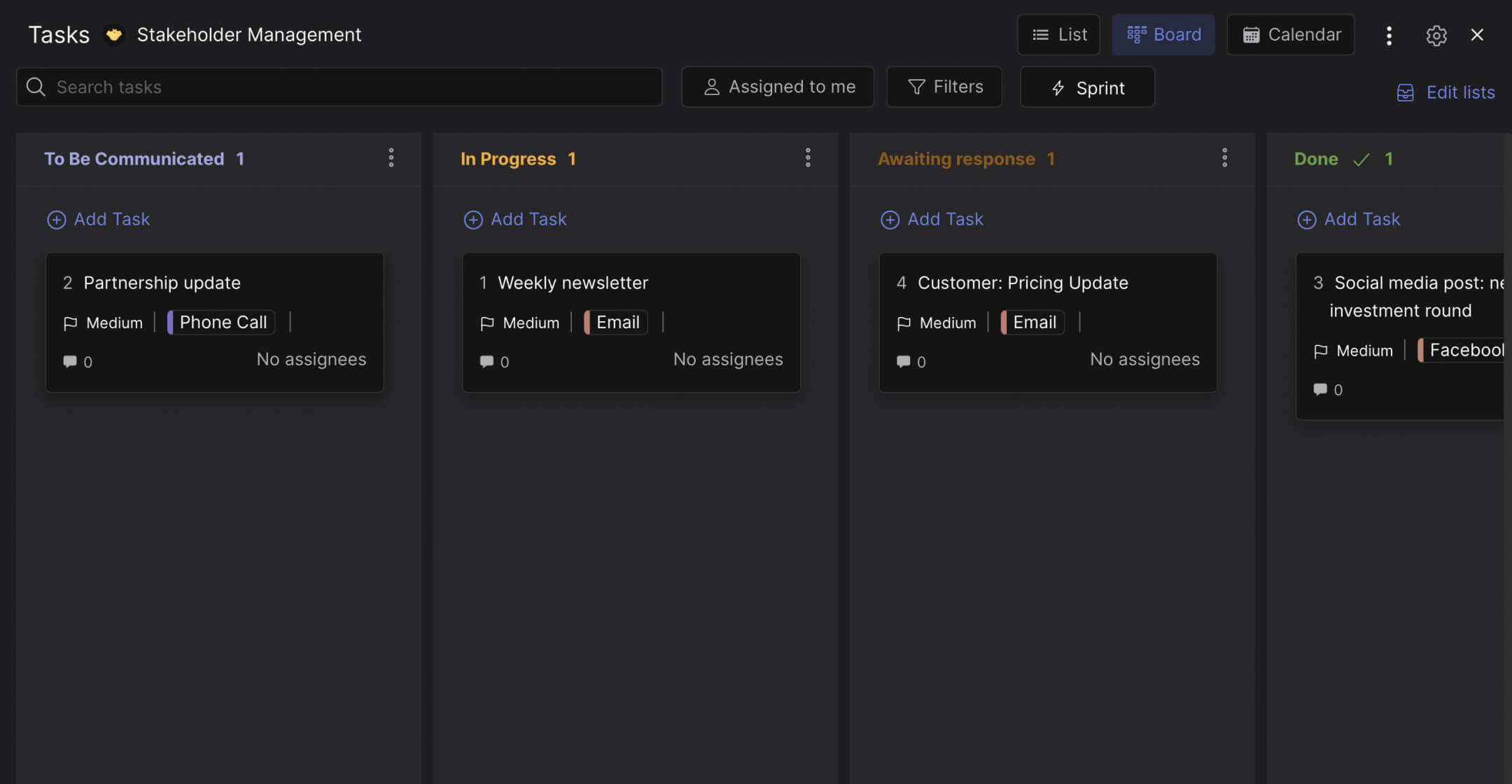
The board has four columns that track the lifecycle of every stakeholder communication.
To Be Communicated. Messages that need to go out but have not been started. A partnership update call that needs scheduling. An investor briefing that needs drafting. A quarterly report that needs to be sent. Each card represents one communication to one stakeholder or group. The column is your outbound queue.
In Progress. Communications being prepared. A newsletter being drafted. A social media announcement being designed. A proposal being written. Cards move here when someone starts working on them. The team can see what is being prepared without asking.
Awaiting Response. This is the column that changes how your team handles stakeholder communication. A pricing update was sent by email three days ago. A contract renewal was discussed on a call last week. A partnership proposal was submitted and you are waiting for feedback. These cards sit here until the stakeholder responds. If a card has been here for more than a week, that is a follow-up trigger everyone on the team can see.
Done. Communication complete. The response was received, the meeting happened, the newsletter was sent and acknowledged. Moving a card here closes the loop.
Labels track the channel: Email, Phone Call, Facebook, or any other platform your team uses. This answers the "how did we communicate this?" question that most people forget to document.
"The single biggest problem in communication is the illusion that it has taken place." - George Bernard Shaw. A sent email is not a completed communication. It is a completed communication when you get a response.
Why "Awaiting Response" changes everything
Most communication trackers have two states: sent and not sent. That binary view misses the most important phase: waiting. A message that was sent but never answered is not communication. It is noise.
The Awaiting Response column makes silence visible. When your board shows four cards sitting in that column for more than five days, you know exactly where your stakeholder relationships need attention. No guessing. No "I think we sent that." No discovering three weeks later that the client never replied to a critical question.
According to Harvard Business Review research, professionals spend an average of 28% of their workweek managing email. Most of that time is spent searching for messages and checking whether someone replied. A visible "Awaiting Response" column eliminates the search. The status is the position of the card.
What we do at Rock: the communication board lives in a space with built-in chat. When your account manager moves a card to "Awaiting Response," they can add a comment noting the follow-up date. The team sees it. If the follow-up is missed, the card is still visible in that column. Nobody needs to ask "did they reply?" because the board answers it. For more on structuring your client communication, the same principles apply.
"Stakeholder engagement fails not because people do not communicate, but because they communicate and then forget to follow up. The gap between sending and confirming is where relationships erode." - Antonio Nieto-Rodriguez, Author, The Project Revolution
Who this template is for
Best for: Agency account managers tracking communications across multiple clients. Project managers coordinating with external stakeholders (vendors, partners, regulators). Any team where "did we follow up on that?" is a question asked more than once a week.
Skip this if: You need a stakeholder mapping tool (power/interest grid, RACI chart). This template tracks communication execution, not stakeholder strategy. Use a mapping tool for planning, then use this board for execution.
Tips for getting started
One card per communication, not per stakeholder. A single stakeholder might have three active communications: a contract renewal (awaiting response), a quarterly report (in progress), and a pricing discussion (to be communicated). Each gets its own card so you can track them independently.
Use labels for channel type. Email, Phone, Social, Meeting. When you review the board weekly, you can filter by channel. Are most of your communications by email? Maybe a phone call would get a faster response. The label data helps you improve your communication strategy over time.
"You cannot manage what you do not track. And you cannot track stakeholder engagement with a spreadsheet you update once a month." - Elizabeth Harrin, Author, Engaging Stakeholders on Projects
Review the Awaiting Response column every Monday. If a card has been there since last Monday, send the follow-up. Do not wait for the stakeholder to come to you. The board gives your team permission to be proactive instead of reactive. Build this into your communication plan as a standing weekly check.
Add due dates to communications with deadlines. A contract that expires in 30 days needs a response before then. A board report due next Friday needs to be out of "In Progress" by Wednesday. Due dates on cards create urgency that the column position alone does not provide.


