
Your team is busy every day but the important work keeps slipping. The client proposal that could bring in $10K of recurring revenue sits in draft while everyone responds to "urgent" Slack messages. The long-term strategy document nobody has time for gets pushed to next week for the third time. Sound familiar?
The Eisenhower matrix fixes this by forcing one question: is this task urgent, important, both, or neither? Most teams know the concept. Few actually use it because most templates give you an empty 2x2 grid and leave you to figure it out. This template is different. Four columns with example tasks that explain exactly why each task belongs where it does.
What is in this template
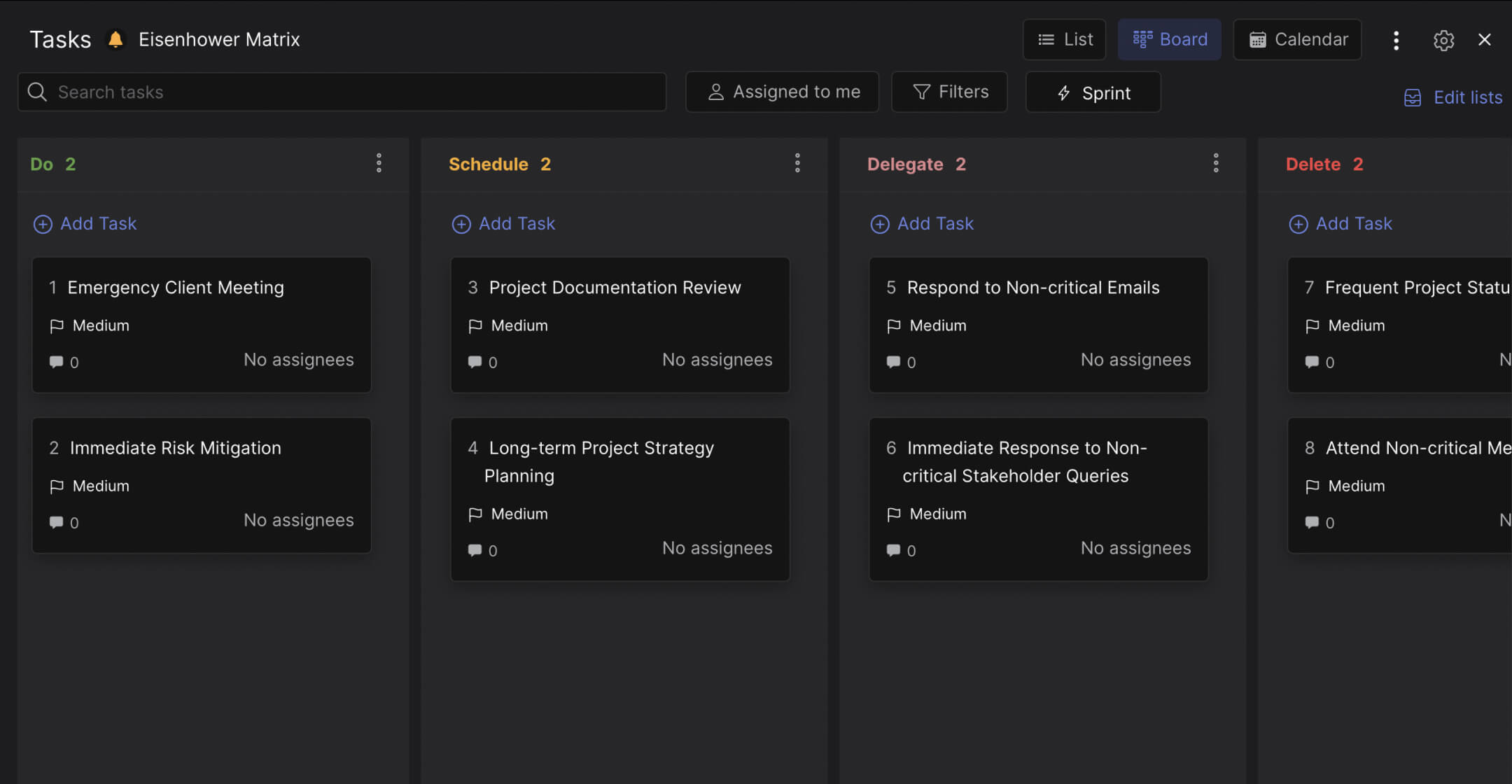
The board has four columns matching the four quadrants of the Eisenhower matrix. Each column comes pre-loaded with example tasks that teach your team how to categorize.
Do (urgent + important). Tasks that need immediate action and directly affect your outcomes. Example: an emergency client meeting called to address concerns about project deliverables. Or a recently identified risk that threatens the project deadline. These are not "everything that feels urgent." They are tasks where delay causes real damage.
Schedule (important, not urgent). Tasks that matter for long-term success but do not need to happen today. Example: reviewing project documentation to keep it accurate, or developing a long-term strategy with KPIs and milestones. These tasks build the foundation that prevents future emergencies. Most teams ignore this column, which is why they live in permanent crisis mode.
Delegate (urgent, not important). Tasks that need timely attention but do not require your specific expertise. Example: responding to a backlog of non-critical emails, or providing immediate responses to stakeholder queries that could be handled by someone else. In Rock, you can duplicate a task to a team member's space so they get the full context and you keep a reference. The work gets done without you becoming the bottleneck.
Delete (neither urgent nor important). Tasks that consume time without producing value. Example: constantly sending minor project updates that nobody reads, or attending meetings where you have nothing to contribute. This is the hardest column to use honestly. But every hour spent on Delete tasks is an hour stolen from Do and Schedule.
"What is important is seldom urgent and what is urgent is seldom important." - Dwight D. Eisenhower
Why columns work better than quadrants for teams
The classic Eisenhower matrix is a 2x2 grid. It works well on a whiteboard or in a personal journal. For a team managing real tasks with assignments, deadlines, and handoffs, columns are better.
Columns are action-oriented. "Do" tells you to act. "Delegate" tells you to hand off. A quadrant labeled "Urgent/Not Important" tells you what the task is, not what to do about it. Research published in the Journal of Consumer Research found that people consistently choose urgent tasks over important ones, even when the important tasks have objectively higher value. The researchers call this the "mere-urgency effect." An action-oriented column structure ("Do this, Schedule this, Delegate this, Delete this") counteracts that bias by telling the team what action to take, not just how to categorize.
What we do at Rock: the matrix board lives in a space with built-in chat. When you move a task to "Delegate," you can leave a comment tagging the team member and they see it in the same workspace. Better yet, duplicate the task to their project space. They get the full context. You keep a reference in the Delegate column. For "Schedule" tasks, duplicate them to a future sprint or project space with the right deadline. The task stays visible in both places.
"The key is not to prioritize what's on your schedule, but to schedule your priorities." - Stephen Covey, Author, The 7 Habits of Highly Effective People
Who this template is for
Best for: Agency teams where everyone feels overwhelmed but output does not match effort. Managers who want to teach their team to prioritize instead of doing it for them. Any team where "everything is urgent" has become the default setting.
Skip this if: You need detailed project tracking with sprints, dependencies, or timelines. The Eisenhower matrix is a prioritization framework, not a project management system. Use it alongside your project board, not instead of it.
Tips for getting started
Review the board weekly as a team. Monday morning, 10 minutes: walk through each column. What moved? What should be in Schedule but ended up in Do because someone panicked? What is sitting in Delegate with no assignee? The weekly review is where the matrix becomes a habit instead of a one-time exercise.
Be ruthless about Delete. Most teams leave this column empty because deleting work feels wrong. But every meeting you attend where you have nothing to contribute, every status update nobody reads, every report that gets filed and forgotten is a Delete task. According to Harvard Business Review, executives spend 23 hours per week in meetings, up from 10 hours in the 1960s. Not all of those meetings are important. The Delete column gives your team permission to say no.
"People think focus means saying yes to the thing you've got to focus on. But that's not what it means at all. It means saying no to the hundred other good things that there are." - Steve Jobs
Use the examples as training. The template comes with 8 pre-loaded tasks that show exactly how to categorize. Before clearing them, walk your team through each one: why is "emergency client meeting" in Do but "stakeholder queries" in Delegate? The reasoning is the lesson, not just the placement. Once your team understands the thinking, they can categorize new tasks on their own. For more on improving team productivity, start with how your team spends its time.


