

Kanban Methodology: A Practical Guide
Kanban is the simplest project management methodology that still works. Four columns, cards for each task, a rule that you cannot start something new until you finish what you started. That is the whole thing. Teams adopt Kanban faster than Scrumban hybrids combine Kanban with Scrum or Waterfall because there is almost nothing to adopt. You put your existing work on a board and you start.
This guide covers the Kanban methodology from origins to execution. Where it came from, the core practices, how Work-In-Progress limits actually work, where Kanban fits in agency work (hint: retainers), and the common failure modes to avoid. There is also an interactive board below so you can try it yourself without leaving the page.
What Is Kanban?
Kanban is a visual workflow method where work flows through named columns from left to right. Each column represents a stage (for example: Backlog, In Progress, Review, Done). Each task is a card. Cards move column by column until they reach Done. The method is based on a simple pull principle: do not start new work until the current work is finished.
The Kanban methodology originated at Toyota in the 1940s. Engineer Taiichi Ohno designed it after watching grocery store workers restock shelves only when items sold. He applied the same pull logic to factory production: downstream stages pulled from upstream stages only when they needed more. The goal was eliminating waste, especially the waste of partially finished inventory sitting idle.
"The kanban is like a nervous system that tells us exactly what to produce." - Taiichi Ohno, Toyota Production System: Beyond Large-Scale Production, 1978
Software teams picked up Kanban in the 2000s, modernized by David J. Anderson. Today Kanban is used well beyond software: marketing teams run it for campaigns, support teams run it for tickets, creative agencies run it for client requests, and operations teams run it for recurring work. For how Kanban compares to other methodologies, see our agile vs waterfall guide or our Scrum for agencies guide.
Try It Yourself
Below is a small interactive Kanban board. Drag cards between columns to see how the system works. Watch what happens when you push more than three cards into "In Progress". The column goes red because you have exceeded the WIP limit. That visual feedback is the whole point of Kanban: you cannot start new work without finishing something first.
Try a Kanban board
Drag cards between columns. Watch In Progress turn red when you exceed its WIP limit of 3.
The Core Practices
Kanban has six practices. They are not rules. They are the habits that make Kanban work.
Visualize the workflow. Every piece of work goes on the board. If it is not on the board, it does not exist. This sounds trivial. It is not. Most team chaos comes from hidden work that only lives in one person's head.
Limit Work In Progress. Each column has a maximum number of cards. Starting a new card while you are at the limit is forbidden. This is the discipline that makes Kanban different from a regular task list.
Manage flow. Watch for cards that sit in one column for too long. That is a bottleneck. Move team capacity to unblock it.
Make policies explicit. Define what "done" means for each column. Write it down. If "Review" means two people sign off, say so on the board.
Run feedback loops. Short meetings (daily or weekly) to check the board, clear blockers, and decide what to pull next.
Improve continuously. Monthly retrospective. What worked, what did not, what to try next. Our retrospective guide covers the format.
WIP Limits: The Secret Sauce
Work In Progress limits are the defining feature of the Kanban methodology. Other methods have boards. Kanban has boards plus a maximum on how many items can sit in each column at once.
The math is Little's Law: average cycle time equals average WIP divided by average throughput. Lower WIP means lower cycle time. That is why your design revision stuck behind four other revisions takes three weeks instead of three days.
"Since high capacity utilization simultaneously raises efficiency and increases delay cost... we will always conclude that operating a product development process near full utilization is an economic disaster." - Don Reinertsen, The Principles of Product Development Flow, 2009
Teams resist WIP limits because it feels like doing less. Looks that way on the surface. What actually happens is finishing more. A team with no WIP limit often has eight items 80% done and zero items delivered. A team with a WIP limit of three has three items 100% done and five in the backlog waiting their turn.
"Capacity: how much stuff will fit. Throughput: how much stuff will flow. They are not synonymous. As the freeway approaches 100% capacity, it ceases being a freeway. It becomes a parking lot." - Jim Benson, Personal Kanban: Mapping Work, Navigating Life
Setting good WIP limits takes a couple of sprint cycles. Start conservative. Adjust up or down based on how the board actually flows.
Kanban vs Scrum at Agencies
For the full side-by-side breakdown including when each wins, common mistakes, and the Scrumban hybrid, see our Kanban vs Scrum guide.
Kanban and Scrum both come from the agile family, but they solve different problems. Agencies usually run both, sometimes in the same space.
Scrum fits fixed-scope project work where the scope can be broken into sprints with clear deliverables at the end of each. Kanban fits continuous work where requests flow in unpredictably, there are no sprint boundaries, and the backlog is always being reprioritized.
Retainers are the clearest Kanban fit for agencies. Client requests come in daily. The team pulls from the backlog as capacity opens up. There is no two-week planning meeting, no sprint review, and no retrospective scheduled to a sprint boundary. The board is the plan. This is why Kanban for agencies that run retainer work tends to stick where Scrum bounces off.
| Aspect | Kanban | Scrum |
|---|---|---|
| Cadence | Continuous flow, no fixed cycles | Time-boxed sprints (1-4 weeks) |
| Planning | Ongoing, as capacity opens up | Sprint planning at start of each sprint |
| Change tolerance | High. Can reprioritize anytime. | Medium. Scope locked during sprint. |
| Roles | None prescribed | Product Owner, Scrum Master, Developers |
| Best fit | Retainers, support, marketing, operations, reactive work | Fixed-scope projects with clear deliverables at sprint end |
| Forecasting | Throughput-based (items per week) | Velocity-based (points per sprint) |
| Agency fit | Strong for retainer work and ongoing client requests | Strong for fixed-scope projects (websites, campaigns, brand identity) |
Where Kanban Works Best
Not every agency work type fits Kanban cleanly. Here is a cheat sheet of what does and does not.
Marketing teams running continuous campaigns find Kanban a natural fit. The AgileSherpas State of Agile Marketing Report found that 45% of agile marketers are currently using a Kanban board to map their work visually, which is the highest of any single framework.
| Work type | Kanban fit | Why |
|---|---|---|
| Client retainers | Excellent | Work arrives unpredictably. No sprint boundaries. Pull model matches the rhythm of retainer billing. |
| Support and ongoing maintenance | Excellent | Tickets flow in daily. Reactive by nature. WIP limits prevent team overload. |
| Marketing and content operations | Strong | Campaigns, content, social posts have continuous flow. Approval gates fit column policies. |
| Design and creative work | Strong | Revision loops fit as a Review column. Explicit policies reduce the "is this done?" ambiguity. |
| Fixed-scope project work | Medium | Works, but Scrum or waterfall give better forecasting for projects with clear deliverables and deadlines. |
| Product development with release dates | Medium | Throughput-based forecasting is harder to commit to than sprint velocity. Consider Scrumban. |
| Compliance or heavy regulation work | Poor | Needs formal gates, documented approvals, audit trails. Waterfall discipline works better. |

Common Kanban Failure Modes
Kanban is simple, which is why teams think they are doing it when they are not. Five patterns show up every time a Kanban rollout stalls.
| Failure mode | Fix |
|---|---|
| WIP limits ignored. Teams push past the limit because "we have to ship." | Write the limit into the column name. Make exceeding it require a team decision, not a silent click. |
| Board zombie. The board does not reflect reality because nobody updates it. | Make the board the source of truth. Any work not on the board does not exist. Update during daily check-in. |
| Review bottleneck. Cards pile up in Review because one reviewer is always busy. | Add backup reviewers. Set a review SLA (e.g., 24 hours). Drop WIP limit on upstream columns until Review clears. |
| Scope creep per card. Cards grow into projects and never finish. | Cap card size (max 2-3 days of work). Anything bigger gets broken into sub-cards before hitting In Progress. |
| No improvement. Team sets up Kanban, runs it, stops getting better after month one. | Monthly retrospective. Track cycle time week over week. Adjust one thing per month (limits, columns, policies). |
Most of these come back to two root causes: WIP limits are either missing or ignored, and the board is not the source of truth. Fix those two things and most of the failure modes disappear.
| Team size | In Progress limit | Review limit | Why |
|---|---|---|---|
| 1-3 people | 1-2 per person | 1 shared | Context switching at this size costs more than parallelism gains. |
| 4-8 people | 2-3 per person | 2 shared | Small enough that coordination is easy. Keep the board tight. |
| 9-15 people | 3 per person or per skill | 3 shared | Specialization rises. Consider swimlanes by role rather than one shared limit. |
| 16+ people | Per swimlane, not team-wide | Per swimlane | One WIP number is too blunt. Split the board into lanes per role or client. |
Running Kanban in Rock
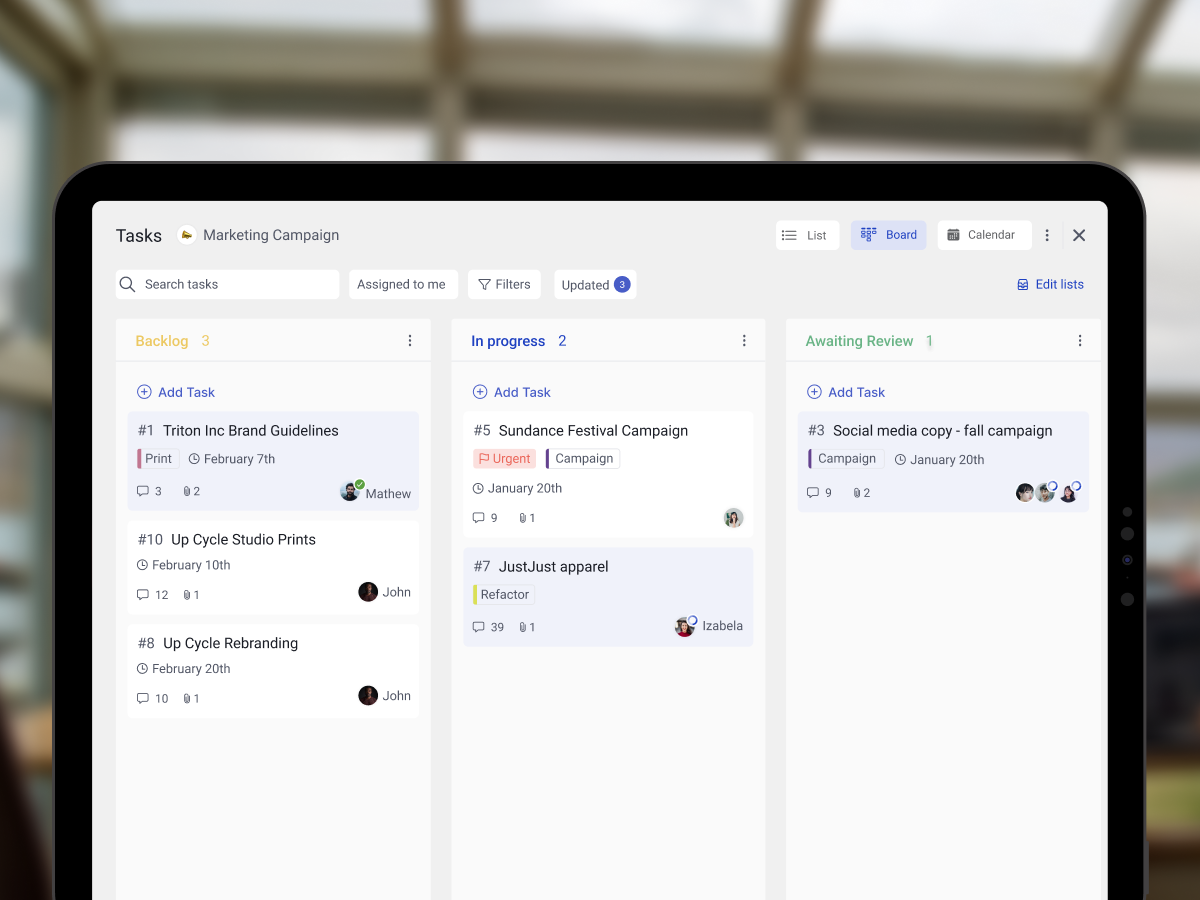
Rock's Board view is a native Kanban board. Drag tasks between columns. Add labels to tag priority, client, or type. Assign tasks to team members with per-person status (none, in progress, blocked, completed). Use task comments for the explicit policies per column. Use cross-org spaces to share the board with clients directly, which is how retainer agencies keep clients informed without separate status reports.

What we do at Rock: a single board per project space. Columns mirror our actual process (Backlog, In Progress, In Review, Done). Labels handle priority and client context. Daily 15-minute check-ins around the board. Monthly retrospectives in a shared note. Honest limitation: Rock does not auto-enforce WIP limits. Team discipline enforces them, with the limit written into the column name (for example "In Progress (3)"). Works well for teams under 20 people.
For a broader comparison of how Kanban fits into your tool stack, see our task board guide. If your agency also runs sprint work, see the agile sprint planning template.
Getting Started with Kanban
Do not overdesign the board. Start with four columns, conservative WIP limits, and iterate after two weeks. The rest comes from running it, not reading about it.
Kanban rewards patience. The board usually gets worse before it gets better because you finally see all the hidden work. That is the point. Once the work is visible, you can actually manage it.
Run Kanban without the overhead. Rock combines chat, tasks, and notes in one workspace. One flat price, unlimited users. Get started for free.





