By clicking “Accept All Cookies”, you agree to the storing of cookies on your device to enhance site navigation, analyze site usage, and assist in our marketing efforts. View our Privacy Policy for more information.
Oops! Something went wrong while submitting the form.
or continue with
This month we shipped four updates: an AI-friendlier public API, a full Spanish interface, sharper space search, and a sweep of UX and stability fixes across web, desktop, and mobile.
Here is what is new.
AI-Friendly Public API
Rock has had a public API for a while. This month we expanded it with the building blocks AI assistants need to act inside your spaces.
The result: you can connect ChatGPT, Claude, Gemini, or any AI assistant, and have it create tasks, send messages, post updates, or pull context from a space. All from a simple conversation.
Claude spinning up a new client project from a brief, straight inside a Rock space.
What that looks like in practice:
Use case
What your AI does in the space
Project kickoff from a brief
Drop a client brief in the space and ask your AI to read it. It breaks the work into tasks, assigns them, and sets the sprint.
Status TL;DR of a space
Coming back from PTO or jumping into a busy space? Ask your AI to read the recent messages, tasks, and notes, and post a summary of where each project stands.
Daily standup recap
Your AI scans yesterday's activity each morning and posts a recap: what shipped, who is blocked, what is next.
Dev updates from Claude Code
Hook Claude Code into your engineering space so it posts when it opens a PR, finishes a build, or pushes a deploy. No more copy-pasting from GitHub.
Client emails to tasks
Paste a long client email and your AI creates the right tasks, with deadlines and owners. No more manual breakdown.
Weekly client recaps
End of the week, your AI scans the space and drafts a status message you can send to the client. Copy, edit, send.
How to set it up
Setup takes minutes. From inside the space you want to plug your AI into:
1. Open Space settings from the space header.
2. Go to Integrations, then Custom Webhook.
3. Click Add new to generate a bot token. (Custom webhooks are part of the Unlimited plan.)
4. Hand the token to your AI assistant. It can now read and act inside that one space, not your whole workspace.
It works the same way MCP connections work in Claude: your AI gets direct access to a single space at a time.
Bring your own key. No per-seat AI fees, no vendor lock-in. Unlike platforms that charge extra for proprietary AI, Rock lets your team use whatever AI they already pay for.
We are actively expanding what the API can do. If there is a workflow you want to automate but cannot yet, let us know.
Rock en Español
Rock is now available in Spanish. The full interface, notifications, and onboarding flow have been translated for Spanish-speaking teams.
Latam is one of our fastest-growing regions, with agencies and small businesses across Mexico, Argentina, Colombia, and Spain running their work on Rock. Until now, those teams worked in English. Now they can work together and with clients in both English or Spanish.
To switch your language: open your user settings, select Language, and toggle to Spanish.
This is our first step toward making Rock accessible to more teams around the world. More languages are on the way. Want to request a language? Poke us in the support space.
Rock now speaks Spanish across the entire workspace.
Sharper Space Search
Space search is now faster and more accurate. Whether you are looking for a message, a task, or a file from a few weeks back, results surface where you expect them.
UX, UI, and Stability
We rolled out a batch of small improvements across the platform: visual refinements, performance updates, and stability fixes on web, desktop, and mobile.
Nothing flashy. Just smoother day-to-day use.
What's Next
This is the start of a busier release cadence for Rock. Over the next few months we will keep expanding the API and shipping the improvements our users ask for most.
Have a feature request or a bug to flag? Ping us in the Rock Support and Updates space. We read every message, and the things you raise shape what we build next.
Communication failure is the most expensive project risk on the table. The Project Management Institute estimates 29% of projects fail from poor communication. PMI also reports that $75 million of every $1 billion spent on projects is at risk from it. The PMBOK Guide puts the share of a project manager's time spent communicating at 75 to 90 percent.
A communication plan is the cheapest insurance against all of that. This guide covers what one is and the five essential elements. It also walks through six steps to build one, five template types, a worked example, and the pitfalls that quietly drain plans.
Quick answer: A communication plan is a written document that defines who needs what information, when, through which channel, and who delivers it. The five elements are goals, stakeholders, key messages, channels and frequency, and roles. Most teams need one for any project running longer than two weeks or involving more than three stakeholders.
What is a communication plan
A communication plan is a written document that defines who needs what information, when, through which channel, and who delivers it. It turns ad-hoc updates into a predictable system. Stakeholders stop chasing the team, and the team stops over-explaining the same thing five times.
A communication plan turns ad-hoc updates into a predictable rhythm everyone can rely on.
It is not the same as a communication strategy. A strategy is the why and the long view (what voice we use, what we stand for, what brand of communicator we want to be). A plan is the operational layer (what we will send next Tuesday, to whom, in which channel). Strategies are written once a year. Plans get written per project, per launch, or per quarter.
Teams need a communication plan whenever the work runs longer than two weeks, involves more than three stakeholders, or crosses time zones. Distributed teams, agency-client work, product launches, and anything regulated all qualify. Most informal teams skip the plan and find out the hard way which decisions never reached the people who needed them.
What a plan is not: a project schedule, a status report template, or a stakeholder map. The plan touches all three but replaces none of them. It sits above them as the agreement on how the project communicates with itself and the world. It is the document everyone refers back to when something goes off the rails.
Every working communication plan answers the same five questions. Skip one and the plan starts leaking value within a week.
Element
What it answers
Example
Goals and objectives
What outcome should this communication produce?
"Keep the client aligned on weekly progress so scope changes are caught in week one."
Stakeholders and audiences
Who needs to know, and what is their level of detail?
Client lead (weekly summary), client exec (monthly), internal team (daily standup).
Key messages
What is the substance of each update?
Status, blockers, decisions needed, next milestones, risks.
Channels and frequency
How and how often does it land?
Async written summary every Friday, 30-min sync on milestone weeks, escalation by phone only.
Roles and owners
Who writes it and who signs off?
Account lead writes, project lead reviews, account lead sends.
The biggest mistake is treating these as separate documents. They are five columns of one plan, and they only work when they are seen together. A goal without a channel never reaches anyone. A channel without an owner gets skipped the first busy week.
The columns matter in this order too. Goals constrain the audience list (who actually needs this information?). The audience list constrains the messages (what do those people care about?). The messages constrain the channel choice (which medium fits what is being said?). Skipping ahead to channels (the most fun column to fill in) is how plans end up with weekly all-hands emails nobody reads.
How to create a communication plan in 6 steps
Six steps is the working baseline. A 30-minute session is enough to draft a plan that covers a quarter, longer for plans that cross multiple workstreams.
Define the communication goals5 minWrite 2 to 3 sentences on what this communication should produce. "Keep client aligned weekly" is a goal. "Communicate the project" is not. Goals decide everything downstream, so spend the time here before moving on.
Map stakeholders and audiences10 minList everyone who needs project information and group them by role: deciders, doers, influencers, observers. Each group gets a different cadence and a different level of detail. The stakeholder communication guide covers this in depth.
Pick channels by message type8 minMatch the channel to the message. Status updates: async written. Decisions needed: short sync call. Crisis: phone. Routine FYI: shared workspace. Document what goes where so the team is not guessing in real time.
Set the cadence and assign owners5 minLock the frequency for each audience group. "Weekly Friday by 5pm" is a cadence. "Periodic updates" is not. Name an owner for each thread. Without an owner, the meeting is everyone's responsibility, which means nobody's.
Document the plan where the work lives5 minPin the plan to the project space, not a separate Confluence page nobody visits. If team chat is in one app and the plan in another, the plan loses every week. Keep it next to the work.
Review at each milestone10 minA plan that never gets reviewed is a document, not a plan. At each milestone or monthly, take 10 minutes to ask what worked, what stakeholders complained about, and what should change. Update in writing.
Run your communication plan where the work happens.
Rock pairs team messaging with a task board, notes, and files so plans live next to the project, not in a separate doc. Flat $89/month, unlimited users.
Templates exist for the same reason recipes do: they keep you from reinventing the basics each time. Five types cover most projects. Pick the one that matches your situation and adapt.
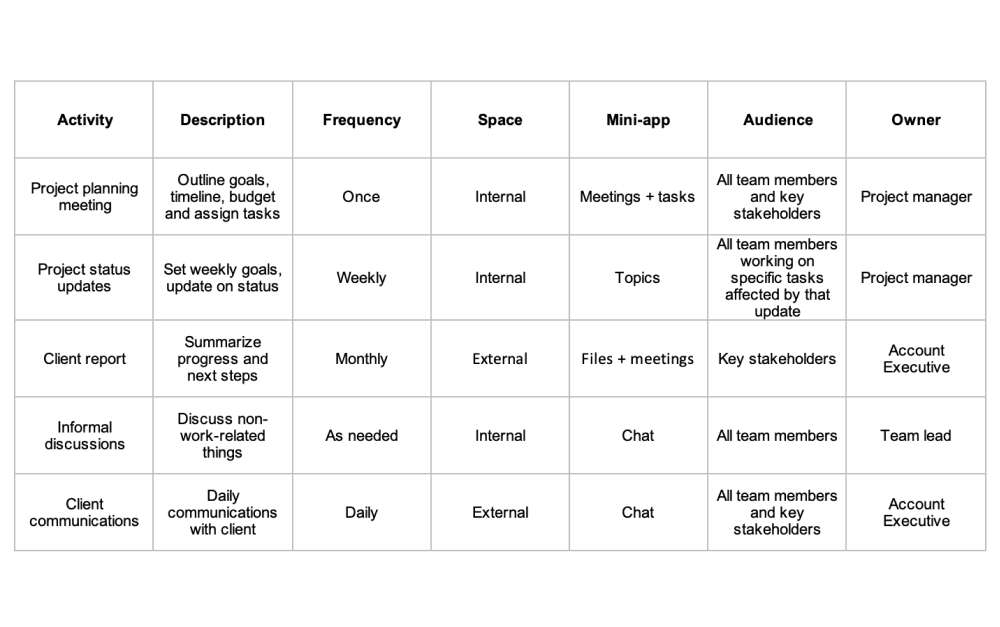
A working communications plan template lists audience, message, channel, frequency, and owner in five columns.
Template type
Use case
Key fields
Default cadence
Project communication plan
Any project with a start, end, and multiple stakeholders.
Most teams need the first one. Agency teams running multiple clients usually run the first and third in parallel, with one shared template each stakeholder relationship adapts. Crisis plans are often skipped and most urgently missed exactly when needed, so pre-build them for the foreseeable situations.
A note on channel choice. Channel decides what gets read and what gets ignored, so match it to the message. Status updates and FYIs belong in async written form where they can be skimmed in seconds. Decisions needed belong in a short sync or a tagged thread with a clear deadline. Crises belong on the phone, no exceptions. Routine cadence belongs in a pinned doc inside the team's working space, not in an email thread that buries itself within a week.
Cadence is the other half. Once-a-week works for most project communication. Daily standups make sense for active sprint weeks but burn the team's attention if they run year-round. Monthly works for executive updates where the audience does not need granular detail. The right rule of thumb: cadence should match how fast the underlying work changes, not how visible the team wants to feel.
Communication plan example: agency client project
Here is a real-shape example for an 8-week brand redesign with a mid-size client. Three audiences: the client lead, the client exec, and the internal delivery team. The plan fits on one page.
Mapping stakeholders by influence and detail level is the highest-leverage step in a real plan.
Goal: Keep the client aligned on weekly progress and catch scope changes within the same week they happen.
Audiences and cadence: Client lead gets a written Friday summary with status, decisions needed, and risks. Client exec gets a one-paragraph monthly highlight at milestone weeks (2, 4, 6, 8). Internal team gets daily async standups and a 30-minute live sync on Mondays.
Channels: Friday summary in the shared client space as a pinned message. Monthly exec note over email. Decision-needed items go in a tagged thread in chat. Anything urgent goes by phone, no exceptions.
Owners: Account lead writes and sends the Friday summary. Project lead reviews before send. Account lead drafts the monthly exec note and the partner reviews. Each team member owns their own daily standup.
Review: At the week-4 milestone, the account lead asks the client lead what is working in the cadence and what they would change. Anything that comes up gets updated in the plan within 24 hours.
Most communication plans fail in predictable ways. Spot the pattern early and the fix is a paragraph; let it compound and you are rewriting the plan halfway through the project.
Over-engineering the planA 12-page plan with 8 audiences and 14 channels is a plan that nobody reads. One page is the working size. If it does not fit on a page, the plan is not the document, the document is the artifact of someone wanting to look thorough.
No named owners"The team will share weekly updates" is not a plan. The team is everyone, which means nobody. Every line in the plan needs a single name attached. If you cannot name an owner, the line is not ready to ship.
A static document nobody readsA plan written once in week one and never touched again is decoration. Plans need a review at each milestone (10 minutes is enough). If review keeps slipping, kill the plan and write a simpler one.
Wrong channel for the messageSending a decision needed in a public chat is how decisions get lost. Sending a status update over phone is how status reports get exaggerated. The channel decides what gets read and what gets ignored.
Plan lives separately from the workA plan in a Confluence page nobody opens does not survive. Keep it in the project space next to the chat and tasks. People should see it while they are doing the work, not only when they are hunting for it.
What we recommend at Rock
Most agency teams we see on Rock keep the communication plan as a pinned note inside the client space. It lives next to the project chat and the task board, which is the single change with the biggest payoff. Plans that live with the work get reviewed; plans that live in a separate doc get forgotten by week three.
When chat, tasks, and files share a space, the plan stops being a separate document.
The other shift we see work is treating the plan as five columns, not paragraphs. Audience, message, channel, frequency, owner. Five columns fits on a page. Paragraphs sprawl. The constraint forces decisions instead of hedging.
That said, the tool is downstream of the plan. The five elements and the six steps work in any stack, including a shared spreadsheet. If your team already has a system that fits on one page and gets reviewed at each milestone, the platform change is optional. If your plan currently lives in three different docs and nobody can find the latest version, consolidation is the cheaper move.
Three other patterns we see work on agency teams. First, a standing 10-minute communication review at every milestone (read out loud what the plan currently says, ask what to keep and what to change). Second, a single owner per audience group, named by name, not by title. Third, a written meeting agenda for any sync over 15 minutes, sent 24 hours ahead, with decisions needed listed at the top.
Frequently asked questions
What are the 5 elements of a communication plan?
Goals and objectives, stakeholders and audiences, key messages, channels and frequency, and roles and owners. Skip any one of these and the plan starts leaking value within a week. Most working plans fit all five on a single page.
How do you write a communication plan?
Six steps: define goals, map stakeholders, pick channels by message type, set cadence and owners, document where the work lives, and review at each milestone. A first draft takes about 30 minutes for a quarter-long project.
What is the difference between a communication plan and a communication strategy?
A strategy is the long-view why (voice, brand, audience principles). A plan is the operational layer (what gets sent next Tuesday, to whom, in which channel). Strategies are written once a year; plans get written per project or per quarter.
Which stakeholders should be involved in communications planning?
Every stakeholder with a role, decision authority, or material interest in the project should appear in the plan. Per PMBOK, inputs include the stakeholder register, the project plan, organizational process assets, and enterprise environmental factors. In practice: deciders, doers, influencers, and observers should all be mapped.
How often should you update a communication plan?
At each project milestone or once a month, whichever comes first. The review takes 10 minutes. Ask three questions: what worked in the last cadence, what stakeholders complained about, and what should change. Update in writing the same day, not "later."
Remote engagement looks different in 2026. Gallup's latest State of the Global Workplace report puts global engagement at 20%, an 11-year low. Fully-remote workers actually beat on-site peers (29% vs 20%), but that signal is fragile. Roughly 22% of remote workers report daily loneliness, and only 28% feel tied to their company's mission.
Engagement is not a perk problem. It is a manager problem, a clarity problem, and a recognition problem, and all three get harder over video. This guide covers what kills remote engagement, the eight practices that move the number, how to measure progress, and where Rock fits in.
Quick answer: Engage remote employees by combining clear weekly outcomes, frequent 1:1s, async-default communication, and specific public recognition. The largest single lever is the direct manager, who Gallup credits with 70% of engagement variance. Virtual activities and team channels help, but only after the basics are in place.
Why remote engagement looks different in 2026
The remote conversation has moved past whether work-from-home is here to stay. Roughly 22% of the U.S. workforce will work remotely by end of 2026. Gallup's 2024 data shows fully-remote workers slightly more engaged (29%) than on-site peers (20%). The question now is how to keep that signal positive when teams are async, distributed, and under economic pressure.
Engagement on distributed teams depends on intentional practice, not ambient connection.
Three forces shape engagement when nobody shares a hallway. The first is mission-connection, with only 28% of fully-remote workers saying they feel tied to their company's purpose. The second is loneliness, where 22% of remote workers report daily loneliness, and engaged employees record 40% less loneliness on the Gallup index. The third is manager quality, which drives most of the engagement variance regardless of location.
None of this means remote is broken. Companies with structured hybrid or remote-first models report 20% higher engagement than firms that reverted to office mandates. The pattern across distributed-first companies (GitLab, Doist, Buffer) is the same: clear outcomes, generous async documentation, and intentional connection.
"People who have flexibility in where and when they work are actually more connected to their teams than those that are five days a week in the office." - Brian Elliott, co-founder of Future Forum
Chat and tasks in one space.
Rock pairs team messaging with a task board, notes, and files so distributed teams stop losing context across four apps. Flat $89/month, unlimited users.
Most engagement problems on distributed teams trace to a small number of recurring patterns. Spot them early and the fix is cheap. Let them compound and they leak the same way every quarter.
Meeting overload masquerading as connectionAdding more video calls when engagement dips. People stop turning on cameras, then stop replying, then quietly disengage. Calendar density does not create connection; intentional moments do. Read the virtual meetings playbook for a leaner cadence.
Unclear weekly outcomesWhen the team cannot articulate what a good week looks like, engagement drifts. Managers assume people know. People assume managers will tell them. Both lose, and the result is anxious overwork on the wrong things.
Recognition that lives in private DMsPraise in a 1:1 feels good for an hour. Praise where the team can see it shapes how everyone reads what good work looks like. Most managers default to the first because it is easier, and lose the cultural compounding effect of the second.
Manager-as-monitor instead of coachPinging "what are you working on?" twice a day signals you do not trust the work to happen without checking. Distributed teams need coach-mode, not watchdog-mode. The fix is fewer status pings and more outcome-focused 1:1s.
8 ways to engage remote employees
These are the practices distributed-first companies use. Each builds on the one before, so clear expectations come before recognition, which comes before culture-building. Skipping levels burns time.
1. Set clear weekly outcomes, not status updates
Engagement starts with knowing what good work looks like this week. Every person should be able to write down 2-3 outcomes by Monday, share them with their manager, and review them Friday. Outcomes beat status updates because they tie work to results, not to hours logged.
At Doist, where the team is fully async across 30+ countries, this lives in a public weekly priorities thread. At GitLab, it lives in a handbook page. The tool matters less than the rhythm. What kills it is letting weekly outcomes turn into another wall of tickets nobody reads.
2. Make 1:1s sacred and structured
Gallup found employees who meet regularly with their managers are three times more engaged than those who don't. The 1:1 is the single most important habit you can build for a distributed team. Keep it weekly, 30 minutes, and let the employee drive the agenda.
Skip status questions, since those belong in writing. Use the time for blockers, growth, and the things they would not say in a group call. Cancel only twice a quarter at most. If you cancel more, the meeting stops feeling sacred and you have lost the one ritual remote teams actually need.
"70 percent of the variance in team engagement is determined solely by the manager." - Jim Harter, Chief Workplace Scientist at Gallup
3. Default to async communication
Async cuts meeting load and makes engagement portable across time zones. Document decisions in writing, use threaded messages instead of meetings when possible, and reserve calls for ambiguity that text cannot resolve. The bar is: if you can write it down, write it down.
This takes investment. Async writing is a skill, response-time norms matter, and managers have to model both. The payoff is fewer broken evenings and a team that can do deep work. The async work guide covers the full playbook.
Async-first teams document agendas and outcomes in writing so context survives time zones.
4. Recognize publicly, specifically, and often
Recognition is the second-largest engagement driver after manager quality, and the cheapest one to fix. Only 26% of remote employees say they receive adequate recognition. Closing that gap moves the engagement number within a quarter.
Make it specific: "Maya shipped the migration two days early and unblocked the design team" beats "great work this week." Make it public, in a team channel where peers can react and add context. Make it frequent. Once a week per direct report is a reasonable starting cadence.
5. Design intentional connection moments
Forced fun is worse than no fun. What works is small, optional, and tied to people's actual interests. A 20-minute coffee pairing every two weeks. A quarterly half-day team retro. An offsite once a year if budget allows.
Avoid mandatory virtual happy hours at 5pm Friday. Engaged people show up. Disengaged people sit silently with their cameras off. Either way you have not changed anything, and you have used up an hour of trust the team will not give you back.
6. Onboard with a buddy and a 30/60/90 plan
New remote hires have it harder than office hires. They cannot read the room, overhear context, or grab someone for a five-minute question. The buddy system fixes most of this, so pair every new hire with a peer (not their manager) for the first 90 days.
Pair the buddy with a written 30/60/90 plan. Week 1: meet the team, ship one small thing. Day 30: own one process. Day 60: lead one project. Day 90: write a retro on what is working and what is not. The plan tells the new hire that you have done this before.
7. Invest in growth visibly
Remote employees need to see the path. In an office, growth is partly visible. You see who gets pulled into rooms, who runs the offsite. Remote, all of that is invisible. So make growth signals explicit: a quarterly skills-and-interests check, a personal L&D budget, public criteria for promotion.
This is also a retention play. Deloitte's 2025 Global Human Capital Trends report shows employees who can name their next step are dramatically less likely to leave. Read the feedback guide for how to run growth conversations that actually compound.
Lightweight polls turn engagement signals into something the team can see and act on.
8. Give the team the right tools
Engagement collapses under tool friction. If team chat lives in one app, tasks in another, and files in a third, people lose context every time they switch. The cognitive cost of context-switching is real and it compounds across a week.
Pick a stack where messaging, tasks, files, and meetings live close together. The fewer "where did we discuss that?" moments, the more energy goes into actual work. The remote work tools guide covers stack choices for small distributed teams.
How to measure remote engagement
Engagement is measurable. The mistake is to measure it once a year with a 50-question survey nobody trusts. What works is a small set of signals at a sensible cadence, paired with a readout where managers respond to what they hear.
Signal
What to track
Cadence
eNPS
"How likely are you to recommend this company to a friend?" 0-10 scale. Score = % promoters - % detractors.
Quarterly
1:1 themes
Recurring topics across all 1:1s. Watch for blockers, frustration patterns, and growth-signal drift.
Monthly review by manager
Async response time
Average time to first reply on threaded messages. Sharp spikes flag overload or disengagement.
Monthly
Recognition cadence
Number of public recognitions per direct report. Below one per week signals a manager habit gap.
Weekly review
Voluntary turnover
Resignations vs. team size, rolling 12-month window. Compare against industry benchmarks.
Quarterly
Manager confidence
"I trust my manager" on a 1-5 scale inside the quarterly survey.
Quarterly
The point of the table is rhythm, not perfection. Pick three of these signals, run them for two quarters, and you will know more than most companies who survey annually. Skip the "what is your biggest frustration" free-text field on the quarterly survey unless someone actually plans to read every answer.
What we recommend at Rock
From watching thousands of distributed agency teams use Rock, the highest-leverage move is collapsing the chat-tasks-files split. Most engagement problems are downstream of context loss. People do not know what is expected, what has been decided, or where to find last week's file.
Rock pairs team messaging with a task board, notes, and file sharing in one space. For agencies and small distributed teams, that means fewer tools, less context-switching, and one place where the work and the conversation around it live together. Flat $89/month for unlimited users is part of the story, but the engagement angle is really about the workspace shape.
That said, tools alone do not fix engagement. The eight practices above are what move the number. If you already have a stack that works, the tool change is optional. If you are bleeding people across four apps, consolidating is one of the cheaper engagement levers. It is also one of the few that pays back inside a quarter.
Engagement is built where the work lives, not in the calendar around it.
Frequently asked questions
How often should managers meet with remote employees?
Weekly 30-minute 1:1s is the working baseline. Gallup data shows employees who meet regularly with their manager are three times more engaged. Skip 1:1s rarely. Cancelling them signals the meeting is optional, which is the opposite of what you want on a distributed team.
Can remote teams be as engaged as in-office teams?
Yes, often more. Gallup's 2024 data showed fully-remote workers at 29% engaged versus 20% for on-site peers. The difference is that remote engagement is fragile. It depends on intentional practice (clear outcomes, frequent 1:1s, public recognition) rather than ambient connection through shared physical space.
How do you prevent burnout in remote employees?
Cut meeting load, set clear weekly outcomes so people stop overworking from anxiety, protect time off, and watch async response-time data for overload signals. The remote work stress guide covers the full pattern.
What tools help keep remote teams engaged?
Tools that reduce context-switching are the highest-leverage. A single space for chat, tasks, and files matters more than any standalone engagement app. Add eNPS survey tools for measurement and a public kudos channel for recognition. The smaller the tool stack, the better.
What is the single biggest driver of remote engagement?
Manager quality. Gallup attributes roughly 70% of engagement variance to the direct manager. Every other practice (recognition, 1:1s, clarity) runs through a manager who knows how to use them. Invest in manager development first, then add tools and rituals on top.
Most teams want to work async until the first big decision lands in a thread that takes three days to resolve. The promise is real, and so is the friction.
Async work is the practice of doing the work without expecting your teammates to be online at the same moment. It produces deeper focus, fewer meetings, and better documentation. It also produces decision lag, weak connection, and onboarding friction when the team has not built the habits that make it work.
This guide covers async work as it actually runs in 2026. The clean definition. The honest sync vs async comparison. The four benefits and five common pitfalls. A tools comparison sorted by use case. An honest take on when async fails. Take the quiz below to see where your team lands today.
Is your team ready for async?
5 questions to score your team on readiness for asynchronous work.
Quiz · 5 questions
Question 1 of 5
Async works when notes, tasks, and chat live in one place. Rock keeps decisions, work, and conversation together so people can catch up on their own time.
Quick answer. Asynchronous work is any work style where teammates do not need to be online at the same time to make progress. Context gets shared in writing or recorded video. Decisions happen on a longer cadence (hours to a day) instead of in live meetings.
A healthy team mix is roughly 20 to 30 percent synchronous (meetings, calls, urgent chat) and 70 to 80 percent asynchronous (notes, tasks, threaded messages, recordings). The async-default model produces deeper focus and stronger documentation, at the cost of slower decisions.
What asynchronous work is
Async work is a methodology that treats team output like a relay race instead of a sprint. Each person picks up the baton when their focus window starts, runs their leg with full context handed off in writing, then hands off to the next person. The team does not need to be in the same room or even online at the same time.
The term was popularized in the 2010s by GitLab's all-remote handbook and Doist's Amir Salihefendić. The underlying ideas predate the term. Tom DeMarco wrote about uninterrupted focus in 1987's "Peopleware." Cal Newport coined "deep work" in 2016. What async added was a clear methodology for distributed teams: write decisions down, expect a 24-hour response window, default to documentation over meetings.
"Teams who try to go remote without putting in place tools, workflows, and norms for asynchronous communication will fail." - Amir Salihefendić, CEO of Doist
Async work is not the same as remote work, even though the two overlap. A remote team can be highly synchronous if everyone joins back-to-back video calls. A co-located team can be highly async if the office norm is uninterrupted morning focus blocks with chat checked twice a day. Async is about response cadence, not physical location.
Sync vs async at a glance
The two modes serve different purposes. Most teams need both. The trouble starts when the default is wrong: defaulting to sync when async would do, or defaulting to async when sync is actually the right tool.
Decision lag, loneliness, weak connection across the team
Documentation
Often skipped, key context lives in the meeting
Built in, context written before reply
Healthy mix
Around 20 to 30 percent of work
Around 70 to 80 percent of work
The healthy ratio for most knowledge teams is around 20 to 30 percent sync and 70 to 80 percent async. Teams that drift toward 80 percent sync end up in meeting hell. Teams that push past 95 percent async lose connection and start to feel like coworkers from different companies. The mix matters more than the absolutes.
Benefits of async work
Longer focus blocks. The single biggest benefit. When the team stops expecting an instant reply, people can sit with a problem for two hours instead of context-switching every six minutes. Cal Newport's research on deep work shows that uninterrupted focus produces disproportionately better thinking, not just more thinking. Async unlocks that.
Fewer meetings. Most status meetings can be a written note. Most "quick syncs" can be a Loom recording. When the team gets disciplined about which interactions actually need to be live, the calendar opens up. Microsoft's 2025 Work Trend Index found employees interrupted every 2 minutes during core work hours, 275 times per day. Async is the lever that cuts that number in half.
Real flexibility, especially across time zones. A distributed team in 5 time zones cannot effectively run on synchronous meetings without one zone permanently working at 11 PM. Async lets each person work during their best focus window. Parents pick kids up at 3 PM. Night owls do their best thinking at 10 PM. The team stays productive without anyone burning out from bad-hour calls.
Documentation as a side-effect. Async-default teams write things down because writing is how work moves. The decision happens in a doc, not a meeting. The status update is captured in a thread, not a chat message that scrolls past. Over time, the team builds an institutional memory that survives turnover.
Common pitfalls
Async work has well-known failure modes. Most teams that try it and revert to sync hit one of these. The honest take: every pitfall has a fix, but the team has to recognize the pattern before they can address it.
Loneliness and weak team connectionAsync cuts the casual interaction that builds trust. Without intentional replacement, the team starts to feel like coworkers from different companies. Schedule deliberate connection: weekly team calls, monthly retros, quarterly in-person time. The remedy is not less async, it is more intentional sync for relationship work.
Decision lagDecisions that needed a 30-minute call get strung out across 4 days of back-and-forth comments. The cure is naming when async stops: if a decision is not made by Tuesday, schedule a 20-minute call Wednesday. Define the escalation path before the back-and-forth becomes the bottleneck.
Documentation that decaysAsync only works if the written record is trustworthy. A 6-month-old playbook nobody updated is worse than no playbook because the team relies on wrong information. Assign one named owner per important doc. Review quarterly. Archive stale entries instead of letting them rot.
Onboarding new hires goes badlyWeek 1 of a new hire is the worst time to be async-pure. New people do not yet know what to search for, who to ask, or how the team writes. Give new hires more sync time in the first 30 days, including pairing sessions and live walkthroughs of the documentation. Then taper.
Loss of urgency for things that need itAsync culture trains the team to expect 24-hour response times. When a real urgency surfaces (security incident, client crisis, production outage), the team is slow to respond because everyone learned to ignore notifications. Define what counts as a real ping vs a normal message. Keep a thin sync channel for true emergencies.
The first three are habits (loneliness, decision lag, doc decay). The last two are scope (onboarding friction, urgency loss). Habit failures show up early and are fixable. Scope failures show up when the team uses async for the wrong situation. Both kinds matter, and a team that fails on either side stops trusting the practice.
Async tools by use case
The right tool stack depends on what kind of async work dominates. Most teams need a combination: one for chat, one for tasks, one for docs, one for recorded video. The table below sorts the common categories.
Tool
Category
Strength for async
Where it falls short
Rock
Workspace
Notes, tasks, and chat in the same space. Decisions get captured where the work happens. Cross-org spaces for clients and freelancers at no extra cost.
Not a dedicated async-video tool; not an enterprise wiki
Slack
Real-time chat
Channels, threads, integrations with everything
Sets a real-time expectation by default; messages scroll past
Twist
Async chat
Threads are first-class, no read receipts, no fake urgency
Smaller integration ecosystem than Slack
Loom
Async video
Replace meetings with 3-minute screen recordings
Video is harder to scan than written notes
Notion
Docs and wiki
Long-form async writing, structured knowledge
Not a chat tool; needs pairing with Slack or similar
Asana, ClickUp, Monday
Task management
Tasks with owners, statuses, async updates per task
Discussion happens in another tool
Two patterns stand out. First, most teams over-rely on Slack as the only async tool. Slack is real-time chat with async features bolted on; the default expectation is fast response. Twist or threaded workspaces produce better async behavior by design. Second, recorded video (Loom) replaces more meetings than most teams expect. A 3-minute Loom usually covers what a 30-minute status meeting would, with the bonus of being searchable later.
Async needs the right tools.
Rock pairs chat, tasks, and notes in one workspace so async actually works.
Async is a team discipline, not a tool choice. Three habits separate teams that make it work from teams that try and revert.
Write the decision down before you ship the work. The team's institutional memory is the document, not the meeting recording. If the decision lives only in a verbal conversation, it gets lost the moment someone new joins.
Define a default response time. Most teams land on 24 hours during work days. Urgent escalations have a separate, narrower channel. Without an explicit norm, people interpret silence differently and the system breaks.
Audit meeting hygiene quarterly. Every recurring meeting should pass a basic test: can this be a written update. If yes, kill the meeting and replace with the note. Doing this once produces nothing. Doing it every quarter compounds into a meeting-light culture.
"Async isn't about the work itself. Async is about being more respectful of your colleagues' time and creating an environment where deep focus is possible." - Darren Murph, former Head of Remote at GitLab
Teams that master async usually report the same surprise: the documentation they build for async ends up being the most valuable knowledge asset the company has. New hires onboard in days instead of weeks. Cross-team handoffs stop losing context. The work itself moves faster because the friction at handoffs disappears.
When async fails
Async is not the right default for every situation. Three contexts where forcing async produces worse outcomes than going synchronous.
Crisis communication. Security incidents, production outages, client emergencies. The team needs to coordinate in real time, run decisions in minutes not hours, and hold a shared picture of the moving situation. Keep a thin sync channel for true emergencies, and define what counts as one.
High-context creative work. Brainstorming, brand workshops, complex design critiques where the back-and-forth produces the result. Some thinking needs the bounce of live conversation. Async does not produce the same quality of creative output for these kinds of sessions.
New-hire onboarding week 1. A new employee does not yet know what to search for, who to ask, or how the team communicates. Pure async week 1 produces lonely hires who quietly disengage. Front-load sync time in the first 30 days, then taper as the new person learns the documentation.
The pattern: async is a default, not a religion. The team that runs async-first for most work and switches to sync deliberately for these three situations gets the best of both modes.
What we recommend
Most teams trying to go async fail because they change the tools without changing the habits. A new chat platform does not produce better documentation. A new task tool does not produce better decisions. The habits come first.
Pick one specific change to start. Replace one recurring meeting per team with a written status note. Define a default response time (most teams land on 24 hours). Build the documentation habit before scaling the practice. Sixty days of one habit beats six months of trying everything.
The pattern we see at Rock. The teams that get the most out of async use a single workspace where chat, tasks, and notes share the same room. Decisions get captured next to the work that produced them. Pinned notes in each project space hold the goals, stakeholders, and open questions.
The team chat sits above, the tasks alongside. New people get added to the space and find context in 10 minutes instead of 10 days.
"Employees are interrupted every two minutes during core work hours, 275 times a day on average." - Microsoft 2025 Work Trend Index
Rock is not enterprise BPM and not an async-video tool. There is no built-in Loom replacement and no 50,000-document semantic search. For 5 to 50 person agency and operations teams, the workspace approach produces better team-level async than buying three separate tools and integrating them. For larger organizations with formal governance needs, pair a workspace tool with dedicated async-video (Loom) and a structured wiki (Notion, Confluence) for long-form documentation.
Two failure modes to watch. First, the team adopts async tools but never updates the meeting cadence. The result is the worst of both worlds: chat plus all the meetings. Second, the team goes too pure too fast and loses connection. Schedule deliberate sync time for relationship work. Treat it as load-bearing, not optional.
FAQ
What is asynchronous work?
Asynchronous work is any work style where teammates do not need to be online at the same time to make progress. People share context in writing or recorded video, and the next person picks up the thread on their own schedule. Decisions, documentation, and task updates happen without scheduling a meeting.
What are examples of asynchronous communication?
Written status updates in a project space, a Loom recording instead of a status meeting, a comment thread on a shared doc, an issue or task with a clear description, a decision proposal posted for a 24-hour review window. Anything where the sender and the responder do not need to be online at the same moment.
What is the difference between synchronous and asynchronous work?
Synchronous work expects an immediate or near-immediate response, usually in meetings, calls, or live chat. Asynchronous work expects a response on a longer cadence (hours to a day) and happens in writing or recorded video. Most teams need both. A healthy mix is roughly 20 to 30 percent sync and 70 to 80 percent async.
What are the benefits of asynchronous work?
Longer uninterrupted focus blocks, fewer meetings, real flexibility across time zones, better documentation because context gets written down at the moment of work, and stronger thinking because written replies are more considered than verbal ones. The trade is slower decision cycles and the need for stronger documentation habits.
What are the disadvantages of asynchronous work?
Slower decisions, weaker informal connection across the team, documentation that decays if not maintained, and a tougher onboarding experience for new hires. Async also struggles with crisis communication and high-context creative work where bouncing ideas in real time produces better results.
What tools are used for asynchronous communication?
Notes and docs (Notion, Slite, Almanac), async-first chat (Twist), recorded video (Loom), task management (Asana, ClickUp, Monday), and workspace tools that combine chat and tasks (Rock, Basecamp). The right mix depends on team size and where current chaos lives. Most agency-scale teams need a workspace tool plus one async-video option.
How do you implement asynchronous work in a team?
Start with one specific change. Replace one recurring status meeting with a written async update. Establish a default response time (most teams land on 24 hours during work days). Define what counts as urgent enough to ping. Build the documentation habit before changing the meeting cadence. Audit progress after 60 days.
Is asynchronous work the future?
Async-default work is the trend at distributed teams, especially since 2020. The honest read is that fully async pure-play is rare; most companies blend sync and async. The right question is not whether async wins, but how much of your team's work should default to async. For most knowledge teams, 70 to 80 percent async is achievable and pays off in deep work and flexibility.
Async work needs notes, tasks, and chat in the same place. Rock pairs them in one workspace so context lives next to the work that produced it. One flat price, unlimited users, clients included. Get started for free.
Every team has workflows. The good ones produce consistent output without anyone having to remember the steps. The bad ones produce slipped deadlines, rework, and the same coordination conversation 14 times a week. Workflow management is the discipline that moves a team from the second pattern to the first. The tooling matters, but less than most articles claim.
This guide covers workflow management as it works in 2026. The honest distinction between a workflow, a process, and a project. The four workflow types mapped to real agency work. The model-execute-monitor-optimize cycle. An honest take on when a workspace is enough, when a dedicated workflow tool earns its keep, and when enterprise BPM is genuinely needed. Take the quiz below to see which type and tool tier fit your team.
Which workflow type fits your team?
4 questions. Get a workflow type plus a tool tier matched to your scale.
Quiz · 4 questions
Question 1 of 4
Workflows work best when they live next to the work. Rock pairs Kanban, List, and Calendar views with team chat in one space.
Quick answer. Workflow management is the design, execution, monitoring, and improvement of the sequences of steps that work moves through. There are four common workflow types: sequential, parallel, state-machine, and rules-driven. Teams under 50 people usually run workflow management inside a workspace with tasks and Kanban views. Teams above 200, or in regulated industries, often need a dedicated workflow management system or enterprise BPM platform.
What workflow management is
Workflow management is the discipline of treating work as a sequence of steps that can be modelled, executed, monitored, and improved. The goal is to reduce friction at handoffs, prevent bottlenecks, and produce consistent output across many similar pieces of work. The framework traces back to Frederick Taylor's scientific management in 1911, Henry Gantt's bar-chart scheduling in the 1910s, and the formal Business Process Management discipline that emerged in the 1990s.
"Reengineering, properly, is the fundamental rethinking and radical redesign of business processes to achieve dramatic improvements in critical, contemporary measures of performance, such as cost, quality, service, and speed." - Michael Hammer and James Champy, "Reengineering the Corporation" (1993)
Modern workflow management is lighter than the 1990s reengineering literature suggested. Most teams do not need BPMN diagrams or six-figure platforms. They need a clear model of how work moves, the right tool to make it visible, and the discipline to update the workflow when it stops matching reality.
Workflow vs process vs project
The three terms get used interchangeably in casual conversation and that is where most planning confusion starts. Each one points at a different altitude of work, and treating them as synonyms produces meetings that argue about vocabulary instead of execution.
Dimension
Workflow
Process
Project
What it is
A sequence of steps that work follows from start to finish
The broader business activity workflows belong to
A one-time effort with a defined start, end, and outcome
Repeats?
Yes, often. Same shape, different content each time.
The fastest sanity check. If the work repeats with the same shape, it is a workflow. If the work is the broader business activity that the workflow belongs to, it is a process. If the work has a defined start, end, and outcome that will not repeat, it is a project.
Most teams have all three. Confusing them is how project managers end up trying to optimize content production one launch at a time instead of fixing the underlying workflow.
The 4 types of workflows
Workflows come in four common shapes. Most agency and operations teams use the first three constantly. The fourth shows up where automation makes sense.
1
Sequential
Each step waits for the previous one to finish. The simplest and most common workflow shape. Easy to design, easy to bottleneck if one step slows down.
Multiple streams run at the same time across different people. The work integrates at a known point. Faster than sequential when steps are independent.
Agency exampleMulti-channel campaign launch: design assets, email copy, social posts, and landing page all built in parallel, integrated for launch day.
3
State-machine
Items move through a defined set of states. Work in one state cannot skip ahead. The Kanban board is the natural visual for this shape.
Different inputs trigger different paths automatically. Conditions drive the workflow forward without manual sorting. Needs automation to be worth the design effort.
Agency exampleInbound lead routing: web form submissions with budget over $10k auto-assign to senior account managers; under $10k auto-route to junior triage.
Real teams rarely use one shape in isolation. A campaign launch might run as sequential at the strategy level, parallel at the channel level, state-machine at the asset-approval level, and rules-driven at the lead-routing level. The point is to name which shape each part of the work is in, so the workflow design matches the work.
The workflow management cycle
Workflow management runs as a four-stage cycle: model, execute, monitor, optimize. Each stage has its own failure mode. Most teams do model and execute reasonably well, skip monitor entirely, and never reach optimize. That is the gap that produces the workflow nobody updates.
ModelMap the workflow before you build it. Identify the steps, the handoffs, who owns each stage, and what triggers movement from one step to the next. The model can be a sticky-note exercise on a whiteboard or a 5-row table in a doc. Either way, it has to exist on paper before it lives in a tool.Agency example: write down the 4 stages of your content production (brief, draft, edit, publish), name one owner per stage, and define what counts as "done" for each.
ExecuteRun the modelled workflow inside the actual tool. Set up the Kanban columns, the task templates, the labels, the recurring cadences. The execution should match the model. When the team improvises around the workflow, the workflow design is wrong, not the team.Agency example: create a project space with a Kanban board where columns are the content production stages. Save the brief template. Make recurring weekly cadence tasks for content reviews.
MonitorWatch the workflow in motion. Where do items sit too long? Which stage produces the most rework? Who is overloaded? Most workflow management failures are silent: nobody notices the bottleneck until the deadline is already missed. Build the visibility into the daily routine.Agency example: at the Monday standup, scan the Kanban board. Cards sitting in "Editor review" for 3+ days mean the editor is overloaded or the brief was unclear. Surface the issue early.
OptimizeImprove the workflow based on what monitoring revealed. Add a stage, merge two stages, automate a handoff, change an owner. Optimization is small and continuous, not a quarterly redesign. The workflow that does not evolve becomes the workflow the team works around.Agency example: if drafts pile up because the editor is the bottleneck, split editor review into two queues (substantive vs copy) with different owners. Iterate again next month.
The cycle is continuous, not a one-time project. Workflows that do not evolve become workflows the team works around. The discipline is small and constant: a 30-minute monthly review of where work is piling up usually surfaces the next optimization.
How to set up a workflow in 5 steps
Step 1: Name the work. What kind of work is moving through this workflow? Content articles? Client deliverables? Marketing campaigns? Be specific. A workflow designed for "client work" in general fits no client work in particular.
Step 2: Map the stages on paper. What are the steps the work moves through from start to finish? 4 to 6 stages is the sweet spot. Fewer than 4 and the workflow is probably not worth managing. More than 6 and it is probably two workflows.
Step 3: Assign owners per stage. Each stage needs a named human responsible for moving work to the next stage. "The team" is not an owner. The owner is the person whose name shows up when the work stalls.
Step 4: Define handoff criteria. What counts as "done" for each stage? Without explicit criteria, work moves forward when someone gets impatient, not when it is ready.
Step 5: Build it in the tool. Now create the Kanban board, the task template, the recurring cadence, the labels. The model exists on paper first; the tool is the execution layer. This order matters because tools amplify whatever they are given.
The whole exercise fits in an hour for a workflow the team will use for the next year. The biggest single-source error: starting in the tool, designing the workflow as you build it, and ending up with a Kanban board nobody trusts.
When you may not need a workflow tool
Not every team needs a workflow management tool. Three contexts where the lightweight approach is the right call.
Teams under 5 people with stable repeating work. A shared doc plus recurring tasks captures the workflow at low cost. The cost of buying and configuring a workflow tool is not paid back at this scale, and the team can hold the current state of work in collective memory.
One-off projects with no repetition. If the work happens once and never again in the same shape, designing a workflow for it is wasted effort. Use a project task list. Save the workflow design for the patterns that repeat.
Teams that have not yet built the capture habit. A tool will not save a team that does not document its work. Buy the platform after the habit exists, not as a substitute for the habit.
Most teams above 5 to 10 people with repeating work benefit from a workflow tool. The threshold is when handoffs start to get missed. Or when the same coordination questions repeat weekly. Or when new team members take longer than a week to understand how things actually get done.
Team-level workflow management vs enterprise BPM
Workflow management and Business Process Management (BPM) overlap but are not the same. Workflow management is the practical layer: the steps, owners, handoffs, and tooling that make work flow consistently. BPM is the strategic discipline: modeling, governing, and optimizing entire business processes, often with formal BPMN diagrams, decision engines, and audit-grade trails.
"Most innovations in process management used to be radical, big-bang projects. Today, organizations are realizing that the same process can be improved incrementally and continuously, with much less risk and faster payback." - Thomas H. Davenport, "Process Innovation: Reengineering Work Through Information Technology" (1993)
BPM platforms (Kissflow, Nintex, ProcessMaker, Pega, IBM Business Automation) are built for regulated industries with formal governance: insurance claim processing, banking approvals, healthcare records, government workflows. They include decision engines, case management, and integration to legacy systems that smaller workflow tools do not have. They also cost more, take months to implement, and require dedicated administrators.
For an agency, a marketing team, or an operations team in the 5 to 50 person range, BPM is overkill. Team-level workflow management inside a workspace or a dedicated workflow tool is the right altitude. The line moves up the scale, not by adding industry vocabulary.
Workflow tools by team size
The right tool depends on team size, workflow complexity, and whether the work is creative or compliance-driven. The table below sorts the main categories by where each tool honestly fits.
Tool
Best for team size
Strength
What it is not
Rock
5 to 50 people
Tasks with 6 views (List, Board, Calendar, My Tasks), sprints, labels, recurring tasks, plus team chat in the same space. Cross-org spaces for clients and freelancers at no extra cost.
Not BPMN modeling or audit-grade governance for regulated industries
Trello
Under 20 people
Kanban-first. Easy to start. Strong for state-machine workflows.
Not enough structure for parallel workflows or multi-project portfolios
Asana, ClickUp, Monday
10 to 200 people
Workflow templates, dependencies, automation rules, multi-view dashboards. Strong for parallel and rules-driven workflows.
Can become its own chaos without strict conventions
Smartsheet, Wrike
50 to 500 people
Spreadsheet-native (Smartsheet) or enterprise-leaning (Wrike). Strong for parallel and resource-heavy workflows.
Heavier learning curve than the team-tier tools
Kissflow, Nintex, ProcessMaker
100+ people, regulated
BPMN modeling, decision engines, no-code workflow design with audit trails. Strong for compliance and approval-heavy work.
Overkill for agencies and most marketing teams
Pega, IBM Business Automation
Enterprise (1,000+)
Full BPM platforms with decision engines, case management, governance, integration to legacy systems
Not a tool for a 30-person team, months of implementation, six-figure licenses
Two patterns stand out. First, the gap between Trello and Pega is enormous, and most teams are stuck in the middle without a clear answer. That is where workspace tools (Rock, Basecamp) and mid-tier workflow tools (Asana, ClickUp, Monday) fit. Second, the BPM tier is a different product category, not just a bigger version of the team tier. Mixing the two up during procurement is expensive.
Common mistakes
Five patterns trip up teams trying to manage workflows. They are easy to spot in retrospect and worth checking against your current setup.
Designing a workflow in a tool before agreeing on it on paperA Kanban board with 7 columns nobody agreed to is a tool problem masquerading as a process problem. Map the workflow on a whiteboard or in a doc first. Get sign-off from the people who will live inside it. Then build the tool. The order matters because tools amplify whatever they are given, including a half-baked design.
Confusing automation with workflowA Zapier zap that creates a task when a form submits is automation, not a workflow. A workflow is the sequence of steps the task moves through after it exists. Automation is a feature inside a workflow, not a substitute for one. Teams that buy automation tools without designing the workflow they automate produce expensive noise.
Too many statusesA Kanban board with 12 columns becomes the workflow nobody updates. The columns multiply because someone tried to capture every possible state. The cure is consolidation: most workflows live happily with 4 to 6 stages. If a workflow needs more, it is probably two workflows pretending to be one.
No named workflow ownerA workflow that everyone uses but nobody maintains decays silently. Three months in, the steps no longer match reality and the team works around the workflow instead of through it. Each workflow needs one named human responsible for keeping it current. The owner is the person whose name is on the workflow doc, not the team.
Buying enterprise BPM for team-level workA 12-person creative team does not need Pega. Enterprise BPM platforms are built for regulated industries with formal governance, decision engines, and audit-grade trails. For an agency running content production, a workspace with Kanban views and recurring tasks is the right tool. Buying up costs more in implementation time than it saves in workflow consistency.
The first three are design failures (tool before paper, automation without workflow, too many statuses). The last two are ownership failures (no named owner, buying up the tier). Design failures show up early and are easier to fix. Ownership failures show up slowly and quietly invalidate the entire investment.
What we recommend
An honest disclosure first. Rock is not enterprise BPM. No formal BPMN modeling, no decision engines, no audit-grade compliance governance. We are not pretending otherwise, and we will not recommend Rock as the right tool for an insurance claims workflow in a regulated industry.
What Rock is: a workspace where Tasks, Kanban boards, sprints, labels, and recurring cadences sit next to the team chat that drives them. For 5 to 50 person agency teams running content production, design review, client onboarding, and campaign launches, this is team-level workflow management without the overhead of a separate dedicated tool.
The pattern we see at Rock. Each workflow lives as a project space. The Kanban board uses the 4 to 6 stages the team agreed on. Recurring tasks handle the cadence. Labels handle the routing. Zapier automations cover the handoffs to other tools. The team chat happens above the board. Workflow design lives in a pinned note that gets updated when the workflow changes.
"Most workflow problems are not tool problems. They are agreement problems. The team has not agreed on what the workflow actually is. Fix that on paper first, and the tool choice gets much easier." - Nicolaas Spijker, Marketing Expert
Two failure modes to watch. First, the team treats the workflow as static. It is not. Workflows decay if not reviewed, and the team starts to work around them within months. Schedule a monthly 30-minute review to find what no longer matches reality.
Second, the team scales past 50 to 100 people and tries to keep using a workspace tool as the only workflow home. At that scale, dedicated workflow tools (Asana, ClickUp, Monday) start to earn their keep, and the workspace becomes the team coordination layer alongside the workflow tool.
FAQ
What is workflow management?
Workflow management is the discipline of designing, executing, monitoring, and improving the sequences of steps that work moves through. The goal is to reduce friction at handoffs, prevent bottlenecks, and keep the team consistent in how it ships work. Tooling matters less than getting the steps right on paper first.
What is the difference between workflow and process?
A workflow is a specific sequence of steps that work follows from start to finish. A process is the broader business activity that workflows belong to. Content marketing is a process. Writing one blog article from brief to publish is a workflow inside that process. Workflows are the executable detail; processes are the strategic frame.
What are the 4 types of workflows?
Sequential (each step waits for the previous), parallel (multiple streams run at the same time), state-machine (items move through defined states like draft, review, approved), and rules-driven (different inputs trigger different paths automatically). Most agency work uses sequential or state-machine shapes; multi-channel campaigns are parallel; lead routing and triage are rules-driven.
What is the difference between workflow management and project management?
Workflow management is about repeating sequences of steps that the team uses across many similar pieces of work. Project management is about coordinating one bounded effort with a defined start, end, and outcome. A project manager runs the Q3 launch project; a workflow manager designs the content production pipeline that the launch uses 50 times.
Do small teams need a workflow management tool?
Not always. Teams under 5 with stable, repeating work often run fine on a shared doc plus recurring tasks. The dedicated workflow tool earns its keep when handoffs are missed, the same questions repeat, or the team can no longer hold the current state of work in collective memory. Most teams hit that threshold around 8 to 15 people.
What is the workflow management cycle?
Four stages: Model (map the workflow on paper), Execute (build it in a tool), Monitor (watch where work piles up), Optimize (improve based on what you see). The cycle is continuous. Most teams do Model and Execute well, skip Monitor, and never reach Optimize, which is why workflows decay over time.
What is the best workflow management software?
It depends on team size and complexity. Under 50 people, a workspace with built-in tasks and views (Rock, Basecamp, Trello) usually beats buying a dedicated tool. From 50 to 200 people, dedicated workflow tools (Asana, ClickUp, Monday) earn their keep. Past 200 or in regulated industries (insurance, banking, healthcare), enterprise BPM platforms (Kissflow, Pega, Nintex) become necessary.
Is workflow management the same as business process management (BPM)?
Related but not the same. Workflow management is the practical layer where steps and handoffs live. Business Process Management (BPM) is the strategic discipline of designing, modelling, and governing entire business processes, often with BPMN diagrams, decision engines, and audit-grade trails. BPM platforms (Pega, IBM, Kissflow) are heavier than workflow tools. Most agency-scale teams need workflow management, not full BPM.
Workflows work best when they live next to the work that produces them. Rock pairs Kanban, List, and Calendar views with team chat in one workspace. One flat price, unlimited users, clients included. Get started for free.
Most teams that miss sprint commits do not have a delivery problem. They have a sprint backlog problem. The work pulled in was not refined, the goal was vague, and there was no plan for how to deliver it. By Wednesday of week two, the team is rebuilding the plan in real time and dropping items.
A sprint backlog fixes this. It is the small, locked set of work the team commits to in one sprint, plus the goal that decides what stays and the plan for delivery.
This guide covers what goes inside a sprint backlog and how it differs from the product backlog. It walks through who actually owns it, a working example, and the pitfalls that quietly turn it back into a wishlist.
Try a sprint backlog
Two stories sit in the Backlog. Drag them through Doing to Done as the team commits and ships, or add a story of your own.
0 of 2 done
Drag cards between columns or click + to add a story
Tap a card, then tap a column header
That is exactly how a sprint backlog moves. Run the same shape with your team in Rock.Try Rock free
Quick answer: what a sprint backlog is
A sprint backlog is the set of work a Scrum team commits to deliver in a single sprint, plus a plan for how. The Scrum Guide names three required parts. A sprint goal that anchors the work, the items pulled from the product backlog, and a delivery plan. It is built at sprint planning, owned by the Developers, and locked once the sprint begins.
A sprint board your team will actually use.
Rock pairs a kanban board with chat and notes in one space. One flat price, unlimited users, no per-seat scaling.
The two terms get used interchangeably, especially in early-stage teams. They are not the same artifact. The product backlog is the full ordered list of everything that might enter the product, kept clear and ranked through ongoing backlog grooming. The sprint backlog is the small, locked subset committed to a single sprint.
If your team only has one of them, it is probably the product backlog, and sprint planning is therefore unstable. The sprint backlog is the part that protects the team from scope changes for two weeks at a time.
Dimension
Sprint backlog
Product backlog
What it is
The set of items the team commits to deliver in a single sprint, plus a plan for how.
The full ordered list of everything that might enter the product, ever.
Time horizon
One sprint (1 to 4 weeks).
Open-ended. Months or years out.
Who owns it
The Developers (per the Scrum Guide). The product owner cannot push items in mid-sprint.
The product owner. They decide what enters and the order.
Stability
Locked at sprint planning. Only the team can adjust scope inside the sprint.
Always changing. New ideas come in, old ones get dropped, priority shifts.
Required parts
A sprint goal, the items pulled in, and a delivery plan with tasks.
Items at varying levels of detail. Top items refined, bottom items rough.
Created at
Sprint planning, every sprint.
Once, then groomed continuously.
"The Sprint Backlog is a plan by and for the Developers. It is a highly visible, real-time picture of the work that the Developers plan to accomplish during the Sprint." - Ken Schwaber and Jeff Sutherland, Scrum Guide 2020
Sprint backlog and product backlog answer different questions and live on different time horizons.
What goes inside a sprint backlog
A sprint backlog is more structured than most teams realize. It is not a list of stories. It is a goal, a selection, and a plan, with acceptance criteria and owners attached.
If any of these parts are missing, the sprint backlog is incomplete and the sprint is at risk. Most failed sprints can be traced back to one of these gaps.
Component
What it is
Example
Sprint goal
One sentence describing what the sprint is meant to achieve. The single anchor that decides what stays and what gets cut.
"Ship the new client onboarding form so account managers can stop sending PDFs."
Selected items
The user stories pulled from the product backlog that fit the sprint goal and team capacity.
5 to 10 stories, each estimated, each tied to the goal.
Acceptance criteria
Per-item conditions that define "done." Without these, the team finishes work that the product owner sends back.
"Form validates email, captures name and company, sends a confirmation, logs to the CRM."
Decomposed tasks
The sub-steps the team will run for each story. Often added in sprint planning, not before.
Build form schema, write validation, wire to CRM, write copy, QA on mobile.
Owner per item
One named person responsible for each story. Two assignees on a single story is a planning smell.
Alex on the form schema, Priya on the CRM integration.
Capacity check
The total estimated effort fits within the team's known velocity for one sprint, with a small buffer.
Team velocity 28 points; sprint commits to 24.
How to build a sprint backlog in 5 steps
The build happens at sprint planning, in one session. The order matters. Goal first, then selection, then estimation, then decomposition, then commit.
Skipping a step rarely works. Teams that estimate before agreeing on the goal end up sizing items they later cut. Teams that commit without decomposing into tasks end up rediscovering scope mid-sprint.
Confirm the sprint goal firstBefore any items get pulled in, the product owner names the goal in one sentence. "Ship the onboarding form so account managers can stop emailing PDFs." If the team cannot agree on one sentence, the goal is not ready and the rest of planning is guesswork.
Pull from a refined product backlogOnly items that meet the team's definition of ready are eligible. Refined items have acceptance criteria, an estimate, and a clear owner. If the top of the backlog is not refined, sprint planning turns into backlog grooming in disguise and the sprint commit gets pushed out an hour.
Estimate against real capacityLook at the last three sprints. Use the average completed effort as the ceiling, then commit to about 80 percent of it to leave room for the unknown work that always shows up. A team with a velocity of 28 points commits to 22 to 24, not 30.
Decompose items into tasksEach item gets broken into the sub-steps the team will actually do. "Build the form schema, write validation, wire to CRM, QA on mobile." Tasks are how the sprint backlog turns from a list of promises into a working plan.
Lock the commit and walk awayOnce the sprint backlog is set, the product owner cannot push items in mid-sprint. The team owns it. New ideas go to the product backlog and wait for the next planning cycle. This is the rule that protects the sprint from the chaos around it.
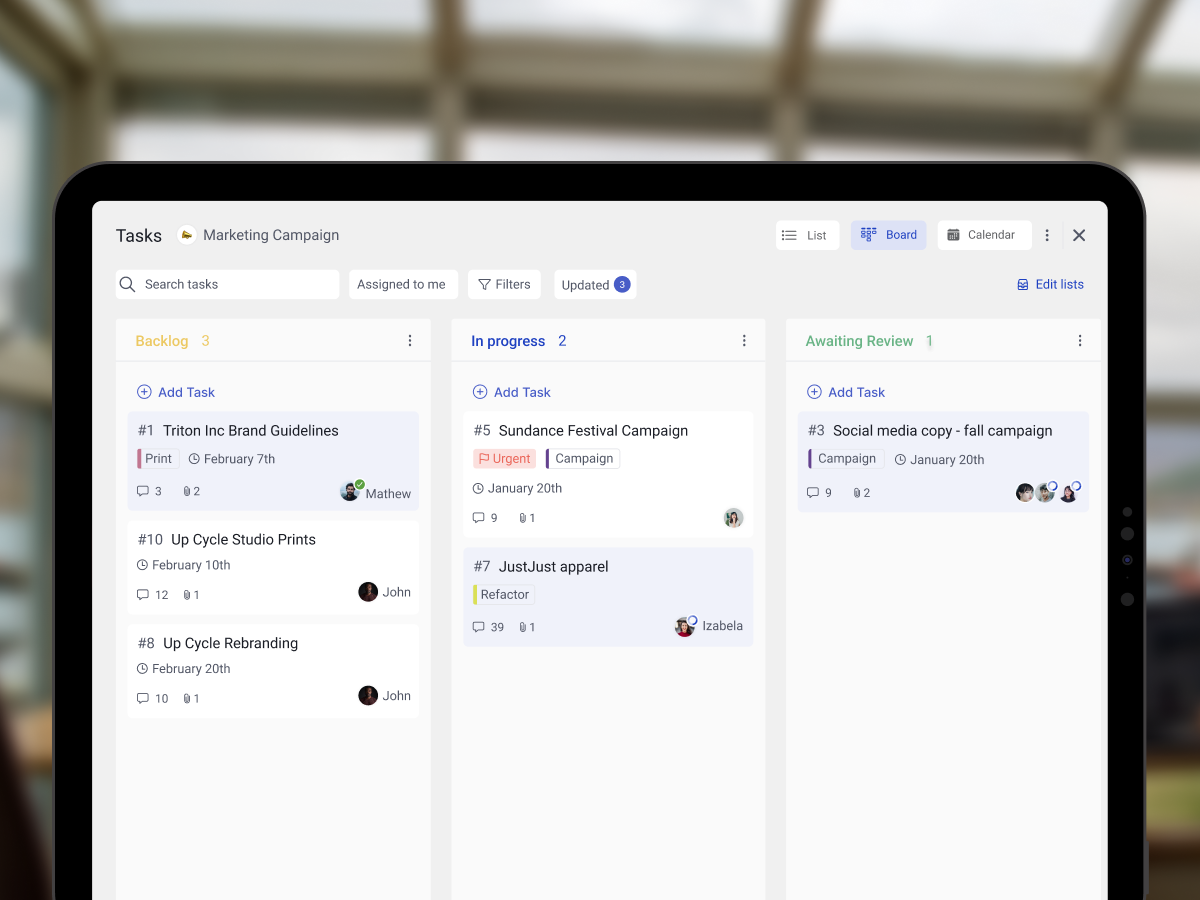
A simple three-column board makes the sprint backlog visible to the whole team and the client.
Who owns the sprint backlog
The sprint backlog belongs to the Developers. This is one of the most cited lines in the Scrum Guide, and it shows up almost word-for-word on the Professional Scrum Master exam. The product owner cannot push items into the sprint backlog mid-sprint, and the scrum master does not own the work.
What the product owner does own is priority. They decide what enters the product backlog and the order. Once an item moves into the sprint backlog at planning, scope inside that item is the team's call. The scrum master facilitates, removes blockers, and protects the sprint from interruption.
This split exists for a reason. If the product owner could push items in mid-sprint, every sprint becomes a wishlist negotiation, the team never finishes anything, and velocity collapses. The hard line on ownership is what makes Scrum work.
The Developers own the sprint backlog because they are the ones doing the work and seeing the trade-offs in real time.
"Scrum's iterative, incremental approach trades the certainty of a fixed plan for the flexibility of a Sprint at a time." - Mike Cohn, Mountain Goat Software
A sprint backlog example
Take an agency team running a two-week sprint to ship a client onboarding form. Velocity is 24 story points. The product owner brings a refined backlog with 12 ready items. Sprint planning produces this commit.
Sprint goal: Ship the client onboarding form so account managers can stop emailing PDFs.
Items selected (5 total, 22 points):
Form schema and validation (5 pts, owner Alex). Acceptance: collects name, company, email, project type. Email field validates. Form rejects empty required fields.
CRM integration (8 pts, owner Priya). Acceptance: form submission creates a new contact in HubSpot with tags. Failed submissions log to Sentry.
Confirmation email (3 pts, owner Alex). Acceptance: client gets a branded confirmation within 30 seconds. Internal Slack notification fires to the account team.
Mobile QA (3 pts, owner Sam). Acceptance: form works on iOS Safari, Android Chrome, and the in-app webview. No layout breaks at 320px width.
Copy review and launch (3 pts, owner Mia). Acceptance: client reviewed and approved copy. Form swapped into production homepage. Old PDF download link redirects.
Two points of buffer are left on the table. That is intentional. The first unplanned support ticket will eat them, and the team will still ship the goal.
What we do at Rock
For agency teams running multiple client sprints in parallel, the textbook sprint backlog template needs adjustment. A 12-person agency with 6 retainer clients does not run six identical sprints. It runs one rolling sprint per client, often with overlapping team members.
We use a per-client task board with three columns: Backlog, Doing, Done. The sprint goal sits pinned at the top of the space as a Note.
Items selected for the current sprint carry a "this sprint" label so they pop visually on the board. The same Developer might have 3 items in the Acme client space and 2 items in the BetaCo client space, all marked "this sprint" with the same end date.
Async refinement runs in the space chat. Acceptance criteria get sharpened in Topic threads, not in 60-minute meetings. The product owner confirms the sprint commit on a Monday, the team owns it for the sprint length, and only negotiated swaps move items mid-sprint.
This pattern works because of one thing: the sprint backlog stays locked. Without the lock, everything else falls apart. Flat pricing on Rock means the same Developer joins all 6 client spaces without per-seat costs scaling. That is what makes the task board pattern viable for small agencies.
A short Monday sync confirms the sprint commit. The rest happens async in chat threads.
Most sprint backlogs fail in predictable ways. The team commits to too much, the goal stays vague, the product owner adds items mid-sprint, items carry over every cycle. These are recurring patterns, not unlucky weeks.
No sprint goalA sprint backlog without a goal is a checklist. The team finishes the items but cannot say what the sprint achieved. The Scrum Guide treats the sprint goal as a required part for a reason. Refuse to commit until it exists in one sentence.
Treating it as a wishlistItems that are not refined have no business in the sprint backlog. They will need clarification mid-sprint, push the team into rework, and either get cut at review or carried over. Pull only from items that meet the team's definition of ready.
Overcommitting on capacityMost teams stuff the sprint backlog at 100 percent of their last sprint's velocity. Real capacity is lower because of meetings, support work, and the unplanned items every sprint surfaces. Commit to 75 to 85 percent and leave the buffer.
The product owner pushes items mid-sprintOnce the sprint is locked, only the team can adjust scope. If the product owner needs something added, they negotiate a swap with the team and remove an equivalent item. Otherwise the sprint quietly becomes a wishlist again and velocity collapses.
No task breakdownA story sitting at "build onboarding form" is not a sprint backlog item. It is a placeholder. The team does not know who picks it up first or what "done" looks like at the task level. Decompose during planning, not during the sprint.
Carrying items over every sprintIf two or three items roll over every sprint, the team is consistently overcommitting and the sprint backlog has stopped meaning anything. Cut the commit until it actually finishes. The retrospective should surface this; if it does not, ask harder questions.
"A sprint goal is the secret sauce of a successful sprint. Without it, the team has a list of tasks but no shared focus." - Roman Pichler, Pichler Consulting
Most failed sprints repeat the same handful of mistakes. The retro is where they surface.
Frequently asked questions
What is a sprint backlog?
A sprint backlog is the set of work a Scrum team commits to deliver in a single sprint, along with a plan for how they will deliver it. The Scrum Guide names three required parts: a sprint goal, the items selected from the product backlog, and a delivery plan. It is created at sprint planning and locked once the sprint begins.
The sprint backlog belongs solely to whom?
The Developers. The Scrum Guide is explicit: "The Sprint Backlog is a plan by and for the Developers." The product owner can negotiate scope with the team, but cannot push items into the sprint backlog unilaterally once the sprint has started.
Who can execute the work of the sprint backlog?
Only the Developers (the team members who build the increment) execute the work. The product owner sets priority, the scrum master facilitates the process, but the work itself sits with the Developers. This is one of the most common Professional Scrum Master exam questions.
What is the difference between a sprint backlog and a product backlog?
The product backlog is the full ordered list of every item that might enter the product. It belongs to the product owner and changes constantly. The sprint backlog is a small subset, pulled in at sprint planning, owned by the Developers, and locked for the duration of the sprint.
Can the sprint backlog change during the sprint?
Yes, but only the Developers can change it. As the team learns more during the sprint, they can add tasks, split items, or remove work that no longer serves the sprint goal. What they cannot do is take on new items pushed in by the product owner. If a swap is needed, the team and product owner negotiate, and an equivalent item gets removed.
Is there a sprint backlog template?
A sprint backlog is more about structure than format. The minimum shape is a board with three columns (Backlog, Doing, Done), each item carrying a title, a size estimate, an owner, and acceptance criteria. The Rock Agile Sprint Planning template ships exactly that layout. Notion, Jira, and most task tools have similar boards built in.
How many items should be in a sprint backlog?
Whatever fits the team's velocity for one sprint, with a small buffer. For most 5-person teams running two-week sprints, that lands at 5 to 10 user stories. Fewer than 5 and the sprint goal is probably too narrow. More than 10 and items are likely too small or the team is overcommitting.
A clear sprint backlog is what separates a team that ships from a team that scrambles. Rock combines chat, tasks, and notes in one workspace. One flat price, unlimited users. Get started for free.
Most agile teams that struggle with sprint planning have the same root problem. The backlog is a wishlist, not a workable queue. The stories are vague, the priorities are debatable, and nobody has estimated anything. Sprint planning then turns into a refinement session in disguise, and the team commits to less than they could have.
Backlog grooming, now officially called backlog refinement, is the practice that fixes this. The Scrum Guide replaced the word "grooming" with "refinement" in 2013, but the work is the same. Keep the top of the backlog clear, sized, and ranked, so the next sprint can start the moment planning begins.
This guide covers what grooming is and how it differs from sprint planning. It walks through the DEEP framework that defines a ready backlog, a working agenda, and the pitfalls that quietly drain its value.
Quick answer: what backlog grooming is
Backlog grooming is the ongoing practice of reviewing, clarifying, estimating, and prioritizing items in a product backlog so the top of the list is ready for the next sprint. The Scrum Guide calls it refinement; in conversation, most teams use both terms.
A grooming session is typically a 60-minute weekly meeting led by the product owner. The team reviews the next 5 to 8 items, sharpens acceptance criteria, estimates effort, and confirms the priority order.
Chat and backlog in one space.
Rock pairs messaging with a task board, so refinement happens where the work lives. One flat price, unlimited users.
The three terms get used interchangeably. They are not interchangeable. Grooming and refinement name the same activity. Sprint planning is a separate ceremony that depends on refinement being done well.
If your backlog is groomed continuously, sprint planning is short. The team walks a ranked list of ready items, picks the ones that fit the next sprint, and starts work. If refinement is skipped, sprint planning balloons into a multi-hour debate about scope, priority, and estimates that should have happened earlier.
Term
What it is
When it happens
Output
Backlog grooming
The older name for backlog refinement. Same activity.
Ongoing, usually weekly or bi-weekly between sprints.
A backlog where the top items are clear, sized, and ranked.
Backlog refinement
The current Scrum Guide term. Reviewing, clarifying, estimating, and prioritizing items.
Ongoing. Scrum Guide caps it at 10 percent of the team capacity.
Same as above. The name changed in 2013, the work did not.
Sprint planning
A separate ceremony where the team commits to a set of items for the next sprint.
Once per sprint, at the start.
A sprint backlog with a clear sprint goal.
"Product Backlog refinement is the act of breaking down and further defining Product Backlog items into smaller more precise items. This is an ongoing activity to add details, such as a description, order, and size." - Ken Schwaber and Jeff Sutherland, Scrum Guide 2020
Refinement runs continuously inside the agile cycle, not as a separate phase.
The DEEP framework for a sprint-ready backlog
A useful backlog is DEEP: Detailed appropriately, Emergent, Estimated, and Prioritized. The acronym is attributed to Mike Cohn at Mountain Goat Software. It is the most practical heuristic for checking whether the top of your backlog is ready for the next sprint.
The trick is that detail is relative. The top 5 items need acceptance criteria, estimates, and clear owners. The bottom 50 only need a title and a one-line summary. Spending refinement time on a story that will not enter a sprint for four months is wasted effort.
Emergent means the backlog is allowed to change. New ideas come in, old ones get dropped, priorities shift as the team learns more. Estimated means every top item has a size attached, even a rough T-shirt size. Prioritized means whoever picks the next item knows it is the most important one.
Criterion
Signal it is missing
How to fix it
D
Detailed appropriately
The team asks clarifying questions during sprint planning that the product owner cannot answer.
Add 2 to 3 acceptance criteria per item. Lean detail at the bottom of the backlog, more detail near the top.
E
Emergent
The backlog has not changed in two weeks. New ideas live in someone's notes app instead.
Move the backlog to a shared tool where anyone can add items between sessions.
E
Estimated
You cannot say how much of the top 10 will fit in one sprint.
Run a quick T-shirt sizing pass. Anything over XL gets split before it enters a sprint.
P
Prioritized
Two team members would pick different items as "the next one."
Force-rank the top 10 using value versus effort or a method like MoSCoW.
"A good product backlog is DEEP: Detailed appropriately, Estimated, Emergent, and Prioritized." - Mike Cohn, Mountain Goat Software
Who runs a backlog grooming session
The product owner leads. They own the priority order and the business context, so they are the right person to set the agenda and walk the team through the top items. The scrum master facilitates, keeps the meeting on time, and surfaces blockers. Developers, QA, and designers contribute estimates and clarifying questions.
Keep the room small. Five to nine people is the working size. Inviting the whole team to every session is one of the most common mistakes, since refinement becomes a roundtable instead of a working meeting. If you have specialists whose input only matters for two items, invite them for those items and let them drop off.
A task board with a clear Backlog column makes refinement visible to the whole team.
What a backlog grooming agenda looks like
A working 60-minute session has a clear shape. Open with priorities, walk the top items, estimate, flag blockers, confirm the sprint-ready set, and update labels. Sending the agenda 24 hours ahead lets the product owner do most of the writing before the meeting and lets the team think before they speak.
If you do not have an agenda, the session drifts. Someone asks a question, somebody else has a long answer, and 45 minutes later you have refined two items. The agenda is what protects the team from a meeting that produces nothing usable.
Review the current sprint and priorities5 minOpen with a 60-second sync on what changed since the last session. New client request, shifted deadline, scope change? The product owner names the top priority for the next sprint so the rest of the session has a target.
Walk the top items together25 minGo through the next 5 to 8 items at the top of the backlog. The product owner reads the story, the team asks clarifying questions. Update acceptance criteria live. Time-box each item to 3 to 5 minutes; if it needs longer, it needs more prep outside the meeting.
Estimate effort15 minT-shirt sizes (S, M, L, XL) work for most teams. Story points work if you have the cadence. Anything that lands at XL gets a "split" tag; it is too big to enter a sprint as one unit.
Flag dependencies and blockers5 minIdentify items waiting on client input, design assets, third-party access, or another team. Tag them so they do not get pulled into sprint planning blind.
Confirm the sprint-ready set5 minRead back the items that now meet your sprint planning definition of ready. The product owner confirms the order. This is the handoff list.
Update labels, owners, and notes5 minTag items by status (ready, needs detail, blocked), assign initial owners where obvious, and log any decisions in a place the absent team members can find later.
What we do at Rock
For agency teams running 4 to 8 client backlogs in parallel, the single-product refinement template breaks down. You cannot hold a 60-minute session per backlog every week. That is 6 hours of meetings plus prep, and most agency teams do not have that capacity.
We use a hybrid model that fits this constraint. Each client space in Rock has its own task board with a Backlog list. The account lead writes proposed items into the backlog as work comes in, with a short description and one or two acceptance criteria.
Once a week, a short async refinement runs in the space's main chat. The account lead drops the top 5 items in a Topic. The team responds with size estimates and clarifying questions during the day, and the product owner confirms the order before the weekly sync. A 15-minute live session at the end of the week handles anything that needs real discussion.
This pattern matters for our ICP. A 12-person agency with 6 retainer clients does not have spare capacity for six weekly hour-long sessions. Async refinement plus a short sync gets the same outcome at a fraction of the meeting load.
Labels are what make it scannable. Every backlog item carries a status tag (ready, needs detail, blocked, deferred), so anyone reviewing the task board can see at a glance what is sprint-ready. Teams that prefer a pull-based flow over fixed sprints can run the same setup as a Scrumban board, where refinement is continuous rather than a weekly ceremony. Once items are refined, the next step is the sprint backlog, which is where the team commits to a specific set for the next cycle.
Labels on every backlog item let the team see at a glance what is ready, what needs detail, and what is blocked.
The Agile Sprint Planning template ships with a Backlog list, sprint columns, and example task cards.
Common pitfalls to avoid
Most refinement sessions fail in predictable ways. The session creeps from forward-looking to status-checking. The product owner walks in cold. The team estimates items that will not enter a sprint for months while items two weeks out stay vague. These are recurring patterns, not unlucky weeks.
Treating it as a status meetingRefinement is forward-looking. If the conversation drifts into "what did you finish yesterday," you have accidentally turned it into a second daily standup. The product owner has to redirect every time. The output is a sprint-ready set of items, not a status report.
No prep from the product ownerIf the team sees stories for the first time in the session, you spend 25 minutes reading and 5 minutes refining. Send a short agenda 24 hours ahead with the items that will be discussed. Anyone who reviews them in advance returns the time tenfold to the rest of the team.
Estimating every story to the same depthA story scheduled for next sprint needs acceptance criteria, an estimate, and a clear owner. A story six sprints out only needs a title and a one-line summary. Detail belongs at the top of the backlog, not the bottom. The DEEP "Detailed appropriately" criterion exists for this reason.
Skipping it during a busy sprint"We are too slammed to refine this week" is the start of a death spiral. The next sprint planning runs long, items get pulled in half-ready, the team finishes less, and the following refinement has more to catch up on. Treat the 60-minute slot as fixed even when capacity is tight.
Inviting the whole team to every sessionFive to nine people is the working size. More than that and the discussion becomes a roundtable where nobody owns the next move. Invite specialists for the items where their input matters, then let them drop off. Smaller, focused sessions produce a more refined backlog than crowded ones.
Refining without rankingA backlog where every item is "high priority" is not prioritized. Force a top 10 ordered list at the end of every session, using MoSCoW or value vs effort. Without a rank, sprint planning starts with a debate about which item comes first, and you lose 30 minutes you did not budget for.
"Don't underestimate the importance of product backlog refinement. It's a critical activity that contributes to the success of your product." - Roman Pichler, Pichler Consulting
How often should you groom your backlog
Weekly is the most common cadence for two-week sprints. The Scrum Guide caps refinement at 10 percent of team capacity. That works out to roughly one 60-minute session per week plus a few hours of prep from the product owner. For teams running one-month sprints, bi-weekly is more efficient than weekly.
A few cases call for a different rhythm. Teams on one-week sprint cycles often run twice-weekly refinement, since the backlog turns over faster. Distributed teams across multiple time zones often run async refinement augmented by a 15-minute sync. The product owner posts updates in a chat thread and the team responds during the day. Agency teams running several client backlogs in parallel follow the same pattern.
What does not work is no cadence. If refinement only happens when sprint planning is two days away, it is too late. The session is rushed, items get pulled in half-ready, and the team finishes less than it could have. Whether you run Kanban or Scrum, the same rule applies: continuous refinement beats panic refinement every time.
Prioritization methods that work inside refinement
The P in DEEP is the letter teams get wrong most often. A backlog where every item is tagged "high priority" is not prioritized. Force a top 10 ordered list at the end of every session, and use a method that actually ranks items.
Three methods do the job. The MoSCoW method sorts items into Must, Should, Could, and Won't have. The Eisenhower matrix ranks by urgency versus importance and works well when client deadlines compete with internal work. Value versus effort is the simplest: score each item on business value and engineering effort, then pick the high-value, low-effort items first. The method matters less than the discipline of forcing a single ranked order.
If your team is unsure how to start, the deeper guide on how to prioritize tasks covers the trade-offs. The point of doing this inside refinement is simple. The team is already there, the context is fresh, and the order ships to sprint planning instead of being argued over again.
Frequently asked questions
Is backlog grooming the same as backlog refinement?
Yes. The Scrum Guide replaced "grooming" with "refinement" in 2013. The activity did not change. Most teams still use both terms in conversation, and the search volume on "backlog grooming" stays high. Use whichever your team prefers; just do not let the word debate replace the actual work.
How is backlog grooming different from sprint planning?
Grooming is ongoing and prepares the backlog. Sprint planning is a single ceremony at the start of a sprint where the team commits to a specific set of items. If refinement is done well, sprint planning is short because the work is already ready. If refinement is skipped, sprint planning balloons into a multi-hour debate.
Who runs a backlog grooming session?
The product owner leads, since they own the priority order and the business context. The scrum master facilitates so the meeting stays time-boxed. Developers, QA, and designers contribute estimates and clarifying questions. Five to nine people total is the working size.
How long should a backlog grooming session be?
60 minutes is the practical default for a two-week sprint cadence. The Scrum Guide recommends refinement take no more than 10 percent of the team capacity overall, which works out to about one 60-minute session per week for most teams. Run shorter, more frequent sessions if your backlog is volatile.
Do you need Jira to do backlog grooming?
No. Any tool where the backlog lives, everyone can access it, and items can be ranked works. Jira is common in engineering teams; a kanban-style task board, a shared sheet, or any project management tool works for smaller teams. The tool matters less than the discipline of running refinement weekly.
How often should we groom the backlog?
Weekly is the most common cadence for two-week sprints. Bi-weekly works for one-month sprints. Some teams run continuous, async refinement instead of a single session, where the product owner posts updates in a chat thread and the team responds during the day. That model fits distributed teams with overlapping time zones.
Backlog grooming is the small weekly discipline that protects every sprint after it. Rock combines chat, tasks, and notes in one workspace. One flat price, unlimited users. Get started for free.
Most project proposals get ghosted. The buyer reads the executive summary, scrolls to the price, opens a competing PDF, and never replies. The proposals that actually win clients do something different. They protect the agency's downside, name the four contract clauses most templates skip, and treat the post-signature week as part of the proposal itself.
This guide is for agency owners and team leads who write proposals to win client work. Not academic research proposals, not internal grant applications. Pitch documents that need to close in a buyer's inbox. The diagnostic below scores a proposal you are writing or reviewing across the seven sections that separate professionally formatted from client-winning.
Seven yes/no questions about a proposal you are writing or reviewing. The scorer outputs the realistic shape of the proposal, plus the specific clauses you are missing.
Question 1 of 7
Whatever shape the proposal takes, the post-signature work happens better in one workspace. Try Rock free.
If the scorer flagged missing clauses, the rest of this article shows how to write each one. If you scored seven, save this as your template and skip ahead to the kickoff section.
Quick answer: what is a project proposal
A project proposal is the agency-side document sent to a prospective client to win a specific engagement, covering scope, timeline, pricing, deliverables, and the terms that govern the work after acceptance.
It is distinct from a creative brief (which the client writes), a scope-of-work (which extends the proposal post-signature), and a project charter (which is internal to the client's company). The proposal is the only one the buyer reads before deciding to spend money.
The next sections cover the sections that win clients, the four clauses most templates skip, what to leave out, and the bridge from proposal to kickoff.
What a project proposal is (and is not)
The term is overloaded. In agency work, a project proposal is a pitch document sent to a prospective client. In academic work, it is a thesis or grant application. In construction, it is a bid against a tender. The structures look superficially similar; the buying processes are completely different.
Five documents commonly get confused with project proposals. Each lives at a different stage of the work and answers a different question. The creative brief is what the client gives the agency to describe the desired outcome. The proposal is what the agency sends back. The scope of work extends the proposal into a contract once accepted. The project charter is the client's internal authorization document, not a sales artifact. The project plan is the post-acceptance execution roadmap.
If a single document tries to be all five, it ends up too long for the buyer to read and too generic to win. The proposal has one job: get the buyer to say yes.
"The written proposal is NOT a necessary step in the buying cycle." - Blair Enns, in The Win Without Pitching Manifesto
Enns has a point that most agencies will not act on. If you cannot replace the proposal with a verbal agreement and a contract, write one that earns its presence in the buyer's inbox.
The sections that win clients
Most proposal templates list 9 to 12 sections. Half of them exist to fill space. The ones that actually move the buyer toward yes are these.
Cover page and one-line value proposition. Buyer name, project name, your agency name, date. One sentence stating what the project will produce and the expected outcome. Not "we will create a website" but "a 12-page redesigned site that converts 35 percent more demo bookings, ready in 8 weeks."
Why you, why now. One paragraph addressing the buyer's specific situation. Reference the discovery call. Quote what they said. Show you listened. Generic "we are passionate about helping brands grow" copy gets the proposal closed before page 2.
Scope and deliverables. The specific outputs, named. Not "social media support" but "16 Instagram carousel posts and 4 reels per month, briefed by you, written and designed by us, posted via your scheduler." Vague scope is the most common cause of post-signature friction.
Timeline with milestone dates. Not "8 weeks" but specific dates. Day-of-week-Month-Day for the kickoff, the midpoint deliverable, and the final delivery. Specific dates force both sides to commit and surface schedule conflicts before signature.
Pricing tied to milestones. The price, broken into payment milestones tied to deliverable acceptance. The total alone is the weakest possible framing. The clauses section below covers how to structure milestones.
Proof of fit. One or two named past projects that match the current scope. Not a generic case studies page link. The specific past project, what was delivered, the result, the client name where permitted. Two strong proof points beat ten weak ones.
The four protective clauses. Scope-change handling, cancellation terms, payment terms, IP and ownership. Most templates omit two of these or use boilerplate that does not protect the agency. Section 4 covers each.
The kickoff plan. What happens in the first 7 days after signature. Most proposals end at the signature page; the strongest ones include the kickoff agenda, the asset handoff plan, and the project workspace setup.
The 4 clauses most templates skip
The contractual sections are where standard proposals fail and agency-grade proposals hold up. Three of these clauses prevent specific failure modes. The fourth defines who owns what after the work ships.
Clause
Standard template language
Agency-grade language that holds up
Payment milestones
"50% upfront, 50% on completion."
"30% on signature, 30% on midpoint deliverable acceptance, 40% on final delivery. Invoices due net 14. Work pauses on any invoice past 7 days overdue."
Scope change
"Additional work will be billed separately."
"Any change to the deliverables, timeline, or stakeholder list listed in section 3 requires a written change order. Change orders are quoted within 3 business days and billed at our standard hourly rate. Work continues on the original scope until the change order is signed."
Cancellation / kill fee
Often missing entirely.
"If the client cancels after signature but before kickoff, the deposit is non-refundable. If the client cancels after kickoff, the client pays for all work completed plus a cancellation fee equal to 25% of the remaining balance."
IP and ownership
"Client owns all deliverables."
"Ownership of final deliverables transfers to the client upon receipt of full payment. Working files, source code, and pre-final iterations remain the property of the agency. The agency retains the right to display non-confidential portions in its portfolio."
The kill fee clause is the one most agencies discover too late. A client cancels two weeks into a 12-week project. The agency has done two weeks of work. Without a cancellation clause, the agency invoices for time spent and hopes; with one, the agency invoices for time spent plus a defined fee tied to the remaining contract value. The difference is often five figures.
The IP-and-payment-tied clause comes from Sharon Toerek of Legal + Creative, who counsels agencies that ownership of deliverables should transfer to the client only upon full payment. Without that language, an unpaid client can legally use the work the agency delivered, then refuse the final invoice. With it, the agency holds leverage that materially changes the conversation.
"Your only real control is to withhold your expertise. And although withholding expertise is the only leverage real experts have, it can be a powerful one, indeed." - David C. Baker, in The Business of Expertise
Withholding here applies before signature, in the proposal itself. Sketching the strategy, drafting the headline copy, building the wireframe inside the proposal converts thinking into a free deliverable the buyer can take elsewhere. The strongest proposals describe the approach without solving the problem.
How AI is changing proposals in 2026
AI proposal builders generate well-formatted documents in minutes. They handle the boilerplate, the structure, the clause language, and the executive summary. The 60 percent of proposal work that used to take an afternoon now takes 15 minutes.
The 40 percent that wins clients still requires human judgment. The case for fit, the pricing strategy, the scope decisions about what to include and exclude, the clauses that need negotiation rather than template language. AI can draft these but cannot judge whether the draft is right for this specific buyer.
Two patterns are emerging across agencies that use AI well. First, AI handles the structural pass and the legal boilerplate; humans rewrite the strategy, the proof of fit, and the pricing rationale. Second, AI assists with proposal triage at the agency: summarizing inbound RFPs, scoring fit, drafting initial responses for human review. The shift is not from human-written to AI-written. It is from spending hours on proposal mechanics to spending those hours on the parts that actually move the buyer.
One pitfall to name. AI-written proposals start to look the same. Buyers reading three proposals in one week notice when all three have the same structure, the same phrasing patterns, and the same generic case-study language. The agencies that stand out are the ones whose proposals still read as written by a person who paid attention to the discovery call.
What to leave OUT
Every proposal advice article on the internet is additive. Add an executive summary, add testimonials, add team bios, add a methodology section. The advice that improves win rates more often is subtractive.
Long executive summaries. The cover page and one-line value proposition do this work. A separate executive summary repeats what the cover already said and pushes the actually useful content further down.
Generic case studies. A case studies page link does not help the buyer. One or two specifically relevant past projects do. The temptation to attach the agency's full portfolio signals you are not sure which past work matters here.
Team bios. Unless the project specifically depends on individual reputation, team bios fill space. The buyer is hiring the agency, not the individual designer or developer. Save the bios for the kickoff.
The thinking that should happen during the engagement. Strategy, creative direction, recommendations on the actual work. Sketching these inside the proposal turns the document into a free deliverable. Describe the approach you would take, not the answer you would deliver.
Industry buzzwords. Holistic, synergy, leverage, iterate. Buyers reading three proposals notice when one sounds like all the others. Plain language reads as more confident than agency speak.
From proposal to kickoff: the 7-day bridge
Most proposals end at the signature page. The buyer signs and then waits to hear what happens next. The strongest proposals include the first 7 days post-signature inside the proposal itself, signaling that the engagement is a real operation rather than a sales pitch followed by improvisation.
Day 0: signature and deposit invoice in the same hourThe proposal is signed. Most agencies wait days to send the deposit invoice. Send it the same hour, with a payment link, while the buying decision is fresh. The deposit signals to the client that the project is real; the delay signals that you are not as organized as the proposal suggested.
Day 1-2: kickoff scheduling email with the agenda attachedThe first kickoff meeting agenda was already in the proposal. Re-send it as a calendar invite with the agenda in the description. List who needs to attend on the client side and the decisions that meeting will lock. Vague kickoff invites with "looking forward" copy delay the project by a week.
Day 3-5: kickoff meeting itselfLock the timeline, decision-makers, communication cadence, and the asset handoff. End with the date and time of the next meeting and what each party owes by then. The agency-side note-taker writes a 5-line recap before the meeting ends and sends it to all attendees within 60 minutes.
Day 5-7: shared workspace activated, first task assignedSet up the shared workspace, the project channel, the task board with the first sprint of work, and the document repository. Invite the client-side decision-maker. The first agency-side task should be done and visible in the workspace by the end of the first week, even if it is small. Visible motion in week one is the strongest signal that this engagement is different from the client's last vendor.
Day 14: midpoint cadence checkTwo weeks in, check whether the cadence agreed at kickoff is actually happening. Review meetings, async updates, response times, scope-change flags. Adjust now while it is still cheap. Most engagements that fail at month three were already drifting at week two; nobody caught it.
The deposit invoice in the same hour as signature is the easiest one to fix and the most often missed. It costs nothing and signals that the agency runs operations in business-hour real time. Most agencies wait two days, then send the deposit invoice with the same buying-cycle slowness that lets engagements drift in week three.
For running the kickoff itself, see our guides on sprint planning and daily standups. The proposal sets up the cadence; the first sprint is where the cadence becomes real.
Common pitfalls
The predictable failure modes when writing proposals, in order of frequency observed across small-to-mid agencies.
Solving the problem inside the proposalSketching the strategy, listing the tactics, drafting the headline copy. The proposal becomes a free deliverable. The client takes it to a cheaper vendor. Blair Enns calls this giving away the thinking before being engaged. Describe the approach, not the answer.
No payment milestones, only a totalA single 50/50 split looks clean and reads professional, but it ties the second half of payment to a single deliverable and gives the client one place to stall. Three or four milestones tied to acceptance of intermediate work pace cash flow and surface scope drift earlier.
Using a template without adjusting the kill fee or scope-change clauseThe most common pitfall. Template proposals come with generic legal boilerplate that does not protect the agency in the cancel-after-kickoff or scope-creep scenarios. Most agencies discover this only after the first cancellation. Adjust both clauses for every proposal, even if you reuse the rest of the template.
Hiding pricing in the back of the documentThe buyer scrolls to it first anyway. Burying it signals that the price is something to be embarrassed about, not justified. Put pricing in section 3 or 4, not section 9. Bracket it with the value language earlier in the document, not after.
Letting AI write the whole proposalThe current generation of AI proposal builders produces well-formatted, generically-written documents that look like every other AI-written proposal in the buyer's inbox. Use AI for the structural draft and the boilerplate clauses; rewrite the strategy, the case for fit, and the pricing section by hand. The parts that win are the parts AI cannot write.
No kickoff plan inside the proposalA proposal that ends at the signature page sends the buyer wondering what happens next. A proposal that includes the first 7 days post-signature (deposit invoice, kickoff agenda, asset handoff plan) closes faster because it removes the implementation question from the decision.
What we recommend
The strongest project proposals are short, specific, and treat the contract clauses as a feature rather than a footnote. Aim for 8 to 12 pages. Lead with the buyer's situation, not the agency's history. Put pricing in section 4 or 5, not section 9. Include the four clauses every time, even on small engagements where they feel like overkill.
What we see across thousands of small teams using Rock to manage post-signature work: the agencies whose proposals close fastest are the ones that already designed the kickoff workspace before the buyer signed. The proposal references "your shared workspace will be set up by the kickoff meeting." The agency clicks two buttons after signature. The client lands in a workspace already populated with the project's task board, the document repository, and the kickoff agenda. The buyer's first experience after saying yes is operational competence, not vendor onboarding.
For the underlying mechanics of running post-signature work in one place, see our guides on project plans, project management templates, and the scope of work document that extends the proposal into the working contract.
Designing the post-signature workspace before the buyer signs lets the client land in an operation rather than a vendor onboarding.
Frequently asked questions
What is a project proposal?
A project proposal is the agency-side document sent to a prospective client to win a specific engagement. It covers scope, timeline, pricing, deliverables, and the contract terms that govern the work after acceptance. It is distinct from a creative brief (which the client writes) and a scope of work (which extends the proposal post-signature).
How long should a project proposal be?
Aim for 8 to 12 pages. Shorter than 8 tends to read as thin; longer than 12 loses the buyer before pricing. The strongest proposals are dense not long: every page has a job, and any section that can be cut without weakening the case for fit gets cut.
What sections are essential in a project proposal?
Cover page with one-line value proposition, why-you-why-now framing tied to the discovery call, scope and named deliverables, timeline with milestone dates, pricing tied to milestones, proof of fit (1-2 named past projects), four protective clauses (scope-change, cancellation, payment, IP), and the 7-day kickoff plan. Most templates omit the kickoff plan and at least two of the four clauses.
Should I include pricing in the project proposal?
Yes, and not in the back. Put pricing in section 4 or 5, broken into payment milestones tied to deliverable acceptance, not a single total. Burying pricing in section 9 signals it is something to be embarrassed about. Front-loading it with milestone structure signals confidence and surfaces budget conflicts before the buyer is emotionally invested.
What is a kill fee in an agency proposal?
A cancellation clause that defines what the client owes if they cancel the engagement after signature. Standard formulation: deposit non-refundable if cancelled before kickoff; if cancelled after kickoff, client pays for all work completed plus a fee equal to a percentage (typically 25-50%) of the remaining contract balance. Most templates omit this clause; agencies discover the omission only after their first cancellation.
Can I use AI to write project proposals?
For the structural pass and boilerplate clauses, yes. For the case for fit, the pricing rationale, and scope decisions, no. AI-written proposals start to look identical to other AI-written proposals in the buyer's inbox. The 60% of proposal work AI can absorb (formatting, boilerplate, executive summary structure) frees time for the 40% that actually wins clients.
What is the difference between a project proposal and a scope of work?
The proposal is the pre-signature pitch document; the scope of work is the post-signature contract that extends the proposal's scope section into legally binding deliverable specifications. Some agencies combine them into one document; most separate them so the proposal can stay short and persuasive while the scope of work can stay precise and contractual.
The proposal that wins is the one that protects the agency, names the post-signature operation, and treats the buyer's time with respect. Rock combines chat, tasks, and notes in one workspace, ready to onboard the client the moment the proposal is signed. Get started for free.
Most teams know they have a knowledge management problem when the same questions keep getting asked. Or when the senior person becomes a bottleneck. Or when a project recovers months of context only because someone happened to be on the original kickoff call.
The framework called knowledge management has been around since the 1990s, with academic roots going back to Polanyi in 1958. The bigger problem in 2026 is not understanding the theory. It is closing the gap between what an enterprise wiki promises and what a 30-person agency actually needs.
This guide covers knowledge management as it actually works in modern teams. The four types of knowledge with concrete examples. The KM cycle (capture, organize, share, use, improve). The SECI model with one agency example per quadrant. An honest take on when a KM platform is overkill, when a workspace is enough, and when the dedicated tool earns its keep. Take the quiz below to see where your team lands.
Do you need a KM platform?
5 questions. Get a recommendation matched to your team size and chaos level.
Quiz · 5 questions
Question 1 of 5
Knowledge stays alive when it lives next to the work. Rock pairs notes with tasks and team chat in one space, no extra wiki to maintain.
Quick answer. Knowledge management is the process of capturing, organizing, sharing, using, and improving the knowledge a team produces. It covers four types: explicit (written down), tacit (in someone's head), embedded (built into systems), and embodied (skill-based craft). For teams under about 30 people, knowledge management often happens best inside a workspace where chat, tasks, and notes share the same room. Past that scale, a dedicated KM platform usually earns its keep.
What knowledge management is
Knowledge management is the discipline of treating what a team knows as an asset that can be captured, maintained, and reused. The term entered business vocabulary in the early 1990s, building on three earlier ideas. Michael Polanyi's 1958 work on tacit knowledge ("we can know more than we can tell"). Peter Drucker's coining of "knowledge worker" in 1959. Ikujiro Nonaka and Hirotaka Takeuchi's 1995 book, which gave the field its dominant model.
"At the most fundamental level, knowledge is created by individuals. An organization cannot create knowledge without individuals. The organization supports creative individuals or provides contexts for them to create knowledge. Organizational knowledge creation, therefore, should be understood as a process that organizationally amplifies the knowledge created by individuals." - Ikujiro Nonaka and Hirotaka Takeuchi, "The Knowledge-Creating Company" (1995)
The discipline has two halves. The theory: types of knowledge, conversion modes, the SECI cycle. The practice: capture, organize, share, use, improve. Both halves matter, but most teams over-invest in the theory (which sounds smart in slide decks) and under-invest in the practice (which is where the work actually happens).
The four types of knowledge
Most KM frameworks split knowledge into types. The original two from Polanyi were explicit (writeable) and tacit (in the head). Modern treatments add embedded (in systems) and embodied (in skill). The four-type model is the one most usable for a team trying to figure out what to capture.
Type
What it is
Example in an agency
Explicit
Knowledge that has been written down, encoded, or documented in a way someone else can read and apply
The client onboarding checklist, the SOW template, the brand voice guide "Lives in a doc"
Tacit
Knowledge held in someone's head from experience: judgment, intuition, pattern recognition. Hard to write down without losing nuance
Knowing which client emails need a 1-hour response and which can wait until tomorrow "Lives in someone"
Embedded
Knowledge baked into processes, products, or systems. The team uses it without consciously thinking about it
The kickoff workflow that automatically creates a project space with the right tasks and labels "Lives in the system"
Embodied
Skill-based knowledge that comes from practice and physical or visual judgment. Often called craft
The senior designer who can spot a layout issue in 5 seconds that takes a junior 2 hours to articulate "Lives in the hands"
Most teams under-invest in capturing tacit knowledge. It is the type that walks out the door when a senior team member leaves. It is also the type that produces the biggest "we already solved this six months ago" frustration when junior team members run into a problem the senior has seen before.
The knowledge management cycle
The KM cycle has five stages. Different sources name them slightly differently, but the structure is consistent: capture, organize, share, use, improve. Each stage has its own failure mode and its own practical fix.
CaptureMove knowledge from someone's head, an email thread, a Slack message, or a Loom recording into a place the team can find later. Most knowledge is lost in the gap between "this happened" and "we wrote it down." Make capture a habit at the moment of work, not a documentation sprint at the end of the quarter.Agency example: after each kickoff call, the account lead writes a 5-line summary in the project space note. Not a polished doc, just enough to recover the context next month.
OrganizeGroup knowledge so the right team member can find the right thing without asking. The structure does not need to be elegant. It needs to be predictable. A simple convention (one note per client, named the same way every time) beats a beautiful taxonomy nobody respects.Agency example: every project space has the same 4 pinned notes (Goals, Stakeholders, Decisions, Open questions). New team members find context in 30 seconds, not 30 minutes.
ShareMake knowledge available to the people who need it without forcing them to ask. Push the right notes into onboarding flows. Cross-link related work. Tag the right people on captured decisions. The goal is to short-circuit the "ask the senior person" loop that scales badly past 10 hires.Agency example: the new account manager joining the ACME project gets auto-added to the project space. The 4 pinned notes brief them in 10 minutes; they ask 2 questions instead of 20.
UseKnowledge that nobody opens has zero value. The team should be able to act on captured knowledge during real work, not on training day. The test: when a problem comes up, does the team find the relevant note in 60 seconds, or do they re-derive the answer from scratch?Agency example: the account manager opens "Decisions" before the QBR with the client. The 3 commitments from last quarter are right there. The QBR feels prepared instead of improvised.
ImproveKnowledge decays. A note from 18 months ago about a tool the team has switched off is worse than no note at all. Build a quarterly review that flags stale entries, archives the dead ones, and bumps the still-true ones forward. KM that does not rot is KM the team trusts.Agency example: every quarter, each team lead spends 30 minutes reviewing the pinned notes in their active project spaces. Outdated lines get rewritten or archived. The team trusts the surviving notes more.
The cycle is not a one-time process. It runs continuously. The team that does this well treats capture and review as habits inside the daily flow of work, not as a quarterly documentation sprint that produces a snapshot of yesterday's reality.
Where teams actually lose knowledge
Tacit knowledge is where most teams hemorrhage. The senior account manager just knows which clients respond to which kind of follow-up. The lead designer just knows when a layout is wrong. That kind of knowledge is rarely captured because nobody asks the experts to write it down, and the experts often cannot articulate what they know without prompting.
"Knowledge derives from minds at work. By learning, transmitting, and using knowledge, organizations differentiate themselves from competitors. The best companies have figured out how to capture and use knowledge that resides in their employees, in physical objects, and in organizational routines." - Thomas H. Davenport and Laurence Prusak, "Working Knowledge" (1998)
Three techniques work in practice for capturing tacit knowledge. Shadowing junior team members during real work and recording the senior's commentary. Asking experts to walk through past decisions and capturing the reasoning behind each one. Writing playbooks together with the expert, where a writer asks "why did you do that" until the answer is fully on paper.
The SECI model, made practical
Nonaka and Takeuchi's 1995 SECI model describes four modes of knowledge conversion. Most KM articles name-drop SECI without explaining how a 12-person agency actually uses the four quadrants.
The SECI model, made practical
Nonaka and Takeuchi's four modes of knowledge conversion, with one agency example each
From → To
To Tacit
To Explicit
From Tacit
SSocialization
Tacit knowledge transfers between people through shared experience, mentoring, and observationA junior account manager shadows the senior on 3 client calls, learning by watching how the senior reads tone and steers conversations.
EExternalization
Tacit knowledge gets written down, often via metaphor, story, or step-by-step captureAfter 4 client calls, the senior writes a 1-page playbook on "how to read a client who says they are fine but is not." The tacit becomes a doc.
From Explicit
IInternalization
Written knowledge gets absorbed into someone's head through practice and use until it becomes second natureThe junior reads the playbook before each call for 3 months. Eventually the patterns are automatic; they no longer reach for the doc.
CCombination
Existing explicit knowledge gets combined, restructured, or summarized into new explicit knowledgeThe agency owner reads playbooks from 3 senior account managers and writes a single client-handling manual that combines the best of all three.
A healthy team cycles through all four modes. Most agencies do Socialization well and Externalization badly. The big leverage is moving from "the senior knows" to "the playbook says."
A healthy team cycles through all four modes. Most agencies do Socialization well (juniors shadow seniors, senior knowledge transfers slowly). Most agencies do Externalization badly (the senior never writes the playbook). The big leverage move for most teams is moving from "the senior knows" to "the playbook says," which is exactly the Externalization quadrant.
Common mistakes
Five patterns trip up teams trying to manage knowledge. They are easy to spot in retrospect and worth checking against your current setup.
Treating KM as a one-time documentation sprint"Let's spend a week documenting everything" produces a snapshot of the team's knowledge that is out of date by month two. Knowledge management is a habit, not a project. Capture happens at the moment of work or it does not happen.
Building the structure before the team needs itA 47-folder taxonomy designed in advance dies on contact with reality. Teams use what they actually open, not what someone designed for them. Start with the simplest possible structure (one note per project, one note per client) and let the friction tell you when more is needed.
Confusing chat with knowledgeA decision made in a Slack thread is captured if you screenshot it before the channel scrolls past. Otherwise, it is not knowledge. It is just communication that happened. The convert-message-to-note action is the bridge most teams skip.
Not assigning a knowledge owner per area"The team owns the wiki" means nobody owns it. Each playbook, client knowledge area, or process doc needs one named human responsible for keeping it current. Without that, knowledge rot is silent and continuous.
Buying a KM platform before fixing the habitConfluence, Notion, or Guru will not save a team that does not capture. The tool is a multiplier, not a fix. Teams that have not yet built the habit of writing things down will produce an empty wiki regardless of which platform they pick.
The first three are about habit (capture-as-event vs capture-as-habit, premature structure, mistaking communication for knowledge). The last two are about ownership and tooling (no named knowledge owner, buying a platform before fixing the habit). Habit failures are the most expensive because they invalidate every downstream investment.
Do you need a KM platform?
The honest answer for most teams under 30 people is no. A workspace where chat, tasks, and notes share the same room often beats a separate KM platform. The knowledge stays attached to the work that produced it instead of orphaned in a parallel system that nobody opens.
The dedicated KM platform earns its keep when search across thousands of historical docs becomes a daily need. Or when governed permission hierarchies start to matter (legal, regulated industries, large enterprises). Or when AI semantic search across the corpus would actually pay off. Most agencies and small businesses never hit those thresholds. Most cross-functional teams above 50 people do.
The trap to avoid: buying a platform too early. Teams that have not yet built the habit of writing things down will produce an empty wiki regardless of which platform they pick. Tools are multipliers, not fixes.
KM tools by team size
The right tool depends on team size, structure need, and where knowledge currently lives. The table below sorts the main categories by team-size fit, with an honest note on what each tool is not.
Tool
Best for team size
Strength
What it is not
Slack alone
Under 10 people
Fast capture, zero structure
Searchable history, not a knowledge base
Rock
5 to 50 people
Notes mini-app sits next to chat and tasks; knowledge stays attached to projects
Not an enterprise wiki with governed taxonomies and AI semantic search
Slite, Almanac, Nuclino
10 to 100 people
Lightweight wikis with clean structure and search
Lighter on real-time collaboration than full workspaces
Notion
5 to 500 people
Flexible structure, databases, integrations
Can become its own chaos without strict conventions
Confluence
100+ people
Structured wiki with formal page hierarchies and permissions
Heavy for small teams; classic "wiki nobody opens" risk
Built around verified-card model, not freeform notes
Document360
Customer-facing teams
Public-facing knowledge base with versioning and analytics
Not designed as an internal team workspace
Two patterns stand out. First, the gap between "Slack alone" and "Confluence" is wide, and most teams are stuck in the middle without a clear answer. That is where workspace tools (Rock, Basecamp) and lightweight wikis (Slite, Almanac, Notion) fit. Second, the customer-facing knowledge base tools (Document360, Guru, Bloomfire) are a different product than the internal team workspace; mixing the two up is a common procurement mistake.
What we recommend
An honest disclosure first. Rock is not Confluence-or-Notion-level structured wiki software. There is no AI semantic search across 50,000 documents. There is no governed permission hierarchy at IBM scale. We are not pretending otherwise, and we will not recommend Rock as the right tool for an enterprise KM rollout.
What Rock is: a workspace where chat, tasks, and notes share the same room. The Notes mini-app sits next to the conversation that produced the decision. Files attach to the right project. Cross-org spaces let clients and freelancers see the same notes the team sees, without separate tooling.
For teams in the 5 to 50 FTE range, this often produces better team-level knowledge management than buying a separate KM platform. Knowledge stays attached to the work instead of orphaned in a parallel system.
"The most useful knowledge management isn't a separate system. It's the side-effect of doing the work in the right place. Capture happens because the team is already there." - Nicolaas Spijker, Marketing Expert
The pattern we see at Rock. Each project space has a small set of pinned notes (Goals, Stakeholders, Decisions, Open questions). The chat happens above. The tasks happen alongside. New team members get added to the space and find their context in 10 minutes. The notes get reviewed quarterly. The system stays alive because the team is in it daily, not just at quarterly KM time.
Two failure modes to watch. First, the team treats the workspace as chat-only and never captures decisions into notes. The capture habit is the foundation of every KM approach, regardless of tool. Without it, no platform helps.
Second, the team scales past 50 people and tries to keep using a workspace tool as the only knowledge home. At that scale, the dedicated KM platform starts to earn its keep, and the workspace becomes the project layer alongside it.
FAQ
What is knowledge management?
Knowledge management (KM) is the process of capturing, organizing, sharing, using, and improving the knowledge a team produces in the course of doing work. It covers four types of knowledge: explicit (written down), tacit (in someone's head), embedded (built into systems), and embodied (skill-based). Done well, KM stops a team from re-deriving the same answers every time someone new joins.
What are the 4 types of knowledge?
Explicit (documents, notes, written procedures), tacit (judgment and intuition that lives in someone's head), embedded (knowledge baked into systems and workflows), and embodied (skill-based craft that comes from practice). Most teams under-invest in capturing tacit knowledge, which is the type that walks out the door when a senior team member leaves.
What is the SECI model?
Nonaka and Takeuchi's 1995 model describes four modes of knowledge conversion: Socialization (tacit to tacit, by shadowing), Externalization (tacit to explicit, by writing down what experts know), Combination (explicit to explicit, by merging existing docs), and Internalization (explicit to tacit, by absorbing written knowledge into practice). A healthy team cycles through all four. Most teams do Socialization well and Externalization badly.
Do small teams need a knowledge management platform?
Usually not. Teams under 30 people often get more value from a workspace where chat, tasks, and notes share the same room than from a separate KM platform. The dedicated KM platform earns its keep when historical search, structured taxonomies, governed permissions, or AI semantic search across thousands of documents become daily needs. Most agency-scale teams hit that threshold around 30 to 50 people, sometimes never.
What are knowledge management best practices?
Capture at the moment of work, not in retrospective documentation sprints. Use the simplest structure that works (one note per client, one note per project) instead of a 47-folder taxonomy. Assign one named owner per knowledge area. Review quarterly and archive what no longer applies. Treat knowledge management as a habit, not a one-time project.
What is the difference between a knowledge base and knowledge management?
A knowledge base is the artifact: the wiki, the help center, the collection of documents. Knowledge management is the discipline: the practices and habits that produce, maintain, and use knowledge across the team. A team can have a knowledge base without managing knowledge well, and a team can manage knowledge well without buying a dedicated knowledge base tool.
What are the best knowledge management tools?
It depends on team size and structure need. Under 10 people, a workspace like Slack plus shared docs is enough. From 5 to 50 people, a workspace tool with built-in notes (Rock, Basecamp) keeps knowledge attached to projects. From 10 to 100, lightweight wikis (Slite, Almanac, Notion) add structure. Past 100, dedicated platforms like Confluence or Guru pay off. There is no universal best tool, only best fit for the team.
How do you capture tacit knowledge?
Tacit knowledge is hard to write down because the experts often cannot articulate what they know. Three techniques work in practice. Shadowing junior team members during real work and recording the senior's commentary. Asking experts to walk through past decisions and capturing the reasoning. Writing playbooks together with the expert, where the writer asks "why did you do that" until the answer is fully on paper.
Knowledge management works best when knowledge lives next to the work that produced it. Rock pairs notes with tasks and team chat in one workspace. One flat price, unlimited users, clients included. Get started for free.
A hybrid working model is a work arrangement that mixes office time with remote time. The hybrid work model varies between companies, but the patterns reduce to four: Office-first with fixed in-office days, Remote-first with optional office, Cohort with shared anchor days, and At-will with employee choice. Picking the right one matters more than picking any one of them well.
This guide covers what a hybrid working model actually is, the four patterns and when each fits, refreshed case studies from companies still running their hybrid policies in 2026 (and the major reversals between 2024 and 2025), and an interactive picker that outputs the model that matches your team's context. Most articles list 9 to 17 examples; this one gives you a decision tool.
Hybrid working models split office time and remote time on a structured cadence; the structure is what separates real hybrid from informal flexibility.
Quick answer: what a hybrid working model is
A hybrid working model is a structured mix of office and remote work, defined by a written policy that specifies the cadence (how often in office), the format (fixed days, anchor days, or employee choice), and the norms (response times, what counts as presence, when to use the office). The four canonical patterns cover most setups: Office-first, Remote-first, Cohort, and At-will. The choice depends on team size, work type, client exposure, and geography.
The single most common failure mode of hybrid working models is treating "hybrid" as a label rather than a written policy. Without explicit norms, people default to whatever they think their manager prefers, and the model collapses into informal pressure to be in the office.
Hybrid Model Picker
Four questions about your team. The diagnostic outputs the hybrid model that matches your context, instead of assuming one schedule fits everyone. None of the top SERP guides give a decision tool; they list 9 to 17 examples and leave the choice to you.
Question 1 of 4
Whichever model fits, the work happens better in one workspace. Try Rock free.
The picker above is calibrated to actual team contexts, not to a default 3-day-a-week assumption. The four-row comparison below shows what each model looks like in practice and which company runs each version.
The 4 hybrid working models, compared
The patterns below are the cleanest way to think about hybrid working models. Other articles list 9 or 17 examples; in practice, every one of them maps to one of these four shapes.
Model
What it is
Real-world example
Best for
Office-first / Structured
3 or more fixed days in the office; the other days are flexible but the cadence is predictable
Apple (3 days), Google (Tue/Wed/Thu)
Co-located teams with collaboration-heavy work and client-facing presence
Remote-first / Flexible
Remote is the default; offices are optional collaboration studios, used for events and quarterly bursts
Spotify Work From Anywhere, Dropbox Virtual First, Atlassian Team Anywhere
Distributed teams, async-mature culture, heads-down work
Cohort / Anchor-day
Each team picks 1-2 shared anchor days per week; non-anchor days are flexible per person
Salesforce Flex Team Agreements
Mid-sized teams with mixed work and partial client exposure
At-will / Employee-choice
Each person picks their own schedule; the manager focuses on outputs, not attendance
HubSpot @flex, parts of Atlassian
High-trust output-measured cultures with global distribution
Office-first works when collaboration is the bottleneck. Remote-first works when focus work is the bottleneck. Cohort works when the team is mid-sized and mixes both. At-will works when output measurement is real and trust is high enough to let go of attendance signals.
"There is no one-size-fits-all solution, no silver bullet, no list of best practices to copy." - Lynda Gratton, London Business School, in Redesigning Work (via MIT Sloan Management Review)
The 2024-2025 RTO reversal: what changed
Between 2022 and 2024, hybrid working seemed to settle into a default. Then in 2024 and early 2025, several large companies reversed course. Any honest hybrid working article in 2026 has to account for this shift, because some of the examples that other articles still cite have changed their policies.
The headline of "RTO is back" is not the full picture. Gallup's 2025 data shows 51% of remote-capable US workers still work hybrid; 27% are fully remote; 21% are on-site. Hybrid is the durable middle ground for most knowledge workers, even as a few large employers grab attention with reversals.
4 hybrid working model case studies in 2026
Concrete examples to ground the four patterns. Each company below has a publicly documented, currently active policy as of 2026. The fifth section covers Amazon as a counter-example: what happens when hybrid drifts to mandate.
Spotify: Work From Anywhere (Remote-first)
Launched in 2021 and reaffirmed in 2025 against the RTO wave, Spotify's Work From Anywhere lets employees choose their work mode (Office Mix, Home Mix, or Office First) and their work region. The HR chief publicly defended the policy in April 2025 with the line "our employees aren't children." Spotify reports retention improvements and broader hiring reach as the main wins.
Atlassian: Team Anywhere (Remote-first)
About 12,000 employees across 13 countries. Team Anywhere lets employees work from any country where Atlassian has a legal entity, plus 90 days per year working internationally. The model pairs explicit guidelines with an internal team measurement program. Internal feedback shows 92% positive sentiment in 2025.
Salesforce: Flex Team Agreements (Cohort)
Three designations: Office-Based (4-5 days office), Office-Flexible (1-3 anchor days), and Remote (limited cohort). The Flex Team Agreements structure pushes the cadence decision down to the team level rather than mandating company-wide. Each team writes its own agreement covering anchor days, response expectations, and meeting norms.
Dropbox: Virtual First (Remote-first)
Launched in 2020 as a permanent policy. Offices became "Studios" used for on-site collaboration sprints rather than daily work. Dropbox reports the lowest attrition in company history under Virtual First and 7x applications per role. The model relies heavily on async-first communication norms.
Counter-example: Amazon's RTO reversal
Amazon ran a hybrid policy from 2021 to 2024, then announced a 5-day-a-week mandate in September 2024, effective January 2025. The pattern: hybrid policy with anchor days drifts toward attendance scrutiny, drifts toward 4 days, drifts toward 5. Worth including not as a model to copy but as the predictable failure mode of Office-first if leadership is uncomfortable with hybrid.
Hybrid work model benefits worth taking seriously
Three benefits hold up in current research. The list is shorter than most hybrid pitches admit; the cases that matter are well-documented.
"Hybrid working from home improves retention without damaging performance." - Nick Bloom, Stanford economist, in Nature (2024)
Talent reach. Hybrid expands the hiring radius without going fully remote. A team running an Office-first model in San Francisco can hire from the broader Bay Area; a Cohort model can hire from a 2-hour drive radius; a Remote-first model removes geographic constraints entirely. Each step widens the pool.
Employee preference.McKinsey's 2024 American Opportunity Survey found 54% of US workers prefer remote, and 17% of recent quitters cite working-arrangement changes among their reasons for leaving. Hybrid is not the perfect compromise; it is the compromise most employees actually accept.
When hybrid is the wrong answer
Three contexts where hybrid working models do not work and the honest call is to pick one or the other.
Roles that require physical presence (manufacturing, healthcare, hands-on labs, on-site security) do not flex into hybrid. Pretending they do produces resentment, not flexibility. The right call is straightforward on-site with separate flexibility levers (compressed weeks, scheduling autonomy, predictable shifts).
Brand-new teams without established trust often struggle with hybrid. The early storming and norming phase benefits from co-location; switching to hybrid before the team has a working model in person tends to ossify dysfunction. Co-locate for the first 3 to 6 months, then move to hybrid.
Heavy regulatory or security environments with workstation lockdown, classified data, or specific physical-security requirements often have hybrid limited to specific roles. Honest implementation acknowledges the constraint rather than pretending the policy is uniform.
How to implement a hybrid working model
The mechanical steps to set up a hybrid working model from scratch, or to fix one that is drifting.
Diagnose what the team actually needsSkip the "everyone does 3 days" default. Run the picker quiz above with the team's actual context: size, work type, client exposure, geography. Two teams in the same company often need different models. The discipline at this step is resisting the urge to standardize before you understand the variance.
Pick a model and write down the rulesSchedule, anchor days, expected response times, what counts as office presence, what triggers a call versus a message. Write it down in a single document everyone can reference. Most hybrid failures come from fuzzy norms, not from the wrong model.
Set up the workspace before the schedule kicks inHybrid only works if information is captured where everyone, in or out of the office, can find it. Tasks, decisions, and updates need to live in writing, not in hallway conversations. The workspace question is upstream of the schedule question.
Run the model for 8 to 12 weeks before judgingMost teams adjust at week 3 because office days feel underwhelming or remote days feel isolating. Hold the line for two months before tweaking. The first month is calibration; the second is real signal.
Audit and adjust quarterlyAfter 8-12 weeks, run a short retro. What is working, what is dragging, what would you change. Adjust the model, not just the schedule. If the team is consistently miserable on anchor days, the anchor day rule is broken; do not just move it from Tuesday to Wednesday and call it solved.
The order matters. Most hybrid model failures trace back to skipping step 1 (the team's specific context) or step 3 (the workspace setup). Schedule and rules in steps 2 and 5 are easy to adjust later; the diagnosis and the workspace are not.
What we recommend
For most teams, the practical move is not to pick the trendiest hybrid model but to write down explicit norms for whatever model fits the work. Hybrid succeeds when the rules are clear, the workspace makes information visible regardless of physical location, and managers measure output rather than attendance.
What we do at Rock: chat, tasks, and notes live in the same workspace, so meeting notes, decisions, and project status all stay accessible whether you are in the office, at home, or working from a different time zone. Hybrid does not work when information lives in hallway conversations or in someone's personal notebook; it works when the workspace itself is accessible to everyone, regardless of where they are sitting that day.
When chat, tasks, and notes share a workspace, hybrid teams stay aligned regardless of where each person is sitting that day.
"The amount of time and energy we're putting into how many days a week somebody should be in the office is a little ridiculous." - Brian Elliott, founder of Future Forum, on the wrong frame for the hybrid question (Allwork.Space, 2024)
Common pitfalls
The predictable failure modes when implementing or running a hybrid working model.
Picking 3 days because everyone else picks 3 days"3 days a week in the office" became the default not because research backed it but because it felt like a compromise. Bloom's 2024 Nature study found 2 days hybrid produced the same productivity as full-time office and reduced attrition 33%. Pick the cadence that matches your work, not the one that signals balance.
Letting anchor days drift into 5-day mandatesAnchor days are a useful coordination tool until leadership starts using them as a presence-tracking tool. The 2024-2025 RTO reversals at Amazon, JPMorgan, and Dell all started this way. If hybrid is the policy, treat it like the policy and resist the slow drift to 5-day expectations.
Treating remote days as second-classIf important meetings, decisions, and casual conversations only happen on office days, remote days become structurally disadvantaged. Hybrid breaks immediately because the unspoken signal is "show up to be taken seriously." Decisions and key meetings either happen synchronously with proper remote inclusion, or asynchronously in writing. Office presence cannot be a prerequisite for visibility.
No written norms, just vibes"Use your judgment about when to come in" is not a hybrid model. It is the absence of a model. Without written norms (what days, what hours, what response time, what counts), people default to whatever they think their manager prefers, which is usually wrong. The doc is the policy.
Skipping the workspace questionHybrid models fail more often from the tools than from the schedule. If meeting notes live in someone's notebook, decisions happen in hallway conversations, and projects exist in 5 different apps, remote workers cannot stay in the loop and the model collapses. Pick the workspace before you pick the schedule.
Frequently asked questions
What is a hybrid working model?
A hybrid working model is a work arrangement that mixes time spent in a physical office with time spent working remotely. The mix varies by company and team, but four canonical patterns cover most setups: Office-first (3+ fixed in-office days), Remote-first (mostly remote, optional office), Cohort (shared anchor days per team), and At-will (each person picks their own schedule).
What are examples of a hybrid working model?
Apple runs Office-first with 3 fixed days. Spotify runs Remote-first under their Work From Anywhere program. Salesforce uses a Cohort model with Flex Team Agreements. HubSpot uses At-will with their @flex policy. The comparison table above maps each model to a real-world example with the policy details.
How many days should hybrid workers be in the office?
Bloom's 2024 Nature study found 2 days of office time per week produced the same output as full-time office work while reducing attrition by 33%. There is no universal answer; what works depends on the team's work type, client exposure, and culture. The picker quiz above outputs a recommended cadence based on your context.
Is hybrid work declining in 2025-2026?
No, despite the headlines. Gallup's 2025 data shows 51% of remote-capable US workers are hybrid, with another 27% fully remote. The 2024-2025 RTO mandates from Amazon, JPMorgan, and Dell are real but represent a minority of large employers. Owl Labs research finds 40% of hybrid workers would job-hunt and 5% would quit immediately if flexibility were removed. The compromise that holds is hybrid; the headline that travels is RTO.
What is the difference between hybrid and remote work?
Remote work means working from outside the office most or all of the time, with no expectation of regular in-office presence. Hybrid work splits time between office and remote, with the split structured by the model the company picks. A fully remote employee may visit the office occasionally; a hybrid employee has a recurring office cadence built into the role.
What are the benefits of a hybrid working model?
Three benefits hold up in research. Retention: Bloom 2024 Nature study found a 33% reduction in attrition with 2-day-WFH hybrid. Talent reach: hybrid expands the hiring radius without going fully remote. Employee preference: McKinsey 2024 found 54% of US workers prefer remote, and 17% of recent quitters cite working-arrangement changes as a reason for leaving. The benefits show up most clearly when hybrid is paired with output-measured culture, not attendance-measured.
When does a hybrid working model fail?
Three failure patterns recur. First, vague norms: "use your judgment" replaces actual rules. Second, presence inequality: important decisions and casual conversations only happen on office days, structurally disadvantaging remote days. Third, weak workspace setup: information lives in hallway conversations and personal notebooks, so remote workers fall out of the loop. The model is fine; the implementation drift kills it.
How to start this week
Run the picker quiz at the top with the team's actual context. Pick the model that scored highest, write down the rules in a single document, and share it with the team. The 30 minutes to write the doc is the difference between hybrid as a label and hybrid as a working policy.
Run the model for 8 to 12 weeks before judging. Most teams want to adjust at week 3 because the new rhythm feels strange; resist the urge to change the model until you have real signal. After two months, run a short retrospective on what works and what drifts, then adjust deliberately.
Hybrid models work better when chat, tasks, and notes share a workspace. Rock combines them at one flat price for unlimited users. Get started for free.
The words "goal" and "objective" get used interchangeably in most business conversations, and most of the time it does not matter. The trouble starts when a team is writing a plan and someone has to decide which is which. The two terms point at different altitudes of work, and treating them as synonyms is how planning meetings devolve into terminology debates instead of producing clear deliverables.
This guide covers the practical difference between a goal and an objective. Where strategy fits between them. The full planning hierarchy from vision to tasks. And the one place the vocabulary flips (OKRs). Use the comparison tables and hierarchy visual to settle the question for your own team.
Quick answer. A goal is a broad outcome the team wants to achieve, usually over months or years. An objective is a specific, measurable step that proves progress toward that goal, usually scoped to a quarter or less. Goals set direction; objectives prove progress. Most teams have 1 to 3 goals and 3 to 5 objectives per goal at any given time.
What is a goal
A goal is a broad outcome a team or business wants to achieve. It is qualitative more often than quantitative, points at a direction, and usually has a long time horizon (months to years). Goals belong at the top of the planning stack, just under strategy. They answer the question "what are we ultimately trying to do."
"Become the most-recommended agency for B2B SaaS clients in our region" is a goal. It is directional, it spans multiple years, and you cannot mark it complete on a Friday. Goals do not need to pass the SMART test in their entirety. They need to be clear enough that everyone on the team can repeat them from memory and recognize whether the team is moving toward or away from them.
What is an objective
An objective is a specific, measurable step that proves progress toward a goal. It is quantitative, scoped to a short time horizon (weeks to a quarter), and either passes or fails at the deadline. Objectives belong below goals in the planning stack and above tasks. They answer "what proof do we have that we are getting there."
"Land 8 referrals from existing B2B SaaS clients by December 31" is an objective. The number, the source, and the deadline are all stated. At year-end the team can answer yes or no without debate. A goal often spawns 3 to 5 objectives that each attack the goal from a different angle.
"There is a difference between a project's purpose, its goals and its objectives. Goals are general guidelines that explain what you want to achieve in your community. They are usually long-term and represent global visions such as 'protect public health and safety.' Objectives define strategies or implementation steps to attain the identified goals." - The Pennsylvania State University, Office of Planning, Assessment, and Institutional Research
A note on terminology
The words mean different things in different traditions. In OKRs, the "Objective" is the aspirational outcome, much closer to a goal in this article's terms, and the "Key Results" are the measurable indicators. In academic course design, "learning objectives" are granular outputs (closer to objectives here). In classical military and business strategy, "the objective" is often the apex aim of a campaign.
For the rest of this guide, we use the planning-and-execution definition that dominates modern team workflows: goals are broad outcomes, objectives are the measurable steps that get you there. If your team uses OKRs, the vocabulary flips, and we cover that one section down.
Goal vs objective at a glance
The two terms differ on seven dimensions worth memorizing. Each row below is a separate test you can apply when something on a team's plan looks ambiguous.
Dimension
Goal
Objective
What it is
A broad outcome the team wants to achieve
A specific, measurable step that gets the team closer to the goal
Time horizon
Long term: 6 months to multiple years
Short term: weeks to a single quarter
Specificity
Directional, often qualitative
Concrete, always measurable
Example
"Become the most-recommended agency for B2B SaaS clients"
"Land 8 referrals from existing B2B SaaS clients by December 31"
Count per project
1 to 3 goals usually
3 to 10 objectives per goal usually
Owner
Team lead, sponsor, or executive
Single individual with deadline accountability
Tracked by
Quarterly or annual review
Weekly status, sprint review, or task board
The fastest sanity check: if you cannot put a number on it and a date next to it, it is a goal, not an objective. If you can, and the time horizon is a quarter or less, it is an objective.
Where strategy fits
Strategy sits between goal and objective in the planning stack. The goal is the destination. The strategy is the route the team picked from several possible routes. The objective is the measurable mile marker along that route. Most teams skip strategy entirely and jump straight from goal to objective, which is how two teams end up working toward the same goal with incompatible plans.
Question
Goal
Strategy
Objective
Answers
What outcome do we want?
How will we get there?
What measurable steps prove progress?
Altitude
The destination
The route chosen between several options
The mile markers along the route
Example
Become the top-rated agency for B2B SaaS in our region
Win on speed and senior account leadership instead of headcount
Convert 30% of inbound leads, with sub-24-hour response time, by end of Q3
Changes when
The mission shifts (rare)
The market shifts or the strategy stops working
The plan is revised quarterly
"A strategy is more than just a goal. It is the integrated set of choices that uniquely positions the firm in its industry so as to create sustainable advantage and superior value relative to the competition." - Roger L. Martin, "Playing to Win," Harvard Business Review
Strategy is the choice. Without it, the team is shipping objectives that do not connect to a coherent direction. The goal stays directional and the strategy stays a choice; only the objectives need to be fully measurable.
The full planning hierarchy
The planning stack has six tiers. Goals sit in the middle. Each tier answers a different question and changes at a different cadence.
The full planning hierarchy
Six tiers from why we exist to what we do today
1VisionWhy we exist
A world where small agencies can compete with big ones on tools, not just talent.
2MissionWhat we do about it
Build affordable workspace software that combines chat and tasks for agency teams.
3StrategyThe route we picked
Win on flat per-month pricing and chat-first UX, not on AI bells and per-seat scaling.
4GoalThe destination this year
Become the most-recommended workspace tool for agencies in Latam and SEA.
5ObjectiveA measurable mile marker
Sign 250 paying agency teams in Latam by end of Q3 with NPS above 50.
6TasksWhat ships this week
Publish 4 case studies, ship Spanish onboarding flow, run 3 webinars per region.
Each tier answers a different question. Goals sit above objectives, below strategy.
Tiers 1 and 2 (vision, mission) almost never change. Tier 3 (strategy) shifts every few years when the market moves. Tier 4 (goal) shifts annually. Tier 5 (objective) is reviewed quarterly. Tier 6 (tasks) shifts daily. Mismatching a tier with the wrong review cadence is a common planning failure. Reviewing the goal every Monday turns it into noise. Reviewing objectives only annually lets slips compound for months.
Worked example: same intent, three altitudes
Reading the same idea written at three altitudes is faster than memorizing definitions. The card below shows one intent expressed first as a goal, then as an objective, then as a SMART objective.
Worked example: one intent, three altitudes
The same idea written as a goal, an objective, and a SMART objective
GoalAnnual horizon
Grow the blog into a meaningful traffic source for the business.
↓
ObjectiveQuarterly horizon
Increase blog organic sessions this quarter.
↓
SMART objectiveSame quarter, sharper
Increase blog organic sessions by 20% by end of Q3 by publishing 2 articles per week on the agency-ops cluster.
Notice the pattern. The goal sets direction. The objective scopes the work to a quarter and one metric. The SMART objective adds the number, the deadline, and the path. All three are talking about the same thing at different altitudes.
Notice how each level adds constraint. The goal is a direction. The objective adds a metric and a quarter. The SMART version adds the number, the deadline, and the path to get there. The same project shows up at all three altitudes because the team needs to communicate at all three.
Goal vs objective in OKRs
The OKR framework, popularized by Andy Grove at Intel and codified by John Doerr at Google in the OKR framework, flips the vocabulary. In OKRs, the "Objective" is the aspirational qualitative outcome (what this article calls a goal), and Key Results are the measurable indicators (what this article calls objectives).
"An OBJECTIVE, I explained, is simply WHAT is to be achieved, no more and no less. By definition, objectives are significant, concrete, action oriented, and inspirational. KEY RESULTS benchmark and monitor HOW we get to the objective. Effective KRs are specific and time-bound, aggressive yet realistic. Most of all, they are measurable and verifiable." - John Doerr, "Measure What Matters"
Both vocabularies describe the same two-tier structure. The disagreement is purely linguistic. If your team uses OKRs, internalize that the OKR Objective is what most planning literature calls a goal, and the Key Results are what most planning literature calls objectives. Then stop debating it. Pick one definition for your team and move on.
Common mistakes
Five patterns trip up teams that try to separate goals from objectives. They are easy to spot in a plan if you know what to look for.
Writing tactics and calling them goals"Publish 2 articles per week" is a tactic, not a goal. The actual goal is what those articles should produce: organic traffic, leads, signups, brand authority. Tactics are how the team chases the goal. When the team confuses the two, every status review turns into a debate about activity instead of outcomes.
Naming objectives that no one can measure"Improve customer satisfaction" is the goal. "Raise NPS from 32 to 45 by end of Q3" is the objective. Without a number and a deadline, the objective is just the goal restated in slightly more polite language. The whole point of dropping from goal altitude to objective altitude is to gain a yes-or-no check at the deadline.
Confusing the OKR vocabulary with this taxonomyIn OKRs, the "Objective" is the ambitious aspirational outcome (closer to a goal in this article's terms) and the "Key Results" are the measurable steps (closer to objectives here). The vocab flips. If your team uses OKRs, agree internally on which definition wins, then stop debating it. The framework matters; the dictionary fight does not.
Stacking too many goalsA team with 12 goals has zero priorities. The point of a goal is that it directs attention. 1 to 3 goals per quarter is the working range. Each goal can have 3 to 5 objectives. Beyond that, the team is shipping a list, not running a strategy.
Reviewing goals at the same cadence as objectivesGoals get reviewed quarterly or annually. Objectives get reviewed weekly or at sprint boundaries. Reviewing the goal every Monday turns it into noise. Reviewing the objectives only annually means slips compound silently for months. Match the cadence to the altitude.
What we recommend
Treat goals and objectives as different artifacts that live at different altitudes, even if your team's vocabulary is loose in everyday conversation. The cost of confusion shows up later, in plans that mix three altitudes of work into one bullet list and produce status reviews that argue about activity instead of outcomes.
Write the goal first. One to three goals per team per quarter. Test it against the planning hierarchy: does this fit on the Goal tier, or is it actually a Strategy or an Objective wearing a goal's clothes. Then write 3 to 5 objectives per goal. Each objective should pass the SMART test: specific, measurable, achievable, relevant, time-bound. If the objective fails any of those tests, sharpen it before the work starts.
The pattern we see at Rock. Each project space has one goal pinned at the top of the chat. The objectives become tasks with owners, statuses, and deadlines. The goal is reviewed at every phase boundary; the objectives are reviewed at every weekly standup. The two artifacts coexist in the same workspace, but they live at different altitudes and they answer different questions.
For teams that prefer the OKR framework, the same separation applies, just under different names. The Objective sits where the goal sits. The Key Results sit where the objectives sit. The vocabulary differs but the artifact stack is identical. What matters is keeping the altitude clean, not which words your team uses.
FAQ
Are goals and objectives the same thing?
No, but the terms are often used interchangeably in casual conversation. A goal is a broad outcome ("become the most-recommended agency"). An objective is a specific, measurable step toward that goal ("close 8 referral deals by December 31"). Goals set direction; objectives prove progress.
Which comes first, a goal or an objective?
The goal comes first. You cannot write a useful objective without knowing what the goal is. Most planning failures trace back to teams jumping straight to objectives ("ship 2 features per sprint") without first defining the goal those features should serve.
Can a goal have multiple objectives?
Yes, and it usually should. A single goal often needs 3 to 5 objectives that attack the goal from different angles. A goal of "grow revenue 20% this year" might have objectives for new-customer acquisition, expansion of existing accounts, and reduction of churn. Each objective is a measurable bet on how the goal gets hit.
What is the difference between a goal, objective, and strategy?
The goal is the destination. The strategy is the route you picked between several possible routes. The objective is a measurable mile marker along that route. Goal answers "what outcome do we want." Strategy answers "how will we get there." Objective answers "what proof do we have that we are on the way."
Why does the OKR framework use "Objective" differently?
In OKRs, the "Objective" is the ambitious qualitative outcome (closer to a goal in this article's terms), and the "Key Results" are the measurable indicators (closer to objectives here). The vocabulary flip is real and confuses teams that mix the two systems. Pick one definition for your team and stick with it.
How do SMART goals fit into goal vs objective?
The SMART framework is a writing test. It applies most cleanly to objectives, where Specific, Measurable, Achievable, Relevant, and Time-bound all need to hold. Goals at the directional level often pass Specific and Relevant but fall short on Measurable and Time-bound by design. The SMART test runs at the objective altitude, not the goal altitude.
How many goals and objectives should a team have at once?
1 to 3 goals per team per quarter, 3 to 5 objectives per goal. A team with 12 goals has zero priorities. The point of a goal is that it forces a choice about where the team focuses. Beyond 3 goals, focus dissolves and every status review becomes a list-reading exercise.
Is "objective" the same as a "key result"?
Mostly yes in OKR contexts. A Key Result is the measurable indicator of progress against an OKR Objective, which functions like a goal in this taxonomy. So an OKR Key Result and a project-management objective are roughly the same artifact. Both should pass the SMART test.
Goals and objectives work best when they live next to the work that produces them. Rock turns each objective into a task with owner, status, and chat next to it. One flat price, unlimited users, clients included. Get started for free.
SMART goals are the most-cited goal-writing framework in business, and the most fudged. The five letters are easy to remember and the format reads as a checklist, which is exactly the trap. A goal can pass the SMART test on paper and still be the wrong goal, the wrong altitude, or just a tactic dressed up as an objective.
The framework is genuinely useful, but only if the team using it knows where it works and where it falls short.
This guide covers SMART goals as they actually work in 2026. Each letter unpacked with a real test. Modern examples by domain (marketing, sales, project management, agency client work). The honest critique most articles skip. The comparison to OKRs, KPIs, and HARD goals. Take the 5-question quiz below to test your SMART knowledge.
Test your SMART knowledge
5 goals. Pick the SMART letter each one is missing.
Quiz · 5 questions
Question 1 of 5
You know your SMART letters. Rock turns each goal into a task with owner, status, and chat next to it.
Quick answer. SMART goals are objectives that pass five tests. Specific (concrete subject), Measurable (a number you can track), Achievable (realistic given resources), Relevant (ties to a meaningful outcome), and Time-bound (clear deadline). The framework was introduced by George T. Doran in 1981, originally with "A" meaning Assignable rather than Achievable. SMART works for individual and team goals at a quarter-or-less horizon. For company-wide alignment and stretch ambition, OKRs are the better fit.
What SMART goals are
SMART is a writing checklist for objectives. The letters are tests every well-formed goal should pass. The framework does not tell you what your goals should be. It tests whether the goals you have written are clear enough to act on. That distinction is the source of most SMART confusion: teams treat the acronym as a strategy framework, then complain that the framework is shallow.
"How do you write objectives. Of course, top management thinks they know how. But just listen to the moans, groans, and outright laughter your operation managers will provide on this question. Writing objectives is an art form. Specifically, objectives should be SMART: Specific, Measurable, Assignable, Realistic, and Time-related." - George T. Doran, "There's a S.M.A.R.T. Way to Write Management's Goals and Objectives," Management Review, November 1981
Doran's original "A" meant Assignable, not Achievable. The shift to Achievable happened later, as the framework moved out of corporate management and into personal-development and self-help contexts. Both readings have value: a goal needs an owner (the assignable test) and a credible path (the achievable test). Modern best practice combines them.
The SMART acronym, letter by letter
Each letter has a specific job. The fastest way to misuse SMART is to skim the acronym without understanding what each letter actually tests.
Letter
Stands for
Test the goal with
S
SpecificThe goal names a concrete subject and outcome, not a vague intention.Could a stranger read this and know exactly what we are doing.
Action verb plus subject. "Increase X" beats "improve things."
M
MeasurableThe goal includes a number, percentage, or quantifiable check.When the deadline arrives, can we say yes or no without debate.
AchievableThe goal is realistic given resources, time, and context.Do we have a credible plan to get there, or is the number a wish.
Honest stretch with a path. "10x" needs the path or it is theater.
R
RelevantThe goal ties to a higher-level outcome the team or business cares about.If we hit this, does anything that actually matters move with it.
Connection to revenue, retention, growth, mission. Not vanity.
T
Time-boundThe goal has a clear deadline or end-of-period anchor.When exactly do we check the result.
Specific date or end-of-quarter, not "soon" or "this year."
Two patterns are worth flagging before the table is filed away. First, the original 1981 "A" was Assignable, meaning the goal needed a named owner. Modern guides emphasize Achievable. The strongest SMART goals pass both readings: a credible path AND a single owner. Second, Relevant is the easiest letter to fudge. A 50% increase in social media followers passes Measurable cleanly but fails Relevant if followers never convert to revenue or retention. The quiz at the top of this article tests whether you can spot a missing letter at a glance.
SMART goals examples
The fastest way to internalize the framework is to see vague goals next to their SMART rewrites. Each row below shows the same intent at two altitudes: a fuzzy version that fails most letters, and a SMART version that passes all five.
Domain
Vague version
SMART version
Marketing
Grow our blog traffic.
Increase blog organic sessions by 20% by end of Q3 by publishing 2 articles per week.
Sales
Close more enterprise deals.
Close $250,000 in new MRR from mid-market accounts by December 31.
Project management
Ship the new feature soon.
Ship the customer notifications feature to general availability by October 15, with 95% uptime in the first 30 days.
Agency client work
Improve the brand for ACME.
Deliver a new brand strategy, design system, and 12 launch assets to ACME by June 30, signed off in 3 client review rounds.
Customer success
Reduce churn.
Reduce monthly logo churn from 3.2% to 2.0% by end of Q4 through quarterly business reviews on the top 30 accounts.
Hiring
Hire engineers fast.
Hire 4 senior product engineers in EMEA by March 31, with all 4 onboarded and shipping code by April 30.
Personal development
Get better at public speaking.
Deliver 4 conference talks of 20 minutes or longer between January and December, with at least 1 keynote.
Patterns to notice. Every SMART version starts with an action verb (increase, close, ship, deliver, reduce, hire). Every one includes at least one number with a unit. Every one names a deadline. The vague versions have none of those. Reading the two columns side by side is faster than memorizing the acronym.
SMART goals work best when the goal is tracked alongside the work that produces it. Each goal becomes a Rock task with owner, status, and chat thread next to it.
Where SMART falls short
SMART has been the dominant goal-writing framework for over four decades. That track record is real. So is the criticism. Edwin Locke and Gary Latham's 35-year goal-setting research showed that hard but reachable goals produce higher performance than easy ones. Ambitious goals also motivate effort more than safe ones. SMART, applied literally, can push teams toward the safe end of the range.
The "A" becomes a ceilingAchievable was meant to filter wishful thinking, not cap ambition. Teams that take it literally start picking goals they already know they will hit. Locke and Latham's research on goal-setting theory shows that hard but reachable goals produce higher performance than easy ones. SMART is fine for routine work; for stretch ambition, OKRs handle the gap better.
Time-bound collapses long-term thinkingA 12-week deadline is precise but it pushes teams toward whatever can be measured by week 12. Strategic work, brand investment, customer-experience overhauls, and any compounding asset rarely fits the SMART deadline shape. Use SMART for tactical goals, then track the multi-year strategic ones outside the framework.
Confusing goals with tactics"Publish 2 blog articles per week by end of Q3" is a tactic dressed as a goal. The actual goal is what those articles should produce (organic traffic, leads, signups). Tactics belong in the project plan. SMART tests the goal, not the work plan that follows it.
Vague "R" turns into rationalizationRelevance is the easiest letter to fudge. Almost any goal can be made to sound relevant with two sentences of corporate framing. The check that matters: if we hit this goal and nothing else changed, would the business genuinely be better off. If the answer is "well, technically..." the goal is not relevant.
SMART goals at the company levelSMART works for a single team or person's objective. Used at the company level, it produces 30 SMART goals that nobody can connect to each other. That is the gap OKRs fill, with one objective and 3 to 5 cascading key results. SMART is a writing checklist; OKRs are an alignment system. Mixing them up is the most common framework mistake.
"Goal setting must be measured against several internal and external moderating variables to function effectively. Ability, commitment, feedback, task complexity, and goal conflict all shape whether a goal produces the intended performance gain. The framework alone is not the mechanism." - Edwin A. Locke and Gary P. Latham, "New Directions in Goal-Setting Theory," Current Directions in Psychological Science, 2006
The honest read. SMART is a useful test for any single goal. It is not a strategy framework, not an alignment system, and not a substitute for ambition. Teams that hit SMART resistance usually need OKRs (for cross-functional alignment) or HARD goals (for stretch personal-development) instead, not a longer SMART acronym.
SMART vs OKRs vs KPIs vs HARD goals
The four frameworks get conflated constantly. Each one solves a different problem at a different altitude. Treating them as competitors creates the framework-fatigue most teams complain about. Pick the right one for the altitude.
Framework
What it answers
Time horizon
Best for
SMART goals
Is this single goal well-formedA writing checklist for any one objective
The sequence in practice. KPIs run continuously to monitor health. OKRs set the ambitious quarterly objective with cascading key results. SMART is the writing test that each key result, each project deliverable, and each individual goal should pass. HARD goals are the alternative for stretch personal-development work where SMART's "A" feels like a ceiling. Most teams use SMART and KPIs every day. OKR adoption is more selective. HARD goals show up in leadership development.
A short history
George T. Doran published "There's a S.M.A.R.T. Way to Write Management's Goals and Objectives" in the November 1981 issue of Management Review. Doran was a corporate planning consultant, and his goal was practical: stop the chronic vagueness in management-by-objectives goal-writing that he saw in client engagements. The original five letters were Specific, Measurable, Assignable, Realistic, and Time-related.
The framework borrowed conceptually from Peter Drucker's Management by Objectives, popularized in the 1950s. Drucker's MBO required goals to be clear, measurable, and assigned. Doran condensed those requirements into an acronym that would stick. Over the next two decades, the framework migrated from corporate planning into personal development, education, healthcare, and nursing curricula. The "A" shifted from Assignable to Achievable along the way, as the audience changed from middle managers to individuals.
Modern variants include SMARTER (adding Evaluated and Reviewed), SMARTIE (adding Inclusive and Equitable), and HARD goals (Mark Murphy 2010, emphasizing emotional pull). The original framework remains the most widely used.
What we recommend
SMART works for tactical goals at a quarter-or-less horizon. Use it as the writing test for every individual goal, project deliverable, sales target, marketing campaign, hiring milestone, and customer-success metric. The quiz at the top of this article walks through 5 examples and helps the team train its eye for the most commonly missed letters.
For company-wide alignment and stretch ambition, SMART is the wrong altitude. Use OKRs instead, with one ambitious objective per team and 3 to 5 measurable key results that each pass the SMART test. The frameworks are not competitors; SMART tests the key results inside the OKR. That is how the two coexist in practice.
For continuous operational health (response times, revenue, conversion rates, customer churn), use KPIs as a dashboard rather than a quarterly goal. KPIs answer "is the business healthy now," which SMART goals cannot. Mixing them up is the most common framework mistake.
"The pattern that works is using SMART for individual and team goals, OKRs for cross-functional alignment, and KPIs for ongoing health monitoring. Picking one and forcing everything through it is what creates the framework fatigue most teams complain about." - Nicolaas Spijker, Marketing Expert
The pattern we see at Rock. Teams write one SMART goal per project space, the goal that defines whether the project succeeded. They then turn each work package into a task with an owner, a status, and a deadline. The goal lives at the top of the project chat. The work happens in the tasks. The conversation about whether we are on track happens in the same space.
That last part matters. SMART goals fail most often because they are written at kickoff and never re-read. Keep the goal visible to the team that owns it. Track the metric inside the project workspace. Check the deadline weekly. The framework only works if the goal is alive in the team's daily attention.
FAQ
What does SMART stand for?
Specific, Measurable, Achievable, Relevant, Time-bound. Each letter is a test the goal must pass: it names a concrete subject, includes a number, can realistically be done with available resources, ties to a meaningful outcome, and has a clear deadline. The acronym was introduced by George T. Doran in 1981 in Management Review, where his original "A" stood for Assignable rather than Achievable.
What is an example of a SMART goal?
"Increase blog organic sessions by 20% by end of Q3 by publishing 2 articles per week." It is specific (organic sessions, blog), measurable (20%), achievable with the named tactic, relevant (organic traffic ties to lead generation), and time-bound (end of Q3). Compare it to "grow our blog traffic" which fails on every letter except possibly the first.
What is the difference between SMART goals and OKRs?
SMART is a writing checklist for any single goal. OKRs are a cascading framework with one objective and 3 to 5 measurable key results, used to align cross-functional ambition. SMART works at the team and individual level for tactical work. OKRs work at the company level for strategic stretch ambition. They coexist: each key result inside an OKR can pass the SMART test on its own.
Are SMART goals still relevant in 2026?
Yes for tactical goals at the team or individual level. The framework has 45 years of evidence behind it for clarifying single objectives. The criticism that SMART limits ambition or stifles creativity is fair when SMART is used as the only framework at the company level. Used as a writing test for individual goals, it still does its job.
What does the "A" in SMART actually stand for?
Most modern guides say Achievable. Doran's original 1981 paper said Assignable, meaning the goal had a clear owner. Other variants use Action-oriented, Aspirational, or Ambitious. The variant matters less than the test: every goal needs both an owner (the assignable reading) and a credible path to completion (the achievable reading). Use whichever reading exposes the gap your team is most likely to skip.
What is a SMARTER goal?
SMARTER adds Evaluated and Reviewed to the original five letters, originally proposed by Graham R. Wilson and Bill Wisman among others. The point is to set a goal and then come back to it on a cadence, rather than declaring it written and walking away. Most teams that use SMART benefit from the SMARTER habit, even if they do not formally adopt the longer acronym.
Where do SMART goals fall short?
Three patterns. The "A" becomes a ceiling that filters out ambitious goals. The "T" pushes teams toward whatever can be measured by the deadline, at the expense of long-term work. SMART used at the company level produces 30 disconnected goals. For ambition and alignment, OKRs are the better fit; SMART is the writing test inside them.
How do I write a SMART goal for work?
Lead with an action verb. Name the subject. Add a number with a unit. Add a deadline tied to a specific date or end-of-quarter. Sanity-check the path (how will this be done) and the relevance (what changes if we hit it). The quiz at the top of this page tests whether you can spot a missing letter, with 5 worked examples and explanations.
SMART goals work best when they live next to the work that produces them. Rock turns each goal into a task with owner, status, and chat thread next to it. One flat price, unlimited users, clients included. Get started for free.
The Gantt chart has been the default project schedule visual for over a hundred years. Most teams know what one looks like (horizontal bars on a timeline) and most have made one in Excel, MS Project, or a Gantt-specific tool. The chart is a strong visualization, but a weak project plan if treated as the plan itself. The bars are downstream of decisions made in the scope, the dependencies, and the durations.
This guide covers Gantt charts as they actually work in 2026. The 6 components every reader should be able to identify. The 1896 origin story (Karol Adamiecki, not Henry Gantt). A 6-step build process with a worked SaaS launch example. The honest comparison to Work Breakdown Structure, Critical Path Method, and project roadmaps. A no-fluff software list. Use the builder below to draft a Gantt with bars, dependencies, and a critical-path overlay as you read.
Gantt chart builder
Add tasks, durations, and dependencies. Bars and the critical path render automatically.
Interactive · Gantt Builder
Critical path
⚠
Gantt drafted. Screenshot it for the deck. Run the project itself in Rock with the team chat next to the tasks.
Quick answer. A Gantt chart is a horizontal bar chart that visualizes a project schedule. Each bar represents a task, positioned on a timeline by its start date and sized by its duration. The 3 main components are the timeline axis, the task bars, and the dependencies. Modern Gantt charts also include milestones, a today line, and a critical-path overlay.
Build the Gantt from a real Work Breakdown Structure, never the other way around.
What a Gantt chart is
A Gantt chart is a visualization of when work happens. Each task is a horizontal bar laid against a timeline axis. The bar's left edge marks the start date, its length marks the duration, and arrows or vertical alignment between bars mark dependencies. The chart answers one question well: across the project, which work happens when, and how do the pieces connect.
The Gantt does not answer what the deliverables are (that is a Work Breakdown Structure). It does not answer why the project exists (the project charter). It does not answer which sequence drives the schedule mathematically (the Critical Path Method). It is the visualization layer that sits on top of those underlying artifacts.
Treating the Gantt as if it were the plan is the most common reason teams end up debating bar positions while the actual scope drifts.
The components of a Gantt chart
Six elements show up in nearly every modern Gantt. A reader who can identify all six can read any Gantt in 30 seconds. A Gantt missing two or three of these is usually a slide, not a working tool.
The components of a Gantt chart
Hover a card below to spotlight it on the chart
Day
0
2
4
6
8
10
12
14
16
18
ASpec doc
5d
BBackend API
10d
CFrontend UI
8d
DLaunch
TODAY
1
Timeline axisDays, weeks, or months along the top
2
Task barsHorizontal bars showing duration and position
3
DependenciesArrows or alignment showing what blocks what
4
MilestonesDiamond markers for kickoff, sign-off, launch
5
Today lineVertical marker showing where the project stands
6
Critical pathColor-coded bars on the longest dependency chain
The today line and the critical-path overlay are the two elements most often missing from kickoff Gantts. Adding them is a 10-minute upgrade that converts a static slide into something the team will actually re-open during execution.
A short history
The chart format predates Henry Gantt. The Polish engineer Karol Adamiecki published a similar concept (the harmonogram) in 1896, but his work appeared in Polish and Russian and went unnoticed in the West. Henry Gantt independently developed the modern bar-chart format around 1910 to 1915 while working on industrial production scheduling at Bethlehem Steel and the Frankford Arsenal during the First World War.
"The Gantt chart provided to industry a tool for the planning and control of work that was new and revolutionary. Its principles became the foundation upon which all subsequent scheduling techniques have been built." - Wallace Clark, "The Gantt Chart: A Working Tool of Management" (1922)
The chart spread quickly through manufacturing in the 1920s and 1930s, and into general project management after the Second World War. The 1950s brought CPM and PERT, which added the dependency math that modern Gantts now display as overlays. Software-era Gantts (MS Project in 1984, web tools from the 2000s onward) made the format collaborative, but the visual is essentially what Gantt and Adamiecki drew with paper and pencil.
How to make a Gantt chart in 6 steps
The process below produces the same chart whether you draw it on a whiteboard, build it in Excel, or use the builder at the top of this page. Six steps, walked here against a typical SaaS feature launch example.
List the tasks from your WBSPull the activity list from the project's Work Breakdown Structure. Each task on the Gantt is a Level 3 work package or a major Level 2 deliverable, depending on the chart's altitude. A Gantt built from invented activities is fiction. A Gantt built from a real WBS is load-bearing.Example tasks: A Spec doc, B Backend API, C Frontend UI, D QA testing, E Launch.
Estimate durationsGive each task a single duration in days, weeks, or whatever unit the project runs in. Pad estimates honestly. A Gantt full of three-day tasks that always take five is a disinformation tool. If durations have real uncertainty, use ranges or move to PERT-style three-point estimates and average them in.Example durations: A 5d, B 10d, C 8d, D 4d, E 2d.
Map dependenciesFor each task, write down what must finish first. Most are finish-to-start. Be honest about which dependencies are real (B literally cannot start until A finishes) versus narrative (B usually starts after A). False dependencies inflate the schedule without anyone realizing.Example dependencies: B and C both need A. D needs both B and C. E needs D.
Lay out the bars on a timelineDraw a horizontal axis with day or week ticks. Place each task as a bar, positioned by its earliest start (computed from dependencies) and sized by its duration. Tasks without predecessors start at day zero. Tasks with predecessors start at the latest finish of their predecessors.Example layout: A starts at day 0. B and C both start at day 5. D starts at day 15 (B finishes at 15). E starts at day 19 (D finishes at 19). Project ends at day 21.
Highlight the critical pathRun the forward and backward pass to compute float for each task. Tasks with zero float form the critical path. Color those bars in a distinct shade (usually red). Without the critical path overlay, the Gantt looks like a list of equal tasks. With it, the team knows which bars are load-bearing.Example critical path: A → B → D → E. C has 2 days of float because it runs in parallel with B and finishes earlier.
Add milestones, today line, and ownersMark stakeholder-relevant moments as diamond milestones (kickoff, sign-off, launch). Add a vertical "today" line so anyone reading the chart can answer "are we on track" at a glance. Tag each bar with its owner. Update the today line and slip-affected bars weekly. A Gantt without these three elements is wallpaper within 30 days.Example: Launch milestone at day 21. Today line moves weekly. Owner labels: A spec writer, B backend engineer, C frontend engineer, D QA lead, E PM.
Steps 1 to 3 are the substantive work. Steps 4 to 6 are mechanical once 1 to 3 are honest. Most Gantt failures trace back to a missing task, an inflated duration, or a fake dependency in the first three steps.
Worked example: SaaS feature launch
Use the builder at the top of the article with its default brand-refresh setup. The chart renders as below: 4 tasks across 19 days, with the critical path highlighted in red and one task carrying float.
Read the chart. A blocks B. B blocks both C and D. C is the longer parallel branch and gates the launch milestone. D finishes 4 days earlier than C, which gives it 4 days of float. Slipping D by 3 days changes nothing. Slipping C by 1 day pushes the milestone one day right.
What the project manager learns from this. Launch comms (D) can slip up to 4 days without consequence because it runs in parallel with the longer Design system (C) branch. Slipping C by 1 day pushes the launch milestone one day right.
If D slips by 5 days, the critical path moves to A → B → D and total duration becomes 20 days. The chart tells the team which slips matter and which ones do not, at the speed of a glance.
"Gantt charts are most useful when the team treats them as a communication tool. The act of reading the chart together, not the act of building it once, is where the value comes from." - PMI, A Guide to the Project Management Body of Knowledge (PMBOK Guide)
The bars and the today line answer the only two questions a stakeholder usually asks. Are we on track. What slips. The project manager can say "C slipped, this matters" or "D slipped, no action needed" within seconds of seeing the update. That is the operational value of a Gantt that is maintained, and the reason kickoff-only Gantts get ignored within a month.
Gantt vs WBS vs CPM vs roadmap
Four scheduling and scope methods get conflated in most project conversations. Each one answers a different question. Treating them as one bloated artifact is how teams end up with a 50-page document that nobody updates.
Where the project is going at the phase levelHigh-level visual, monthly cadence
Timeline or now-next-later
Stakeholder alignment, board reviews
The sequence in practice. The Work Breakdown Structure decomposes scope. The Critical Path Method computes which sequence drives the schedule mathematically. The Gantt chart visualizes that schedule on a calendar. The project roadmap shows the same picture at a higher altitude for stakeholders. Each one is the right tool for its specific job. The Gantt is the most visible, but it is downstream of the other three.
Gantt chart software compared
The software market splits into three categories: Gantt-only tools, Gantt views inside broader PM platforms, and slide-export tools for stakeholder-deck Gantts. The right pick depends on whether the chart is a kickoff artifact or a daily working tool.
Tool
Best for
What it does well
Office TimelineFree + Pro from $59/mo
PowerPoint and slide-deck Gantts
Exports clean visuals to PowerPoint and PDF. Best when the deliverable is a stakeholder slide, not a live schedule.
TeamGanttFree up to 1 project, Pro from $19/user/mo
Collaborative web Gantts
Browser-native, drag bars, dependency arrows, comment threads. Best for teams that live in the chart and update daily.
SmartsheetFrom $9/user/mo
Spreadsheet-native teams
Spreadsheet rows with a Gantt view layered on top. Strong for finance and ops teams who already think in cells.
MS ProjectFrom $10/user/mo (cloud)
Enterprise schedules and resource leveling
Industry standard for large programs with hard dependencies, baselines, earned value. Steeper learning curve.
AsanaFree, Starter from $10.99/user/mo (Timeline view)
Teams already using Asana for tasks
Timeline view extends the task list into a Gantt. Good when the team already has tasks in Asana and wants a schedule overlay.
The pattern most teams settle into. One person owns the Gantt. They update it weekly or at every phase boundary. The deliverable is either a screenshot pasted into the status review or a live link shared with the sponsor. Heavy live-Gantt usage past 30 to 50 bars almost always migrates to MS Project or a dedicated scheduling tool, regardless of what the team started with.
Common Gantt chart mistakes
Five patterns account for most failures we see in Gantts that get built and then abandoned. They are easy to spot in a draft chart if you know what to look for.
Treating the Gantt as the project planA Gantt chart is the visualization. The plan is the underlying scope, dependencies, owners, and durations. Teams that build the Gantt first and the plan never end up debating bar positions instead of debating the work. The Gantt should be the output of a real plan, not the plan itself.
No critical path overlayA Gantt without critical-path highlighting tells the team every task looks equally important. It is not. Highlight the critical path in a distinct color so anyone reading the chart can see which slips matter. A 30-bar Gantt where every bar is the same shade is a slide, not a working tool.
Ignoring resource conflictsThe Gantt shows two tasks running in parallel. The schedule says they share an owner. The team finds out at week three that one person cannot do both at once. Run a resource-leveling check after the Gantt is drafted, or surface the conflict in the project plan and re-sequence accordingly.
Building it once and never updatingA Gantt drawn at kickoff is a one-shot artifact. By month two, durations have shifted, dependencies have changed, and the team is shipping against a chart no one trusts. Update at every phase boundary, every scope change, and any time a critical-path task slips.
Hiding the today lineWithout a vertical "today" indicator, the Gantt does not communicate where the project actually stands. Stakeholders see colorful bars but cannot answer the only question they care about: are we on track. Add the today line. Update it weekly.
The first three are structural (Gantt as plan, no critical path, ignored resources). The last two are operational (one-shot artifact, no today line). Both kinds matter, and a Gantt that fails on either side stops being load-bearing within weeks.
When a Gantt chart is overkill
The Gantt is not load-bearing for every project. Three contexts where skipping it is the right call.
Projects under ~15 tasks. If the entire project fits on a sticky-note timeline, the Gantt is overhead. The schedule is obvious by inspection. A simple ordered task list with target dates does the same job in 5 minutes instead of an hour.
Projects with no hard dependencies. If activities can mostly run in parallel and the team is capacity-bound rather than dependency-bound, the Gantt produces a near-flat picture that maps to whatever task has the longest duration. The chart looks impressive but tells the team nothing they did not already know. Resource leveling is the more useful tool for this shape of project.
Sprint-internal agile work. Inside a 2-week sprint, the Gantt is overkill. The backlog and the burndown are the right artifacts. At the program level, where multiple agile teams have hard cross-team dependencies and fixed launch dates, Gantt-style schedules still apply. Use the right one at the right altitude.
Most projects do not fall into these three buckets. For mid-size to large projects with hard dependencies, fixed launch dates, and parallel workstreams, the Gantt is worth the hour it takes to set up. Maintenance runs about 10 minutes per week.
What we recommend
An honest disclosure first. Rock does not have a Gantt view. The product has List, Board, Calendar, and My Tasks views. We are not pretending otherwise, and we will not recommend Rock as a Gantt tool. The pattern that works for most teams is a clean split between where the Gantt is drawn and where the project actually runs.
For the Gantt itself, the builder at the top of this page is enough for most kickoff decks and weekly status reviews. Input the tasks, set durations and dependencies, screenshot the result, paste into the slide. Five minutes start to finish.
For ongoing programs that need dependency tracking, milestone reports, baselines, and stakeholder dashboards at scale, use a dedicated tool. Office Timeline for clean PowerPoint exports. TeamGantt for collaborative web Gantts. Smartsheet for spreadsheet-native teams. MS Project for enterprise schedules with resource leveling.
For the project workspace where the work actually gets done, that is the layer Rock fills. Each task on the Gantt becomes a Rock task with an owner, a status, and a chat thread next to it. The team chat sits next to the tasks. When a critical-path task slips, the conversation, the dependency, and the status update happen in the same space, not across three tools.
"The bars on the chart are the easy part. The work that goes into them is the hard part. The Gantt is most useful when the team has agreed on what they are looking at before anyone draws a single bar." - Nicolaas Spijker, Marketing Expert
Two failure modes to watch. First, the team treats the Gantt as the project plan. The Gantt is the visualization. The plan is the underlying scope and dependencies. Build the WBS first, the dependencies second, the Gantt last. Second, the team builds the Gantt once at kickoff and never updates it.
By month two, the chart no longer matches the project. Update at every phase boundary, every scope change, and any time a critical-path task slips. The today line is the cheapest update of all and the one that keeps the chart trustworthy.
FAQ
What are the 3 main components of a Gantt chart?
The timeline axis (days, weeks, or months across the top), the task bars (horizontal bars showing duration and position in time), and the dependencies (arrows or vertical alignment showing what blocks what). Most modern Gantt charts add three more: milestones (diamond markers for major events), the today line (vertical marker for current date), and a critical-path overlay (color highlighting the longest dependency chain).
How do I make a Gantt chart in Excel?
Build a table with task name, start date, duration, and dependency columns. Insert a stacked bar chart and use the start date as the invisible first series and duration as the visible bar. Reverse the axis so the first task is at the top. Excel does not auto-compute the critical path, so add a column for float manually or use a template. The widget at the top of this page does the same job without the spreadsheet gymnastics.
What is the purpose of a Gantt chart?
A Gantt chart visualizes when each task in a project happens on a calendar, and how the tasks connect through dependencies. Its main jobs are communicating the schedule to stakeholders at a glance and tracking progress against the planned dates. It is a visualization layer on top of the underlying project plan, not a replacement for it.
What are the disadvantages of a Gantt chart?
Gantt charts assume single-point duration estimates, ignore resource constraints unless leveling is added separately, become unwieldy past about 50 bars, and need constant updates to stay accurate. They communicate plans well but track real-time progress poorly, and a Gantt that is not maintained becomes wallpaper within a month.
Is a Gantt chart agile or waterfall?
Traditionally waterfall. Inside an agile sprint, a Gantt is overkill. But at the program level, where multiple agile teams have hard cross-team dependencies (release trains, hardening sprints, fixed launch dates), Gantt-style schedules still apply. The activities are epics and integration milestones rather than user stories. The Scaled Agile Framework calls this the program board.
Who invented the Gantt chart?
Henry Gantt developed the modern bar-chart format around 1910 to 1915, originally for industrial production scheduling. The Polish engineer Karol Adamiecki published a similar concept (the "harmonogram") in 1896, but his work was published in Polish and Russian and went unnoticed in the West. The chart is named for Gantt, but Adamiecki published first.
The right project tool keeps the schedule and the team conversation in the same place. Rock turns each Gantt task into a workspace task with owners, status, and chat next to it. One flat price, unlimited users, clients included. Get started for free.


.jpeg)