

Slack vs Google Chat: How to Pick in 2026
Slack and Google Chat compete for the same job, but they approach it from opposite directions. Slack treats chat as the workspace and pulls everything else in through integrations. Google Chat treats chat as one layer inside Google Workspace, sitting next to Gmail, Drive, Calendar, and Meet. The choice often comes down to which side of that fence your team already lives on.
This guide compares Slack and Google Chat axis by axis, then runs the real cost at 5, 15, 30, and 50 seats. It also covers the late-2025 Google Chat catch-up that most ranking comparison articles still miss. Some teams should pick Slack. Some should pick Google Chat. And some should pick neither because they need chat plus tasks plus notes in one workspace, not just chat. Run the recommender below for a starting point.
Slack or Google Chat? Or neither?
Answer 4 questions for an honest pick.
1. What does your team already run on?
2. How many people will use it?
3. Do you want native AI in your chat tool?
4. Do clients or freelancers need access?
Start over
Quick answer. Slack is the chat-first option, Salesforce-owned, and has the deepest integration directory in the category at 2,600+ apps. Google Chat is bundled with Google Workspace and shines for teams that already use Gmail, Drive, and Meet. Pick Slack if your team values polish and integration breadth. Pick Google Chat if you already pay for Workspace and want chat next to your inbox. Pick neither if you want chat with tasks and notes in one workspace, at flat pricing, without the per-seat tax.

Want chat plus tasks?
Rock pairs messaging with tasks and notes in one workspace. One flat price.
What Slack is built for
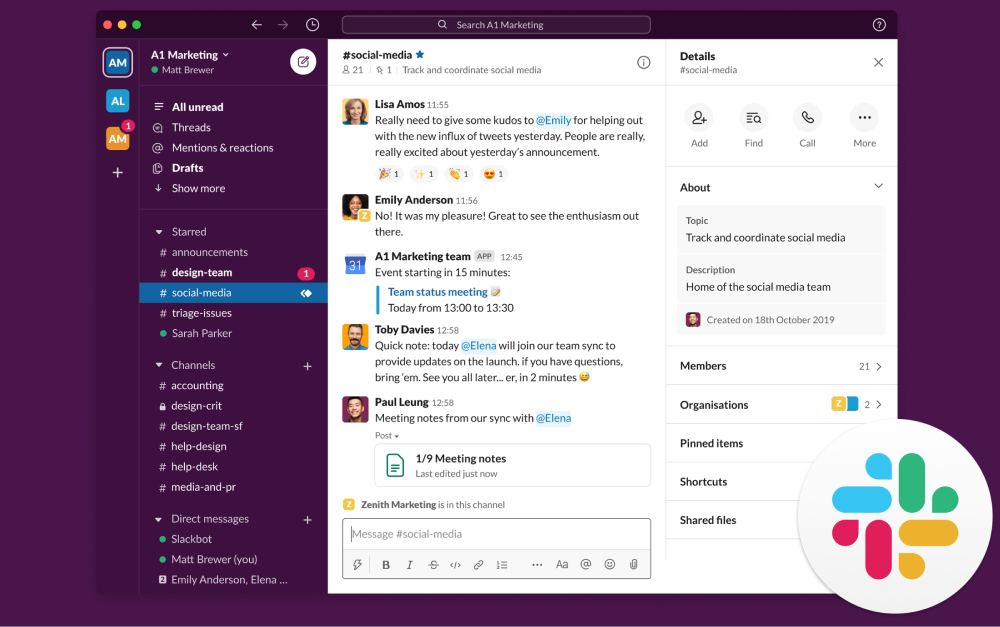
Slack launched in 2013 and made channels and threaded chat the default for team communication. Salesforce acquired the company in 2020. The product has stayed close to the original idea: chat is the workspace, and everything else is a deep integration on top.
The 2026 feature set covers channels, threads, group huddles, Canvas (collaborative documents inside Slack), Lists (lightweight project tracking), and Slack Connect for cross-organization channels. Slackbot is now context-aware, pulling answers from channels, canvases, and Salesforce records when grounded with permissions. Agentforce agents run inside Slack threads for sales and support workflows. The integration directory has 2,600+ apps, the deepest in the category by a wide margin.
"Slack wins on UI and has a better chat flow. Google Chat wins in price, integrations, and audio/video capabilities." - Reddit user, cited in Connecteam's Google Chat vs Slack review (2026)
The Reddit framing captures the buyer experience. Most teams that have tried both come away with the same conclusion. Slack feels nicer to use day to day. Google Chat is good enough and meaningfully cheaper if you already pay for Workspace. The honest comparison is not which is "better" in the abstract. It is which trade-off matches your team.
The big 2025 shift was AI pricing. Slack killed the standalone Slack AI add-on (which was $10 per user per month) and bundled the same features into every paid tier mid-year. So Pro, Business+, and Enterprise+ all now include AI message summaries, channel recap, and search-grounded answers as part of the base price. This makes the Slack vs Google Chat cost comparison more direct than articles published before May 2025 suggest.
For a wider category view, see our Slack alternatives guide and the instant messaging apps roundup.
What Google Chat is built for
Google Chat is the messaging layer inside Google Workspace. Originally launched as Hangouts Chat in 2017, then rebranded to Google Chat in 2020, the product spent the last few years catching up to Slack on features. The core value proposition stayed the same. Tight integration with the rest of Google Workspace at no extra cost on most paid plans.
The current feature set covers spaces (the Slack-channels equivalent), threads, direct messages, group DMs, and the new Huddles feature for ad-hoc audio and video conversations. Spaces can hold up to 500,000 members. Gemini integration runs in a side panel inside Chat for summaries, action items, and grounded answers. Late in 2025, Google Chat became a data source in the Gemini app, which means Workspace users can query Chat content directly from Gemini.
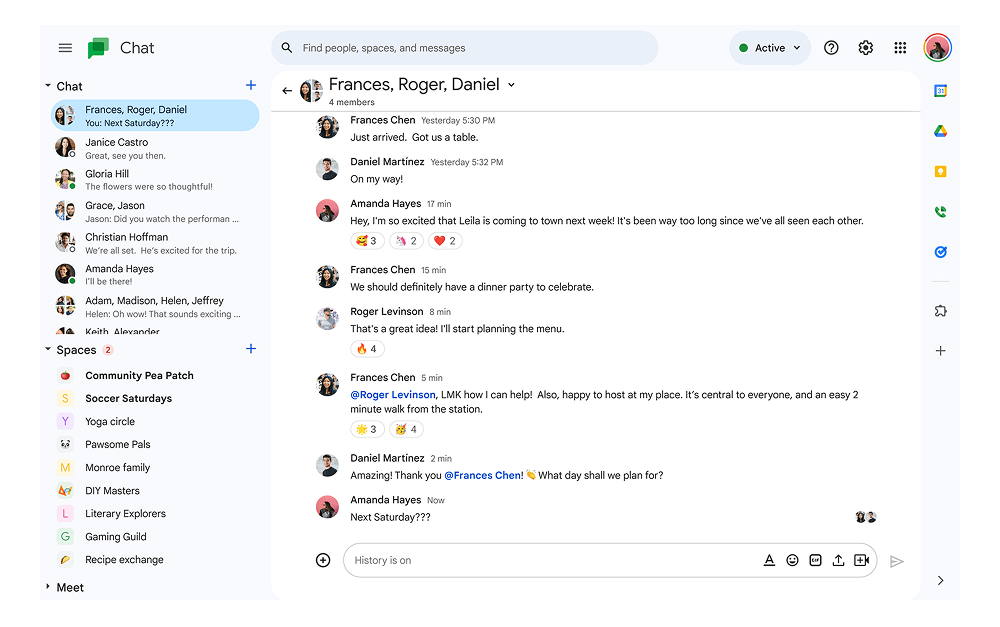
"Chat integrates seamlessly with Gmail, Calendar, Drive, Meet, and other Google Workspace apps which makes it easy for us to use all in one workspace." - G2 reviewer, Google Workspace
That review captures Google Chat's main strength. The integration with the rest of Google Workspace is unmatched. Gmail messages can convert into Chat threads. Drive files preview inline. Calendar events become Meet meetings in one click. For a team already standardized on Workspace, the friction to adopt Chat is close to zero.
The 2026 release pushed AI deeper into the product. Gemini in the side panel can summarize long conversations, extract action items, draft replies, and answer questions about the channel history. Translation is automatic across multilingual teams. The Gemini integration is included in Workspace Business Standard and higher tiers, with no separate per-user surcharge for the chat-grounded features.
Where Google Chat struggles is outside the Workspace ecosystem. The third-party app directory exists but is shallower than Slack's, with around 100 apps versus Slack's 2,600+. External users can join shared spaces but the experience is less polished than Slack Connect. And the depth of customization (channel templates, workflow builder, custom slash commands) is more limited than Slack offers.
Slack vs Google Chat side-by-side
Six axes matter when picking between these tools in 2026. Channels and threading, video and audio, AI strategy, integrations, security and compliance, and pricing. Here is how each one stacks up.
| Feature | Slack | Google Chat |
|---|---|---|
| Owned by | Salesforce (since 2020) | Google (part of Google Workspace) |
| Built around | Channels and threaded chat as the workspace | Messaging layer inside Google Workspace |
| Best for | Chat-first SaaS teams, Salesforce-stack companies | Teams already on Google Workspace |
| Channels and threads | Strong, mature threading model | Spaces and threads, simpler model |
| Video and audio | Huddles for ad-hoc calls in all paid tiers | Huddles launched late 2025 in DMs and spaces; Google Meet for scheduled calls |
| AI in 2026 | Slack AI bundled in all paid tiers; Agentforce agents | Gemini in side panel; Chat is now a Gemini data source |
| Integrations | 2,600+ apps in directory; deepest ecosystem | Deep Google Workspace integration; ~100 third-party apps |
| Free plan | 90-day message history, limited integrations, no group huddles | Free with personal Gmail; limited features for business use |
| Paid from | Pro $7.25/user/mo (annual) | Bundled with Workspace Business Starter $7/user/mo (annual) |
| Higher tier | Business+ $12.50/user/mo | Workspace Business Standard $14/user/mo (annual) |
| Lock-in | Salesforce orbit and integration ecosystem | Google Workspace dependency (full Google stack) |
| External users | Slack Connect for cross-org channels (mature) | External users via shared spaces, less polished |
| Mobile | Strong, near desktop parity | Strong, especially inside Workspace ecosystem |
Channels and threading
Slack wins on threading depth and channel polish. Threads were a first-class feature from the early days. The pattern is well established: a channel holds the conversation flow, and threads keep replies organized so a fast-moving channel does not bury context. Mature teams build cultures around threading discipline.
Google Chat threads work, but the model is simpler and the conventions less developed. Spaces can be threaded or unthreaded at creation time, which is a one-way choice. The threading experience inside spaces is functional but less polished than Slack's. For teams coming from Gmail conventions (long-form messaging, reply-all chains), Google Chat's flatter structure can feel more familiar.
Both tools support direct messages, group DMs, mentions, and reactions. The basics are at parity. The difference is in how teams actually use channels day to day.
Video and audio
Both tools now offer ad-hoc audio and video. Slack Huddles have been around since 2021 and are mature. Google Chat Huddles launched in late 2025, fully rolled out by early 2026. Both let participants click a phone icon in any DM, group chat, or space to start a quick audio call, with optional video and screen-sharing.
For scheduled meetings, Google Chat hands off to Google Meet, which is a full meeting platform with recording, transcription, and breakout rooms. Slack does not bundle a scheduled-meeting platform at the same depth, so most Slack-using teams pair it with Zoom or Google Meet for formal meetings. If your team runs heavy meeting volume and wants chat plus video in one tool, Google Chat plus Meet is the tighter combination.
For teams that prefer async-first work and use video sparingly, both options work fine. See our Zoom vs Google Meet comparison for the standalone meeting tool decision.
AI strategy in 2026
This is where the two products diverge meaningfully. Both have native AI, but the scope and pricing model differ.
Slack went all-in on bundling AI into base plans. At $7.25 per user per month on Pro, you get message summaries, channel recap, search-grounded answers, and Canvas AI editing. Agentforce agents extend this for Salesforce-stack teams. There is no separate AI add-on cost.
Google Chat uses Gemini, which comes bundled with Google Workspace Business Standard and higher tiers. Gemini in the side panel can summarize threads, generate action items, refine messages, and translate across languages. In late 2025, Google Chat became a data source for the Gemini app, which means Workspace users can query Chat content from anywhere in the Gemini interface. The bundling means there is no separate AI fee on top of Workspace pricing.
Slack AI is more focused on chat-internal workflows. Google's Gemini is broader and grounded across the full Workspace corpus (Gmail, Drive, Docs, Sheets, Calendar, Meet). For teams already on Workspace, Gemini's reach is wider. For chat-only AI use cases, Slack's implementation is more mature.
Integrations
Slack wins on breadth. The integration directory has over 2,600 apps including most major SaaS tools (Salesforce, Jira, GitHub, Zoom, HubSpot, Notion, Linear, Figma). The integrations are typically deeper than what Google Chat offers, because Slack has been the default chat tool for SaaS-first companies for a decade.
Google Chat has a smaller third-party app directory of around 100 apps. The native integrations with the rest of Google Workspace are unmatched. Gmail, Drive, Calendar, Meet, Docs, Sheets, and Forms all connect natively. AppsScript and Apps Script automation work inside Chat for custom workflows. For teams that live in Workspace, the depth of native integration often beats what they would get from a third-party Slack app.
For a team that lives in SaaS tools, Slack's directory is a real productivity advantage. For a team that lives in Workspace, Google Chat's native integrations are an advantage in the other direction. The question is which ecosystem your team already runs on.
Security and compliance
Both tools cover the major enterprise compliance certifications. Google Chat inherits Google Workspace's compliance surface (HIPAA, FedRAMP Moderate, GDPR, SOC 2, ISO 27001). Slack covers similar certifications on Enterprise+ tier, plus additional industry-specific options.
For organizations not in regulated industries, the difference rarely matters in practice. For organizations that ARE in regulated industries, the procurement question often comes down to which platform your IT team is already comfortable provisioning. If you are already running Workspace, adding Chat is zero-friction. If you are running a different stack, Slack Enterprise+ or Microsoft Teams may be the easier procurement path.
Pricing tiers
Slack uses straightforward per-user tiers. Pro is $7.25 per user per month on annual billing. Business+ is $12.50 per user per month. Enterprise+ is custom (typically $15 or more). All paid tiers include Slack AI as of mid-2025. Pricing details on slack.com/pricing.
Google Chat is bundled with Google Workspace plans. Workspace Business Starter is $7 per user per month annual ($8.40 monthly), which includes Chat plus Gmail, Drive (30 GB), Calendar, Meet (up to 100 participants), and basic security. Business Standard at $14 per user per month annual includes 2 TB of storage, Meet recording, and Gemini AI features. Business Plus at $22 includes Vault and advanced security. Pricing details on workspace.google.com.
Both vendors raised prices in 2025, with Google's increase tied to the addition of Gemini AI features. The math depends on team size and what you actually use. For chat-only use, Workspace Business Starter at $7 is the cheapest paid path. For teams that want full Gemini features, Business Standard at $14 is the typical sweet spot.
Google Chat 2026 catch-up: Huddles, Gemini, and the rebrand
Most ranking comparison articles still describe Google Chat as it was in 2023 or 2024. Three things have changed materially since then.
First, Huddles. In late 2025, Google launched Huddles in Google Chat. Click the phone icon in any DM, group chat, or space and start a quick audio call. Participants join with one tap. Video and screen-sharing turn on optionally. This closed the biggest functional gap with Slack, which has had Huddles since 2021. Many older comparison articles still cite Google Chat's lack of native voice and video as a Slack advantage. In 2026, that gap is gone.
Second, Gemini in Chat became a data source. As of February 2026, Workspace customers can query Google Chat content directly from the Gemini app. The Gemini side panel inside Chat had been there for over a year. The new piece is bidirectional: Chat threads inform Gemini's answers across the rest of Workspace, not just inside the Chat interface. For Workspace-native teams, this makes Chat content first-class in their AI workflows.
Third, the long Hangouts-to-Chat migration finished. Classic Hangouts was deprecated in 2022, and the rolling migration to the new Chat completed in 2024. The product that ranks against Slack in 2026 is genuinely different from the Hangouts product that lost the chat-tool comparison fights in 2018-2020. The branding consolidation and feature parity push has been steady, and the pricing bundle has stayed competitive.
The freshness of these developments is itself an advantage when evaluating older comparison content. Many top-ranking articles still cite Slack-only-has-Huddles or Google-Chat-lacks-AI as decisive. In 2026, neither is true. The comparison is closer than the SERP suggests.
Real cost at 5, 15, 30, and 50 seats
Most comparison articles model 10 seats and stop. Below is the verified annual cost at 5, 15, 30, and 50 seats using 2026 list prices on annual billing. Google Chat pricing assumes the relevant Workspace plan since most buyers do not run Chat as a fully standalone product. Rock is included as a flat-rate reference for the chat-tool category.
| Team size | Slack Pro (incl. AI) | Slack Business+ (incl. AI) | GW Business Starter | GW Business Standard | Rock Unlimited |
|---|---|---|---|---|---|
| 5 people | $435 | $750 | $420 | $840 | $899 |
| 15 people | $1,305 | $2,250 | $1,260 | $2,520 | $899 |
| 30 people | $2,610 | $4,500 | $2,520 | $5,040 | $899 |
| 50 people | $4,350 | $7,500 | $4,200 | $8,400 | $899 |
Three things stand out. First, Slack Pro and Google Workspace Business Starter are within $35 a year of each other across all sizes. The "Slack is more expensive" framing is mostly outdated. Second, the bigger gap shows up at the higher AI tier. Slack Business+ at $12.50 versus Workspace Business Standard at $14 is a small per-user difference, but Workspace Standard adds 2 TB storage, Meet recording, and the broader Gemini features. Third, Rock at $899 per year on annual billing crosses the breakeven line around 11 to 12 people for both Slack and Google Chat.
The breakeven math: at 5 people, Slack Pro ($435) and Workspace Business Starter ($420) are both about half of Rock ($899). Past 12 people on either Slack Pro or Workspace Starter, Rock starts to cost less. At 30 people, Rock at $899 is a third of Slack Pro's $2,610 or Workspace Starter's $2,520. At 50 people, the gap is dramatic enough to fund a part-time role with the savings.
None of this matters if Slack or Google Chat is the right tool for the work. Pricing alone is a bad reason to switch. But the math becomes part of the conversation as teams grow past 15 people. For broader cost modeling against the wider category, see our task management apps roundup.
When to pick Slack
Slack is the right pick for teams that lead with chat and want the deepest integration ecosystem. Some specific cases.
SaaS-first companies and startups. If your stack is built on tools like Salesforce, HubSpot, GitHub, Jira, Linear, Figma, or Notion, Slack's integration directory delivers the deepest connections in the category. Most modern SaaS tools have a Slack integration before they have a Google Chat one.
Teams already in the Salesforce orbit. Slack plus Salesforce gives you Agentforce agents inside chat, channel access to CRM records, and unified search across both. For sales-heavy organizations, the integration is meaningful.
Teams that prioritize threading and channel discipline. Slack's threading model is the most mature in the category. Teams that depend on async work and channel-based information architecture will feel at home faster than they would on Google Chat's simpler structure.
Cross-org collaboration with external partners. Slack Connect is the most polished cross-organization chat in the category. Working with clients, vendors, or partners who use Slack themselves is much smoother than the equivalent in Google Chat.
Skip Slack if. You already pay for Google Workspace and your team mostly uses Gmail, Drive, and Meet. You want a single bill for chat plus email plus storage plus video. Or your team is on a tight budget and the per-user math at scale is a problem.
When to pick Google Chat
Google Chat is the right pick for teams already standardized on Google Workspace. Some specific cases.
Teams already on Google Workspace. If your team uses Gmail for email, Google Drive for files, Google Calendar for scheduling, and Google Meet for video, Chat sits inside the same workspace with zero adoption friction. The integration is unmatched and the learning curve close to zero. Buying Chat separately when you already pay for Workspace makes no sense.
Small to mid-sized teams that want one bill. Workspace bundles email, calendar, file storage, video, and chat into one subscription. For a 10 to 30 person team, $7 to $14 per user per month covers most of the collaboration stack. Adding Slack on top of that bill is duplicative for most teams.
Teams that need video as a first-class feature. Google Meet is a full meeting platform with recording, transcription, breakout rooms, and now AI-generated summaries. Combined with Chat Huddles for ad-hoc calls, the video experience inside Workspace is comprehensive without any third-party add-on.
Teams that want AI grounded across the full Workspace. Gemini in Workspace can answer questions across Gmail, Drive, Docs, Sheets, Calendar, Meet, and Chat. For knowledge workers whose context lives across multiple Workspace tools, that grounding matters more than chat-only AI features.
Skip Google Chat if. Your team is not on Google Workspace. You are SaaS-first and want the deepest third-party integration directory. You depend on threading discipline and channel polish that Slack does better. Or you do regular cross-org work with clients on Slack and Slack Connect would solve a real problem.
That third option, simply.
Rock combines chat, tasks, and notes. Built for client work, free for small teams.
When you should pick neither
The Slack vs Google Chat question hides a third question: is chat alone the right tool, or do you need chat plus tasks plus notes in one workspace? Slack and Google Chat are both chat-first products. They do not bundle real task management or document collaboration. So most teams using either pair it with a separate project management tool (ClickUp, Asana, Monday, Trello, Notion) and a separate document tool. Three tools, three bills, three places where information lives.
The Harvard Business Review study on app toggling found that knowledge workers switch apps up to 1,200 times per day, losing roughly four hours a week to context switching. Stacking Slack on top of a PM tool on top of a doc tool makes that number worse, not better. For agencies and growing teams that pull clients and freelancers into the work, the per-seat math on guest access compounds the cost.
Rock falls into the chat-with-tasks-and-notes category. Every project space includes its own chat, task board, notes, and file storage. Pricing is flat at $89 a month for unlimited users, or $74.92 a month on the annual plan, which works out to $899 per year. For a 25-person team, that is $36 per person per year, less than three months of Slack Pro at the same headcount. Clients and freelancers join spaces directly without per-seat fees, which solves the cross-organization access tax that bites both Slack Connect and Google Chat external-user setups.
Rock is not the right tool for everyone. If your team is 100+ people and needs full enterprise compliance, Microsoft Teams or Slack Enterprise+ is a safer pick. If your team lives in Salesforce and needs Agentforce agents inside chat, Slack is the better fit. If your team has standardized on Google Workspace and the integration cost of switching is high, Chat plus Workspace stays the easier path. Rock fits the chat-first growing team that wants tasks and notes in the same workspace, at flat pricing, without the per-seat tax. That is a real subset of teams, but not the universal answer.
For teams that want to test the chat-first workspace model on real work, Rock's free plan covers 3 group spaces with 5 members each. That is enough to run a project end to end. Compare against your current Slack or Google Chat plus PM tool plus doc tool monthly cost. The math at 15 or more people is hard to argue with. See our WhatsApp vs Slack vs Rock comparison and the Rock vs Slack page for the wider chat-first context.
FAQ
Is Slack better than Google Chat? Neither is universally better. They are built around different stacks. Slack is the stronger pick for teams outside the Google ecosystem, especially Salesforce-stack and SaaS-first companies. Google Chat is the stronger pick for teams already on Google Workspace and for organizations that want one bill for chat plus email plus storage plus video. The right choice depends on what your team already runs on.
Is Google Chat free? The personal version of Google Chat is free with a regular Gmail account. The business version is bundled with paid Google Workspace plans starting at $7 per user per month annual. Workspace Business Starter is the cheapest paid option that includes Chat for business use. There is no standalone "Google Chat for Business" SKU sold separately from Workspace.
Which is cheaper, Slack or Google Chat? Per-user pricing is close. Slack Pro is $7.25 per user per month annual. Google Workspace Business Starter is $7 per user per month annual. The Google Chat bundle includes Gmail, Drive (30 GB), Calendar, and Meet, which Slack does not. If your team already pays for Workspace, Chat is effectively free. If you are choosing chat alone, the costs are within $35 a year of each other for a 10-person team.
Does Slack have AI? Yes. Slack AI was a $10 per user per month add-on through 2024. In mid-2025, Slack killed the add-on and bundled the features into every paid tier. So Pro, Business+, and Enterprise+ all include AI summaries, channel recap, search-grounded answers, and Canvas AI editing as part of the base price. Agentforce agents (Salesforce-integrated) are available for compatible setups.
Does Google Chat have AI? Yes, through Google Gemini. Gemini in the side panel of Chat can summarize conversations, generate action items, refine messages, and answer questions about chat history. As of February 2026, Google Chat is a data source for the Gemini app, which means Workspace users can query Chat content from the broader Gemini interface. Gemini features are bundled with Workspace Business Standard and higher tiers, with no separate AI add-on cost.
Does Google Chat have Huddles or video calls? Yes. Google Chat Huddles launched in late 2025 and rolled out fully by early 2026. Click the phone icon in any DM, group chat, or space to start a quick audio call. Video and screen-sharing turn on optionally. This closed the biggest functional gap with Slack. For scheduled meetings, Chat hands off to Google Meet, which is a full meeting platform with recording, transcription, and breakout rooms.
Can Slack and Google Chat talk to each other? Not natively. There are third-party bridge tools (Mio, Cloudfuze) that synchronize messages between the two platforms, but the experience is imperfect. Most organizations that need both end up running them in parallel for different use cases (Workspace for internal Google-stack work, Slack for client channels and SaaS integrations).
What about teams of 5 to 15 people that do not need much? Both Slack and Google Chat have entry-level tiers that work fine for small teams. Slack Free caps at 90 days of message history but covers DMs, channels, basic integrations, and one-on-one huddles. Google Workspace Business Starter at $7 per user per month is cheap enough for small teams and includes the rest of Workspace. For a 5 to 15 person team, the choice usually comes down to which ecosystem you are already on.
Want one workspace where chat, tasks, and notes live together? Rock combines all three with flat pricing for unlimited users. Get started for free.





