

15 Best Notion Alternatives for Teams in 2026 (Tested)
We are the team behind Rock, a chat and tasks app for teams, so we test these tools constantly. Rock is on this list, but if what you love about Notion is the docs and databases, some of the options below fit better, and we say so. We set each one up and used it for real work to see who it actually suits.
Notion is one of the most flexible workspaces ever shipped. It is also one of the easiest to outgrow. Teams hit the same wall at different speeds. Pricing climbs as you add seats, the page-and-database flexibility turns into a maintenance project, and performance lags on heavy workspaces. There is still no built-in chat, so you keep paying for Slack or one of its alternatives on top.
If you are shopping for Notion alternatives, the good news is that the market has matured. There are tools built for chat-first teams, for visual project management, for offline knowledge bases, and for agencies that need clients in the same workspace. This guide covers 15 worth testing in 2026, organized by the job each one does best. Run the recommender below to see which one fits your team.
Quick comparison of 15 alternatives
Here is the full lineup at a glance. The full breakdown for each tool is below.
| Tool | Best for | Free plan | Paid from | Chat built in |
|---|---|---|---|---|
| Rock | Chat-first team collaboration | Yes (3 spaces) | $89/mo flat, unlimited users | Yes |
| ClickUp | Deep project management | Yes (100MB) | $7/user/mo | Yes (basic) |
| Coda | Keeping the database power | Yes (limited docs) | $10/user/mo | No |
| Microsoft Loop | Microsoft 365 teams | Included with M365 | From $6/user/mo (M365) | Via Teams |
| Obsidian | Personal knowledge management | Yes (personal) | $50/user/yr (commercial) | No |
| Slite | Company wiki and async docs | Yes (limited) | $8/user/mo | No |
| Nuclino | Fast lightweight team wiki | Yes (50 items) | $5/user/mo | No |
| Monday.com | Visual project workflows | 2 seats | $12/user/mo | No |
| Asana | Traditional task-focused PM | Yes (basic) | $13.49/user/mo | No |
| Confluence | Engineering teams in Atlassian stack | Yes (10 users) | $5.16/user/mo | No |
| Airtable | Database-heavy ops workflows | Yes (limited) | $10/user/mo | No |
| Trello | Simple Kanban without setup | Yes | $5/user/mo | No |
| Evernote | Solo notes and light tasks | Yes (limited) | $14.99/user/mo | No |
| Capacities | Object-based modern PKM | Yes (limited) | $10/user/mo | No |
| Basecamp | Async PM with built-in messaging | 1 project | $15/user/mo or $299/mo flat | Yes |
Which Notion alternative fits your team?
Answer 4 questions. Takes 30 seconds.
1. Why are you leaving Notion?
Select all that apply
2. What does your team mainly use it for?
3. How many people will use it?
4. What is your budget?
Start over
Quick answer. A Notion alternative is a tool that replaces some or all of what teams use Notion for: notes, wikis, databases, tasks, or light project management. The right choice depends on which Notion feature your team relies on most. Chat-first teams pick Rock. Project-heavy teams pick ClickUp or Monday.com. Database-heavy teams pick Coda or Airtable. Personal note-takers pick Obsidian or Capacities.
Why teams leave Notion in 2026
Notion solves a real problem at small scale. One workspace for docs, tasks, and team knowledge feels lighter than running a separate wiki, project tool, and shared drive. Once a team grows past 15 or 20 people, the trade-offs add up.
The most common complaint is pricing. The Plus plan starts at $10 per user per month, and unlocking Notion AI requires moving up to Business at $20 per user per month. A 25-person team pays $250 a month for the base plan alone, more than the flat-rate options on this list. The second issue is the learning curve. Page templates, linked databases, and relations require setup time that smaller teams do not always have.
Performance is the third pain point. Workspaces slow down as the page tree grows, and offline access remains limited compared to local-first tools. Search across long-running spaces becomes harder to trust. None of this is a deal-breaker on its own, but together they push teams to look elsewhere.
The last issue is communication. Notion has comments and mentions, but no real chat. Most teams pair it with Slack, Microsoft Teams, or WhatsApp. That stack works, but it splits team knowledge across two products. Harvard Business Review found that workers switch apps up to 1,200 times per day, losing roughly four hours a week to context switching.
"The tools that have been around for a long time just don't work the way teams work anymore. Business moves so quickly and the tools can't keep up with that pace of change." - Liz Pearce, former CEO, LiquidPlanner

Want docs, tasks, and chat together?
Rock combines notes, task boards, and team chat in one workspace. Flat price, unlimited users.
15 best Notion alternatives in 2026
1. Rock - Best for chat-first team collaboration
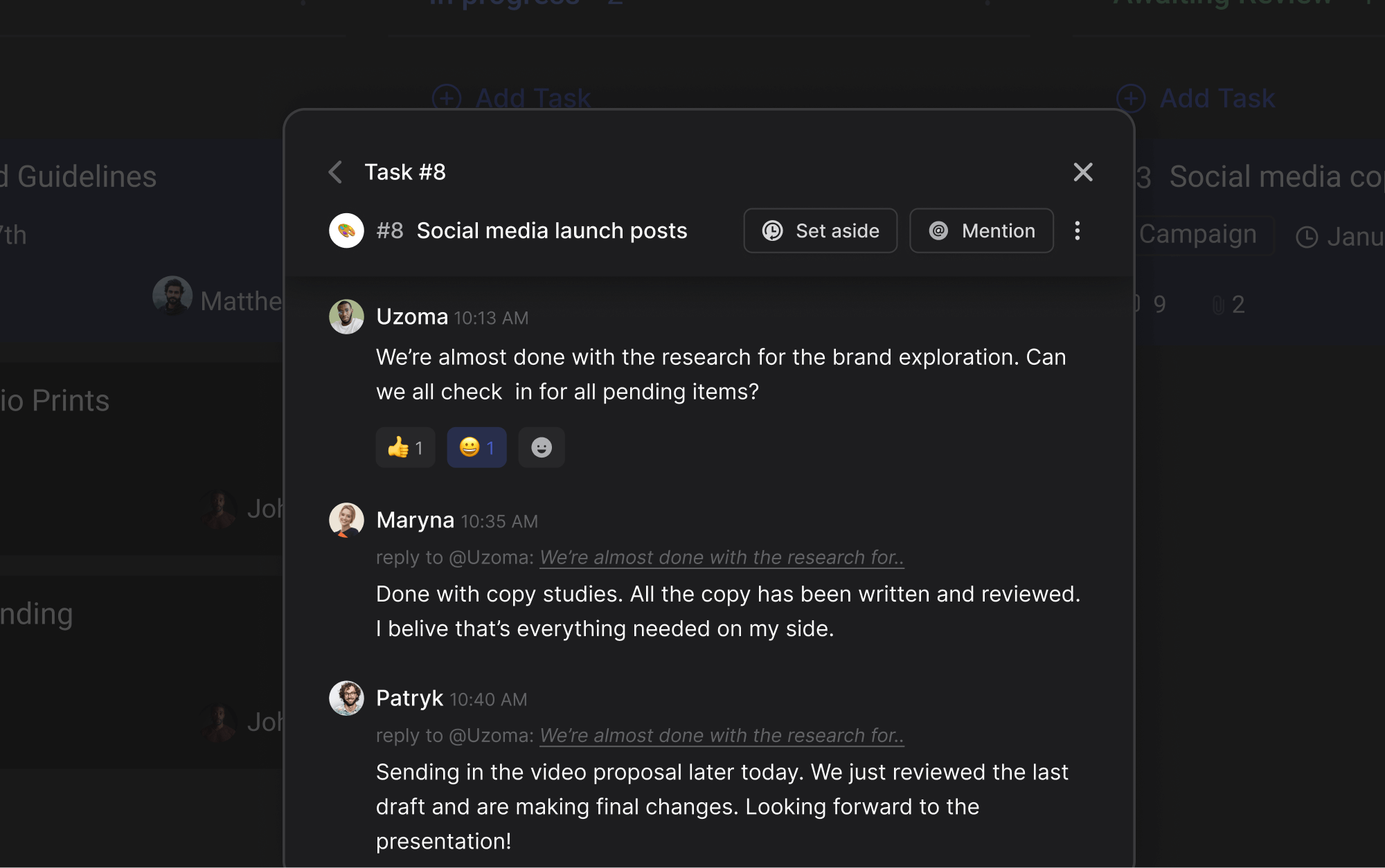
Most Notion alternatives swap one doc tool for another. Rock takes a different angle. Every project space includes its own chat, task board, notes, and file storage in one place. There is no separate messenger to bolt on.
Skip Rock if what you need is Notion-style docs, wikis, or databases. For a knowledge base or a custom database workspace, Coda, Slite, or Obsidian below will fit better.
Rock also connects to AI assistants like Claude and Cursor through a native MCP integration, plus an open API, so you can drive Rock from your AI tools and automate routine work. It is available on the free plan, not gated behind an upgrade.
For agencies and growing teams, the client collaboration model stands out. External clients and freelancers join spaces directly at no extra cost. They see the same chat, tasks, and notes the team sees. No guest seat fees, no permission workarounds. What we do at Rock: we run our own go-to-market work in Rock spaces where partners and contractors collaborate side by side with the core team.
The pricing is flat. $89 per month for unlimited users, spaces, and tasks. For a team of 15, that works out to under $6 per user. For 30 people, under $3. Per-seat tools like Notion get more expensive as you grow. Rock gets cheaper per head.
Pricing. Free plan with 3 group spaces, 50 tasks per space, 5 members per space. Unlimited plan: $89/mo flat for unlimited users.
Best for. Teams that want to stop paying for Notion plus Slack separately and need chat and tasks in one workspace.
Skip Rock if. You need Notion-style relational databases, deeply nested wiki pages, or formulas. Rock notes are simpler than Notion by design.
Paid: $89/mo flat, unlimited users
2. ClickUp - Best for deep project management
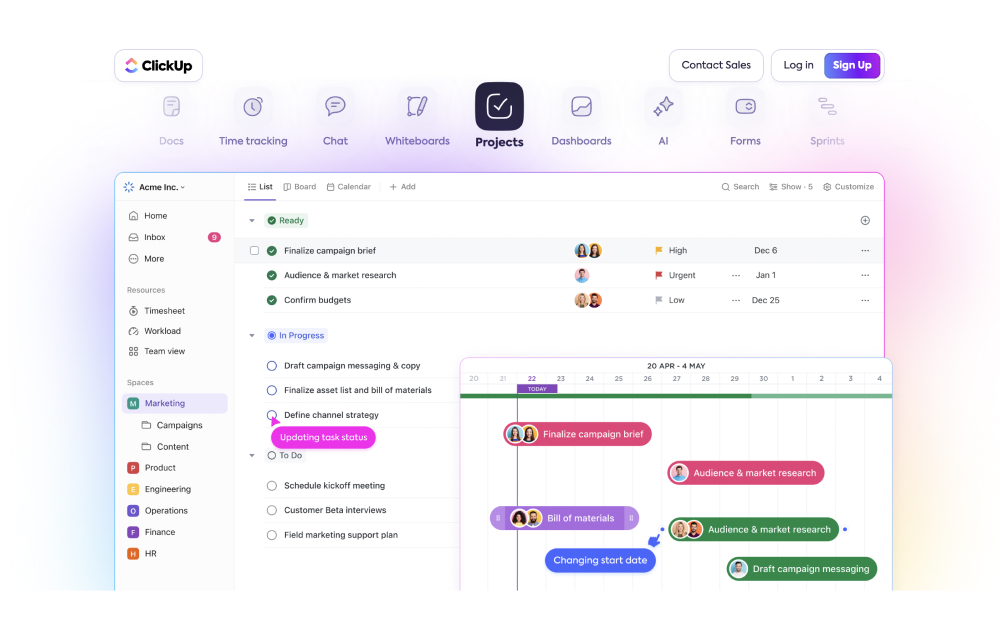
ClickUp is the closest answer to Notion's biggest weakness: real project management. Gantt charts, workload views, time tracking, dependencies, custom fields, and dashboards come built in. Notion can mimic some of this with templates, but ClickUp delivers it without the setup.
The trade-off is a steep learning curve. ClickUp tries to be everything: tasks, docs, whiteboards, goals, chat, and forms. Setting it up takes hours, not minutes. Teams that pick ClickUp for the depth often complain about the breadth.
For teams leaving Notion mainly because PM features are weak, ClickUp covers the gap well. For teams leaving Notion because it is too complex, ClickUp will feel worse.
Pricing. Free plan with 100MB storage. Unlimited: $7/user/mo. Business: $12/user/mo.
Best for. Operations and PM-heavy teams that want one tool for tasks, docs, and reporting. See what ClickUp does well for the full picture.
Skip ClickUp if. Notion already felt overwhelming. ClickUp packs more, not less, into the interface.
Paid: $7/user/mo
3. Coda - Best for keeping the database power
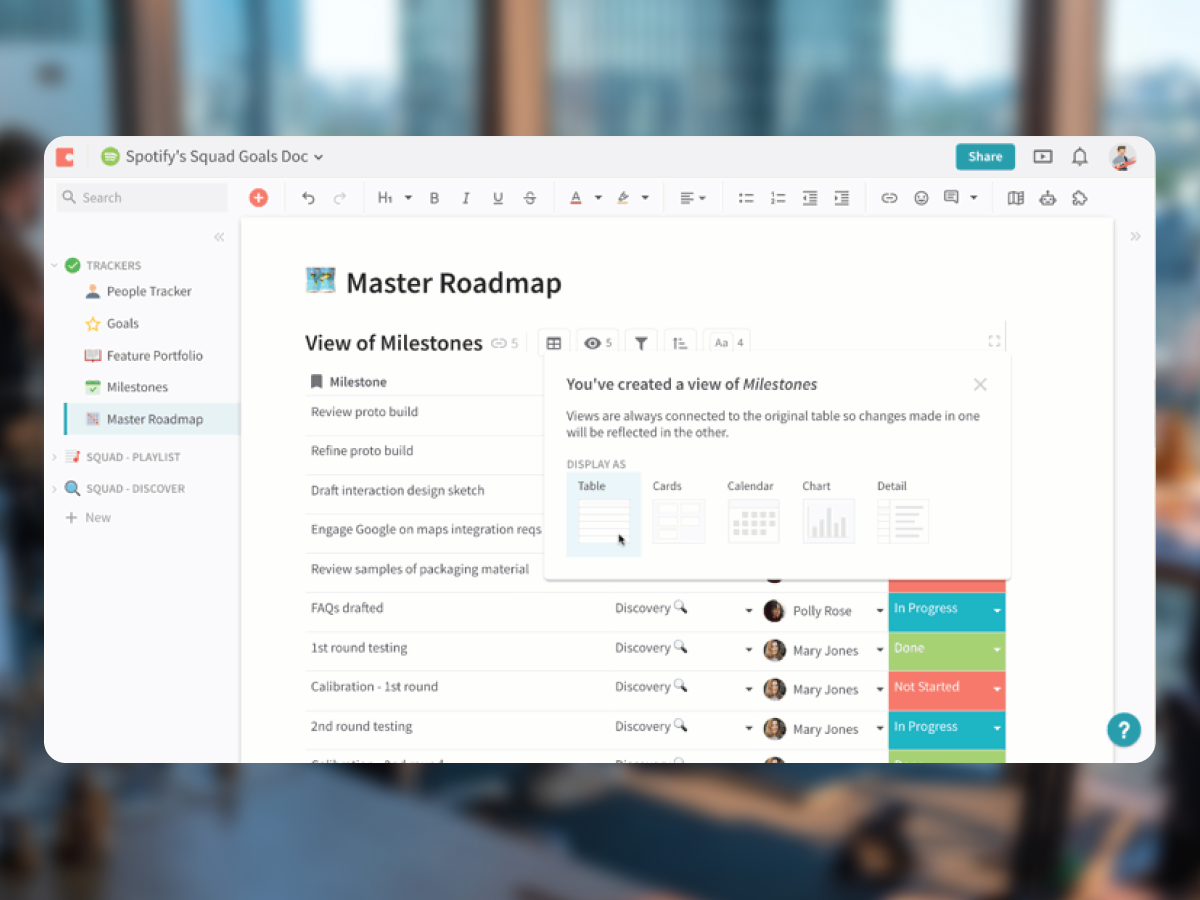
If you are leaving Notion but want to keep the page-and-database flexibility, Coda is the closest one-to-one match. Pages, tables, formulas, and a strong Pack ecosystem (its term for integrations) cover most of what makes Notion useful.
Coda goes further than Notion in two areas. Two-way sync with tools like Jira, Salesforce, and Google Calendar is built in. And formulas feel more powerful, with logic that mirrors spreadsheet thinking rather than database queries.
The downsides are familiar: Coda has its own learning curve, and pricing climbs with seats just like Notion. Teams using it tend to be ops-heavy, with one or two power users building docs that the rest of the team consumes.
Pricing. Free plan with limited Doc size. Pro: $10/user/mo. Team: $30/user/mo.
Best for. Teams that loved Notion's database flexibility and want a more polished version of the same idea, with strong external integrations.
Skip Coda if. You are leaving Notion because of complexity. Coda is not simpler.
Paid: $10/user/mo
4. Microsoft Loop - Best if you are already on Microsoft 365
Microsoft Loop is Microsoft's answer to Notion. Loop components live across Outlook, Teams, and Word, so a table or task list updates wherever it appears. For teams already paying for Microsoft 365, Loop is included with most Business plans at no extra cost.
The product is younger than Notion. Some templates and workspace features are still rolling out, and the offline experience is uneven. But for organizations standardizing on Microsoft, Loop avoids the licensing conversation.
The integration angle is the real value. Mentioning a teammate in a Loop component pings them in Teams. A task in Loop appears in their Microsoft To Do. The pieces work together by default.
Pricing. Included with Microsoft 365 Business Basic ($6/user/mo) and above.
Best for. Teams already on Microsoft 365 that want the Notion experience without paying for a second tool.
Skip Loop if. You are not on Microsoft 365 already, or you need a deep template ecosystem and large user community.
Paid: From $6/user/mo (M365)
5. Obsidian - Best for personal knowledge management
Obsidian is local-first by design. Your notes live as Markdown files on your machine, not on a vendor server. That makes Obsidian the strongest pick for users who want full ownership of their notes, offline access, and zero vendor lock-in.
The plugin ecosystem is huge. Graph view, daily notes, kanban boards, calendar integration, and AI assistants are all available as community plugins. Power users build elaborate personal knowledge systems with backlinks and graph visualizations.
Team collaboration is the weak spot. Obsidian Sync ($4/user/mo) adds shared vaults, but real-time co-editing is not the same as Notion or Google Docs. For solo work and pair-sized teams, it shines. For larger groups, it struggles.
Pricing. Free for personal use. Sync: $4/user/mo. Commercial use: $50/user/yr.
Best for. Researchers, writers, and individuals who want offline notes, full file ownership, and a deep plugin ecosystem.
Skip Obsidian if. Your team needs real-time collaboration, structured project management, or built-in chat.
Paid: $50/user/yr (commercial)
6. Slite - Best for company wiki and async docs
Slite strips Notion down to its core wiki use case. Docs, channels, and a clean editor. No databases, no relations, no formulas. The lack of features is the point.
Where Slite earns its place is search and AI. Cross-doc search is fast and works well across long-running knowledge bases. The Ask AI feature pulls answers from your wiki and cites the source doc, which helps onboard new hires without sending them a list of links.
For teams whose Notion use was 80 percent docs and 20 percent everything else, Slite removes the noise. Teams that built complex Notion workflows will find it limiting.
Pricing. Free plan with limited members and docs. Standard: $8/user/mo. Premium: $12.50/user/mo.
Best for. Teams that want a focused company wiki with strong search and an AI assistant that cites internal docs.
Skip Slite if. You need databases, project tracking, or any structured data beyond plain pages.
Paid: $8/user/mo
7. Nuclino - Best for fast lightweight team wiki
Nuclino looks like Slite's cousin. Both are wiki-first, both strip Notion down to docs. Where Nuclino stands out is speed. The interface is fast, the page tree is clean, and there is a graph view that mirrors Notion's relation feature without the setup.
Nuclino also includes a basic Kanban board view, which Slite does not. So small teams that want a wiki with light task tracking can run both inside one tool.
Pricing is the most aggressive in this category, starting at $5 per user per month. For a 10-person team that just wants a clean knowledge base, Nuclino delivers without the Notion overhead.
Pricing. Free plan with 50 items. Standard: $5/user/mo. Premium: $10/user/mo.
Best for. Small to mid-sized teams that want a fast company wiki at a low per-seat price.
Skip Nuclino if. You need real-time chat, formal project management, or external client collaboration.
Paid: $5/user/mo
8. Monday.com - Best for visual project workflows
Monday.com is the strongest pick if Notion's tasks felt thin. Color-coded boards, timelines, Gantt charts, and an automation builder come built in. Templates cover marketing campaigns, sprint planning, CRM pipelines, and client portals.
The AI features added in 2025 (board automations, sentiment analysis on comments, workflow suggestions) keep the platform competitive with newer entrants. For visual thinkers, Monday clicks faster than Notion.
The cost is the catch. The $12 per user per month standard tier requires a minimum of three seats, and several useful features sit on the Pro tier at $20 per user. A 20-person team pays $240 per month before hitting any feature caps.
Pricing. Free plan with 2 seats. Standard: $12/user/mo. Pro: $20/user/mo.
Best for. Visual project teams that want boards, timelines, and automations without building them from scratch.
Skip Monday if. You are a small team watching costs, or you need built-in chat and document collaboration.

Paid: $12/user/mo
9. Asana - Best for traditional task-focused PM
Asana is a structured task and project management tool, period. No databases, no docs the way Notion has them, no chat. If you are leaving Notion because you want a real PM tool with portfolio views and reporting, Asana fits.
Cross-project visibility is the standout feature. Portfolio views, workload management, and goal tracking sit at the top of the hierarchy. Useful when one person owns 5 projects and needs to see the whole picture.
The cost grows quickly. The Starter tier at $13.49 per user per month gates timelines and custom fields. A 20-person team on Starter pays $269 per month. Most growing teams end up on Advanced ($30.49 per user) within a year.
Pricing. Free plan with basic features. Starter: $13.49/user/mo. Advanced: $30.49/user/mo.
Best for. Teams that want focused project management with portfolio views and goal tracking. See our full Asana alternatives breakdown, or our head-to-head Asana vs Notion, if Asana itself is on your shortlist.
Skip Asana if. You need built-in docs, chat, or client-facing collaboration. Asana stops at tasks.
Paid: $13.49/user/mo
10. Confluence - Best for engineering teams in the Atlassian stack
Confluence is the wiki half of the Atlassian stack. If your team already runs on Jira, Confluence is the path of least resistance for documentation. Pages, spaces, and templates cover most of what Notion offers without paying for a second platform.
The integration with Jira is the real reason teams stay. Linking a Confluence page to a Jira ticket is one click. Embedding Jira issue lists in a Confluence doc takes seconds. For software teams, this is hard to beat.
Outside engineering, Confluence feels heavy. The interface is dense, the editor is less polished than Notion or Slite, and standalone use (without Jira) makes less sense.
Pricing. Free plan for up to 10 users. Standard: $5.16/user/mo. Premium: $9.73/user/mo.
Best for. Software and engineering teams already on Jira that want their wiki next door.
Skip Confluence if. You are not in the Atlassian ecosystem. Confluence as a standalone wiki feels dated next to Slite or Nuclino.
Paid: $5.16/user/mo
11. Airtable - Best for database-heavy ops workflows
Airtable is a database that learned to act like a project tool. For teams whose Notion use centered on linked tables, content calendars, or CRM-style workflows, Airtable is more powerful and faster than Notion at the same job.
Views are the strength. Grid, Kanban, calendar, gallery, and timeline views work over the same data with one click. The automation builder triggers on record changes, time-based events, or external webhooks. The Interface Designer lets non-technical teammates use the data without seeing the raw tables.
Airtable is not a wiki, and it is not a doc tool. The learning curve is steeper than Notion for users who have never thought in databases. Pricing also climbs faster than expected on larger record sets.
Pricing. Free plan with limited records. Team: $20/user/mo. Business: $45/user/mo.
Best for. Operations and content teams that need real database tools with multiple views and automations.
Skip Airtable if. Your team writes more docs than tracks records. Airtable is a database first, doc tool second.
Paid: $10/user/mo
12. Trello - Best for simple Kanban without setup
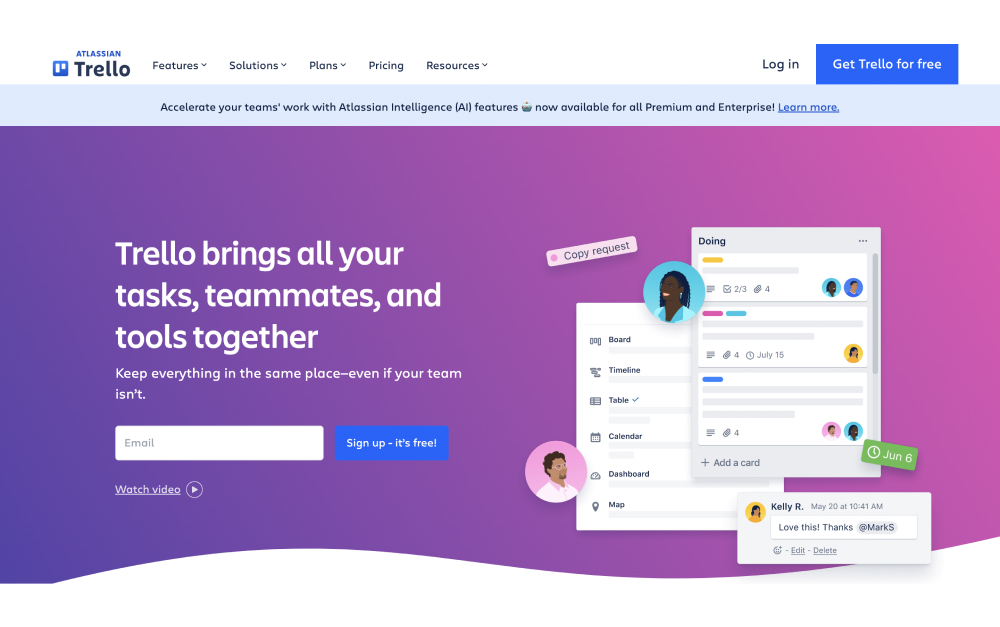
Trello goes the opposite direction from Notion. One concept, one view: cards on a board. Drag cards across columns, add checklists, attach files, set due dates. The interface is intuitive enough that new team members figure it out in minutes.
Power-Ups extend Trello with calendar views, voting, custom fields, and integrations. Free plans are limited to one Power-Up per board. Premium unlocks views like timeline and dashboard.
Trello is not trying to replace Notion's wiki side. It is the right pick for teams that built a Kanban inside Notion and never used the rest. Drop the doc baggage, keep the board.
Pricing. Free plan with unlimited boards and 1 Power-Up per board. Standard: $5/user/mo. Premium: $10/user/mo.
Best for. Small teams that want a simple visual task board without configuration. Compare to Trello alternatives if Trello itself comes up short.
Skip Trello if. You need formal project management, dependencies, or a wiki to go with the board.
Paid: $5/user/mo
13. Evernote - Best for solo notes and light tasks
Evernote is the elder of this list. It predates Notion and most of the tools here. Web clipping, document scanning, and personal note search are still the strongest features. Tasks were added in 2021 and now include due dates and reminders.
For solo users and freelancers who want a reliable note app with a long file history, Evernote is hard to beat. The OCR (text recognition inside images and PDFs) is among the best in the category.
Where Evernote falls short is team collaboration. Shared notebooks exist, but real-time co-editing and team admin features lag behind Notion and Slite. Pricing also feels high for what you get on the team tier.
Pricing. Free plan with limited notes. Personal: $14.99/user/mo. Professional: $17.99/user/mo. Teams: $24.99/user/mo.
Best for. Individuals and freelancers who want strong web clipping, OCR, and personal note management.
Skip Evernote if. You need real team collaboration, databases, or modern shared workspaces.

Paid: $14.99/user/mo
14. Capacities - Best for object-based modern PKM
Capacities is a newer entrant in the personal knowledge management category. Notes are tied to objects (people, projects, books, meetings) rather than free-form pages. The mental model is closer to a database than a doc tool, but lighter than Notion.
For users who tried Notion, gave up on managing nested pages, and want a more structured but still flexible system, Capacities is worth a look. Daily notes, calendar integration, and a clean editor make it a solid daily driver.
The trade-off is community size. Capacities has a smaller user base, fewer templates, and a smaller plugin ecosystem than Obsidian or Notion. Team features are still developing.
Pricing. Free plan with limited objects. Pro: $10/user/mo. Believer (annual prepay): $7.50/user/mo.
Best for. Solo PKM users who want object-based notes without building a full Notion system.
Skip Capacities if. You need team collaboration, established integrations, or a large template library.
Paid: $10/user/mo
15. Basecamp - Best for async PM with built-in messaging
Basecamp does what it has done since 2004: project management for async-first teams. Each project gets a message board, to-do lists, a schedule, a chat room, and file storage. That is it. No custom fields, no automations, no AI features.
The simplicity is the value. The message board format encourages thoughtful updates instead of rapid-fire chat. Hill Charts give a visual sense of progress without daily status updates. Clients can be added to projects with limited visibility.
Basecamp's flat pricing matters at scale. $299 per month for unlimited users (Pro tier) becomes cheaper than per-seat alternatives at around 20 people. Smaller teams pay $15 per user per month on the standard tier.
Pricing. Free plan with 1 project. Plus: $15/user/mo. Pro Unlimited: $299/mo flat.
Best for. Async-first teams that want simple project management with built-in messaging and flat pricing at larger sizes.
Skip Basecamp if. You need Kanban boards, automations, or detailed reporting across projects.
Paid: $15/user/mo or $299/mo flat
Tools we did not include (and why)
A few categories of Notion alternatives intentionally did not make this list. Each is fine for the right user, but pulls readers away from what most teams searching for an alternative actually need.
Open-source and self-hosted tools. AppFlowy, AFFiNE, Logseq, and Anytype are popular among privacy-focused users and developers. They require setup, self-hosting, or a steeper technical learning curve. If you are evaluating SaaS Notion alternatives, these are not direct swaps.
Niche PKM tools. Tana, Mem, Heptabase, and Scrintal each have strong followings inside the personal knowledge management community. They are powerful, but small user bases mean fewer integrations, slower updates, and limited support if your team adopts one.
SharePoint and OneNote. Microsoft's older doc tools serve different jobs. SharePoint is enterprise file management with a wiki layer. OneNote is a personal note app inside Office. Neither competes with Notion the way Microsoft Loop does.
Quip. Salesforce acquired Quip in 2016. The product still exists, but new development is slow, and Quip works best inside the Salesforce ecosystem. Outside it, the better option is one of the tools above.
Simpler than building it in Notion
Rock gives you tasks, notes, and chat out of the box. No setup project required.
How to choose the right Notion alternative
Start with why you are leaving Notion. The four most common reasons line up with different tools.
Pricing at scale. If your bill grew with the team, run the math at your current size. Flat-rate options like Rock and Basecamp Pro Unlimited overtake per-seat tools somewhere between 12 and 20 people. Below that size, per-seat pricing usually wins.
Complexity and setup time. If your team gave up because the workspace got messy, lean toward simpler tools. Slite, Trello, and Nuclino strip the feature surface back. Coda and ClickUp will feel as heavy as Notion.
Missing project management. If your team built tasks inside Notion and ran out of room, the answer is a real PM tool. ClickUp, Monday, and Asana cover this well. Each has a different angle: ClickUp for depth, Monday for visual workflows, Asana for portfolio reporting.
Want chat in the same place. If your team pairs Notion with Slack, Microsoft Teams, or WhatsApp, that stack costs money and time. Rock and Basecamp combine docs or tasks with built-in messaging. The consolidation argument matters more as the team grows.
Then think about who needs access. Agencies that bring clients into projects need tools built for external collaboration without per-seat fees. Internal-only teams have more flexibility on tool choice. Either way, picking the right setup also depends on your team's communication style.
"The ability to perform deep work is becoming increasingly rare at exactly the same time it is becoming increasingly valuable in our economy." - Cal Newport, Georgetown Professor, Author of Deep Work
The best Notion alternative is the one your team will actually use. Most of these tools offer a free plan or trial. Pick two or three from this list, run a real project through each for a week, and let the team vote. The recommender at the top of this page can narrow the starting point.
Which Notion alternative fits you
| If you want... | Best pick | Why |
|---|---|---|
| Chat-first team collaboration | Rock | chat and tasks in one, no setup project, flat pricing |
| Deep project management | ClickUp | deep project management with many views |
| Keeping the database power | Coda | Notion-style docs and databases with more power |
| Microsoft 365 teams | Microsoft Loop | lightweight co-creation inside Microsoft 365 |
| Personal knowledge management | Obsidian | local-first personal knowledge management |
| Company wiki and async docs | Slite | clean company wiki and async docs |
| Fast lightweight team wiki | Nuclino | fast, lightweight team wiki |
| Visual project workflows | Monday.com | visual, colorful project workflows |
| Traditional task-focused PM | Asana | structured task and project management |
| Engineering teams in Atlassian stack | Confluence | team wiki for the Atlassian stack |
| Database-heavy ops workflows | Airtable | database-first ops workflows |
| Simple Kanban without setup | Trello | Simple Kanban without setup |
| Solo notes and light tasks | Evernote | Solo notes and light tasks |
| Object-based modern PKM | Capacities | Object-based modern PKM |
| Async PM with built-in messaging | Basecamp | Async PM with built-in messaging |
What we recommend at Rock
We are not neutral about Rock. We use it every day to run our marketing, support, and product teams across time zones. So our perspective on Notion alternatives is shaped by what we have seen work and not work.
For most teams of 5 to 50 people that are leaving Notion because it does not include chat, Rock is the simplest swap. One workspace, one bill, no extra Slack tab. Clients and freelancers join spaces directly without a per-seat charge, which matters more for agencies than the headline pricing suggests.
Rock is not the right choice for everyone. If your work depends on Notion-style relational databases, formulas across linked tables, or wiki-grade nested pages, Rock notes will feel limited. Coda and Airtable handle that better. If you are a solo PKM user who wants offline-first Markdown, Obsidian is the clear pick.
"The key is not to prioritize what is on your schedule, but to schedule your priorities." - Stephen Covey, Author of The 7 Habits of Highly Effective People
If you want to test the chat-first model on real work, the free plan covers 3 group spaces with 5 members each. That is enough to run a project end to end with the team. Compare against your current Notion plus Slack monthly cost before deciding.
Want one workspace where chat, tasks, and notes live together? Rock combines all three with flat pricing for unlimited users. Get started for free.





