

Asana vs Monday (2026): Structured PM or Work OS?
Asana and Monday.com both want to run your team's work, but they approach the problem from opposite ends. Asana ships opinionated structure: projects, Goals, Portfolios, and dependencies designed around how work should flow. Monday.com ships rebrandable boards you configure yourself, which become a project tool, a CRM, a dev tracker, or anything else.
This guide picks based on your team size, your budget, and whether you want a PM tool that tells you how to structure work or one you structure yourself. Run the recommender below to see which way your answers lean, then read the sections that matter.
Asana, Monday, or something else?
Answer 4 questions. Takes 30 seconds.
1. What is the bigger priority?
2. How big is your team?
3. Do external people (clients, freelancers) need access?
4. What matters for pricing?
Start over
Quick answer. Asana and Monday.com both want to run your team's work, but from opposite ends. Pick Asana if you run structured projects and want opinionated structure: Goals, Portfolios, dependencies, OKR rollups, and AI Studio plus AI Teammates bundled on every paid plan. Its free plan covers up to 10 users. Pick Monday.com if you want a configurable Work OS with 15-plus views and the flexibility to reshape boards into a CRM, dev tracker, or service desk without leaving the platform. Choose Asana for structure handed to you, Monday for a workspace you shape yourself.
One pricing detail that should factor in. Both Asana and Monday now put their AI behind an extra add-on or credit system, on top of the per-user plan. If your team already pays for ChatGPT or Claude, you are often paying again for the same kind of model. The question is not which has AI. It is whether that AI is wired into your workflow enough to justify a second bill.
Asana vs Monday at a Glance
Here are the headline differences. The sections below unpack each one.
| Feature | Asana | Monday.com |
|---|---|---|
| Core purpose | Structured project management | Configurable Work OS |
| Ownership | Independent (NYSE: ASAN) | Independent (NASDAQ: MNDY) |
| Free plan | Up to 10 users | Up to 2 users, 3 boards |
| Paid entry | Starter: $10.99/user/mo | Basic: $9/user/mo (3-seat min) |
| Views | 5 native (list, board, timeline, calendar, workload) | 15+ (Kanban, Gantt, Chart, Workload, Map) |
| AI | AI Studio + AI Teammates bundled on all paid plans | AI Blocks, 500 free credits/mo all plans |
| Standout | Goals + Portfolios, OKR rollups | Rebrandable boards (Work Mgmt, CRM, Dev, Service) |
| Integrations | 270+ native | 200+ native |
| Best for | Teams running structured projects and OKRs | Teams needing cross-department configurable workflows |

Want chat with your project work?
Rock pairs messaging with tasks and notes. One flat price, unlimited users.
What Asana Is Really Built For
Asana launched in 2008 and went public on the NYSE in 2020. Dan Rogers took over as CEO in July 2025, with founder Dustin Moskovitz moving to chairman. The product is a polished work management platform with a clear opinion about how projects, goals, and teams should connect.
Every project supports five native views (list, board, timeline, calendar, workload) on the same underlying data. Tasks carry dependencies, custom fields, and multi-homing (one task in multiple projects). Workflow Builder handles conditional logic automations.
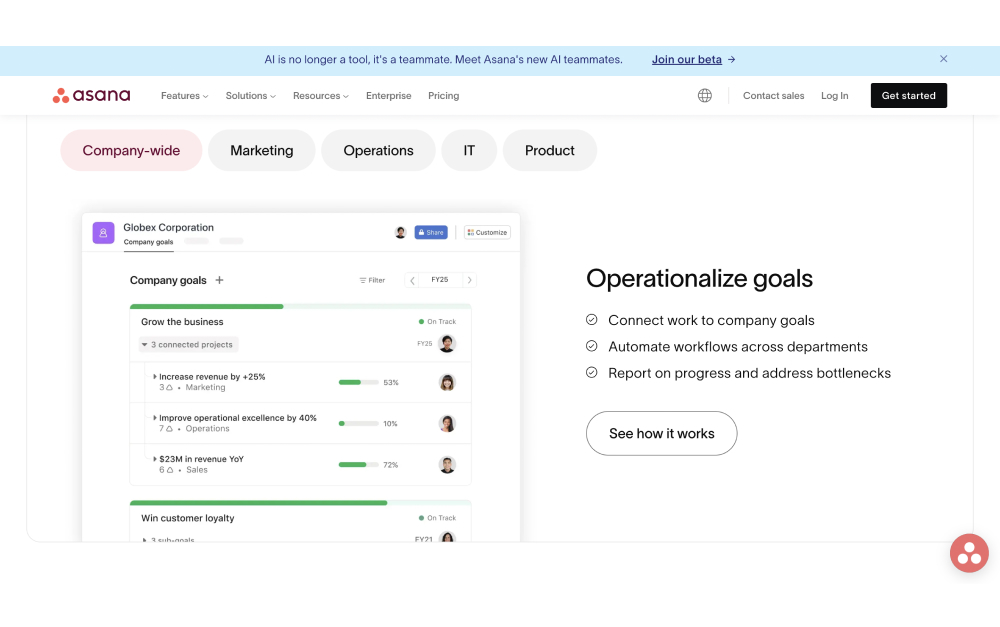
The standout feature is Goals and Portfolios. Asana has one of the most polished OKR frameworks in the category. Company, team, and individual goals connect to contributing work and auto-update as tasks complete. Portfolios give executives a clean rollup across dozens of projects.
"Autonomy is the wrong goal. The future is not humans or AI. It is humans and AI, collaborating with the right workflow context." - Dan Rogers, CEO of Asana
In September 2025 Asana launched AI Teammates, persistent-memory agents that can work alongside humans on specific projects. They are bundled in every paid plan alongside AI Studio, which matters at scale when per-seat AI add-ons start compounding.
What Monday Is Really Built For
Monday.com launched in 2012 as daPulse and rebranded in 2017. It is independent (NASDAQ: MNDY) and co-led by founders Roy Mann and Eran Zinman. FY2024 revenue passed $972 million, driven by a product strategy most competitors do not run: a multi-product Work OS.
The core is a configurable board. Columns represent any data type (text, status, person, date, formula, automation). Boards become project trackers, CRMs, dev pipelines, recruiting funnels, or service tickets depending on how you set them up. Monday ships dedicated products for Work Management, CRM, Dev, and Service, all running on the same engine.
The AI layer is AI Blocks, which bundles into every plan with 500 free monthly credits. Blocks handle sentiment analysis on incoming text, extract structured data from unstructured notes, translate, and summarize. The philosophy is no-code: drop a block into a workflow, configure inputs, done.

Structured PM vs Work OS: the Real Trade-off
Every Asana vs Monday comparison lists features. The decision lives one level deeper: do you want a tool that models how work should be structured, or a tool you structure yourself?
Asana's opinionated model is an advantage when your team needs structure imposed. Projects have tasks. Tasks have subtasks and dependencies. Goals roll up from work. The framework is there before you start. That speeds adoption, especially for teams that struggle to self-organize.
Monday is the opposite. Boards are a blank canvas. Columns are whatever you want them to be. That flexibility is powerful for cross-department use (marketing, ops, and sales on the same platform), but the trade-off is that every team has to decide how to structure its board before the tool becomes useful. Teams that like frameworks often find Monday's flexibility overwhelming.
"We never sought control. We do not dictate from the top. We allow people to take the lead and express themselves." - Eran Zinman, Co-CEO of Monday.com
Harvard Business Review tracks the hidden cost of tool sprawl: knowledge workers switch between apps and windows around 1,200 times a day. A Work OS like Monday wins here if your alternative is three separate tools. A structured PM tool like Asana wins if you already know what framework you want to run.
AI and Automation
Both platforms bundle AI. The difference is philosophy.
Asana AI Studio includes AI Teammates, which are goal-aware agents with persistent memory. They work inside a specific project, remember past context, and can take ownership of recurring work like status updates, research, and triage. Dan Rogers has positioned them as collaborators, not autonomous agents. The focus is human plus AI, not AI-only.
Monday AI Blocks are practical and no-code. Drop a sentiment block on an incoming feedback column and it tags each row. Drop a summarize block on long descriptions and it generates a one-line summary. Every plan gets 500 monthly credits included, so most small teams never hit a cap.
Workflow automation is close between the two. Asana's Workflow Builder handles conditional logic and multi-step approvals. Monday's automations are simpler to set up but hit walls on complex conditions. For non-technical ops teams Monday's interface usually wins. For teams with formal approval chains, Asana wins.
Pricing in 2026
Monday looks cheaper at the entry tier, but the 3-seat minimum and tier gating change the math quickly. Here are the paid plans both vendors sell today:
| Tier | Asana | Monday |
|---|---|---|
| Free | Personal ($0, up to 10 users) | Free ($0, 2 users, 3 boards) |
| Entry | Starter ($10.99/user/mo) | Basic ($9/user/mo, 3-seat min) |
| Mid | Covered in Starter | Standard ($12/user/mo) |
| Top | Advanced ($24.99/user/mo, Goals + Portfolios) | Pro ($19/user/mo, private boards) |
At 15 users, Monday Standard runs $180 per month ($2,160 annual). Asana Starter lands at $165 per month ($1,978 annual). Roughly even. The gap opens at Asana Advanced ($375 per month) because Goals and Portfolios only unlock at that tier. If OKRs are the reason you are buying, Asana Advanced with bundled AI still beats Monday Pro plus any per-seat AI surcharges. If you just want boards and automations, Monday Standard does more for less.
Views and Scale
Both platforms handle scale, but with different ceilings.
Asana caps at 250,000 tasks per workspace on Advanced. Views are consistent: every project supports the same five native views, which makes training and onboarding straightforward.
Monday's MondayDB 2.0, rolled out through 2025, pushed item limits 10x higher and dashboard capacity 25x higher than the old architecture. That matters for teams running a CRM or a Dev tracker at real volume inside Monday. Views cover Kanban, Gantt, Chart, Workload, Map, and Calendar, with visual customization per board.
For teams with simple projects and under 50 users, either platform handles the load easily. Differences emerge when you get to 100 plus users, or when you use Monday as a CRM at tens of thousands of contacts. At those volumes Monday's DB rebuild makes it the more battle-tested option.
When to Pick Asana
Asana is the right pick when:
You run structured projects with dependencies. Engineering, product, and marketing teams that work in defined phases benefit from Asana's opinionated project model. Setup friction is lower than Monday because the structure is decided for you.
OKRs and portfolios matter. Asana's Goals feature is the best in its price tier. Company goals connect to team goals connect to project work, and Portfolios give executives clean rollups. If you run quarterly OKRs, Asana Advanced earns its price.
AI bundled in the base price matters. AI Studio and AI Teammates are included on every paid plan, starting from Starter at $10.99. Teams that want AI without surcharges should default to Asana.
Your team size is under 10. Asana's free plan supports 10 users with real features. Monday's free plan is effectively single-user.
Skip Asana if you want flexibility to run multiple workflow types (CRM, Dev, Service) inside one platform, or if your ops culture pushes back on predefined frameworks.
When to Pick Monday
Monday is the right pick when:
You need a cross-department platform. Monday's Work Management, CRM, Dev, and Service modules let marketing, sales, engineering, and support all work in the same platform with shared data. One bill, one login, four products.
Flexibility matters more than structure. Teams that resist predefined frameworks and want to shape their own workflows usually prefer Monday's blank-canvas boards. Operations and client services teams often fit here.
You want a visual dashboard experience. Monday's dashboards, charts, and customizable columns are more visually configurable than Asana's. Teams with executives who want custom reporting surfaces appreciate the flexibility.
You need CRM or Dev as a first-class product. Asana is a PM tool. Monday ships dedicated CRM and Dev products on the same engine. If you are evaluating tools for multiple use cases, Monday's range is harder to match.
Skip Monday if your team wants frameworks decided for them, or if OKRs and executive Portfolios are a core requirement.
Yes — that is exactly Rock.
Chat, tasks, and notes in one workspace. Built for client work, free for small teams.
What If You Also Need Chat?
Neither Asana nor Monday does team chat well. For the doc-side angle on Monday, see our Monday vs Notion head-to-head. Asana has no native chat. Monday has comments on each item but no real-time group messaging. Most teams pair one of these tools with Slack or Teams, which adds per-seat cost and another place to check.
If chat and tasks together is actually what you need, tools built around that combination exist. Rock charges a flat $89 per month for unlimited users and keeps messaging, tasks, notes, and files in one workspace. At a team of 15 it works out to about $6 per person. Clients and freelancers join at no extra cost, which matters if your workflow involves external collaborators.
Want one workspace for chat, tasks, notes, and files? Rock combines them all for $89 flat per month, unlimited users. Get started for free.

Related Reading
Still deciding? A few cluster reads cover the adjacent questions:
Direct Rock comparisons. See Rock vs Asana and Rock vs Monday.
What is Asana and what is Monday explain each tool in depth. Asana alternatives and Monday alternatives show the broader field. For other head-to-heads see ClickUp vs Asana, ClickUp vs Monday, Asana vs Trello, ClickUp vs Trello, and Trello vs Monday. For a full category view, see the best task management apps.
Asana and Monday solve the same problem from different angles. Asana is built around the plan, the timeline, and the steps to get there. Monday is built around the board, with tables, color, and structure you configure to taste. Both reward a team that will maintain them. Pick the one whose mental model your team already lives in.





