

ClickUp vs Asana (2026): Depth or Clarity?
ClickUp and Asana solve project management problems with opposite philosophies. ClickUp bets on consolidation: tasks, docs, whiteboards, chat, goals, and time tracking in one workspace, at a price most competitors cannot match. Asana bets on clarity: a polished, opinionated experience with deep Goals and portfolios that scales without a steep learning curve.
This guide covers what each tool is really built for and where the 2026 AI pricing differs materially. It also covers the performance gap most comparisons gloss over, and when picking one over the other actually makes sense. No marketing spin.
ClickUp, Asana, or something else?
Answer 4 questions. Takes 30 seconds.
1. What is the bigger priority?
2. How big is your team?
3. Do external people (clients, freelancers) need access?
4. What matters for pricing?
Start over
ClickUp vs Asana: Quick Comparison (2026)
Here is the side-by-side before we go deeper.
| Feature | ClickUp | Asana |
|---|---|---|
| Core purpose | All-in-one consolidation | Polished structured PM |
| Free plan | Unlimited tasks, unlimited members | Up to 2 users |
| Paid entry | Unlimited: $7/user/mo | Starter: $10.99/user/mo |
| Views | 15+ (list, board, Gantt, mind map, etc.) | 5 native (list, board, timeline, calendar, workload) |
| AI pricing | Brain +$9 or Everything AI +$28 per user | AI Studio bundled in every paid plan |
| Time tracking | Native on all paid plans | Advanced tier only ($24.99/user) |
| Goals and portfolios | Goals (Business+) | Strong Goals + Portfolios (Advanced) |
| Setup time | 2-3 weeks structured onboarding | Days to productivity |
| Performance | Legacy slowness complaints; 4.0 improved | Fast, reliable at scale |

Want chat with your PM work?
Rock pairs messaging with tasks and notes. One flat price, unlimited users.
Worth weighing before you pick. ClickUp and Asana both charge for their AI separately, as an add-on or credit pack on top of the per-user price. If you already pay for ChatGPT or Claude, that is a second charge for a similar model. Judge it on whether the AI is genuinely tied into the work, not on the feature list. Otherwise it is just your bill going up.
What ClickUp Is Really Built For
ClickUp launched in 2017 and is still privately held. It crossed $300M in annualized revenue in early 2026, hired a six-person executive bench widely read as IPO prep, and ships as the broadest all-in-one PM tool on the market.
Within one workspace you get 15+ views (list, board, Gantt, calendar, mind map, timeline, workload), Docs, Whiteboards, Forms, ClickUp Chat, Goals, time tracking, and dashboards. Task hierarchies run five levels deep, tasks carry custom fields and dependencies, and Butler-style automations fire on status changes.
The pitch is tool consolidation: one ClickUp seat replaces three to five separate SaaS subscriptions. For teams willing to invest two to three weeks in setup, the math works. For teams that will not or cannot invest that setup time, ClickUp can feel like a fire hose pointed at a houseplant.

What Asana Is Really Built For
Asana launched in 2008, went public on the NYSE in 2020, and now serves more than 170,000 customers. Dan Rogers took over as CEO in July 2025 after Dustin Moskovitz retired. The product is a polished work management platform with a distinct opinion: structured projects, strong Goals, and executive portfolios.
Every project supports five native views (list, board, timeline, calendar, workload) on the same data. Tasks carry dependencies, custom fields, and multi-homing (one task in multiple projects). Workflow Builder handles no-code automations with conditional logic.
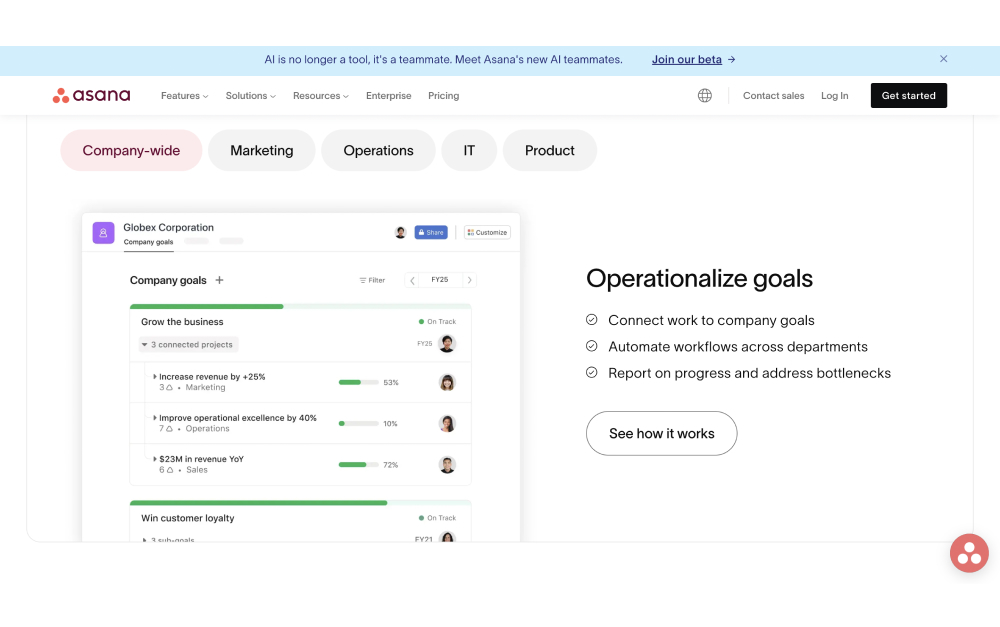
The standout feature in 2026 is Goals. Asana has one of the most polished OKR frameworks in the category, with company, team, and individual goals that connect to contributing work and auto-update as tasks complete. Portfolios give executives a clean rollup across dozens of projects. For companies running quarterly OKRs, Asana's Goals are harder to match.
Depth vs Clarity: the Real Trade-off
Every ClickUp vs Asana comparison eventually lands on the same axis: how much complexity can your team absorb?
ClickUp rewards investment. A team that spends two or three weeks setting up spaces, templates, automations, and custom fields ends up with a tool that replaces three other subscriptions. A team that does not end up with a complicated tool that is underused, which is worse than a simpler tool that is fully used.
Asana is the opposite philosophy. The product is opinionated about how work should flow, which means less configuration but also less flexibility. Teams adopt it faster because there are fewer decisions to make. The price of that speed is that very custom workflows hit walls Asana will not bend around.
The honest framing: if your team is willing to invest in a tool and wants to stop paying for five others, ClickUp. If your team wants to be productive next week with clean Goals and portfolios, Asana.
"Our mission from day one has always been to save time. Time really is our only finite resource." - Zeb Evans, Founder and CEO, ClickUp
AI and Automation
AI pricing is the biggest honest gap most comparisons miss.
Asana bundles AI Studio into every paid plan, including Starter. You get credit-metered agents that summarize updates, draft status reports, and route work automatically. It is included, not an add-on.
ClickUp charges extra for AI on top of every base plan, including Enterprise. Brain is $9 per user per month for summaries and writing. Everything AI is $28 per user per month for the AI Notetaker, image generation, and larger credit pools. A 25-person team on ClickUp Business plus Everything AI pays roughly $1,000 per month before hitting Enterprise features.
Automation without AI is closer. ClickUp's Automations fire on status changes, due dates, and custom field edits. Asana's Workflow Builder handles conditional logic, multi-step approvals, and Forms that route to the right person based on field values. Both are capable. For non-technical ops teams, Asana's interface is more approachable.
Pricing in 2026
On paper, ClickUp looks cheaper. In practice, AI is the wildcard.
ClickUp Free Forever: $0. Unlimited tasks, unlimited members, 100 MB storage.
ClickUp Unlimited: $7 per user per month (annual). Most storage, Gantt, resource management.
ClickUp Business: $12 per user per month (annual). Advanced dashboards, private docs, workload.
ClickUp AI add-ons: Brain +$9 per user per month, or Everything AI +$28 per user per month.
Asana Personal: Free for up to 2 users.
Asana Starter: $10.99 per user per month (annual). Unlimited users, timeline, Workflow Builder, AI Studio Basic bundled.
Asana Advanced: $24.99 per user per month (annual). Goals, Portfolios, workload, time tracking, approvals.
At 25 users, ClickUp Unlimited is $2,100 per year. Asana Starter is $3,297 per year. ClickUp wins. Add Brain AI ($9/user), and ClickUp jumps to $4,800 per year, which is more than Asana Starter with AI bundled. Add Everything AI ($28/user), and ClickUp lands at $10,500 per year. Asana Advanced with everything unlocked is $7,500.
Performance and Setup Time
Performance is the less-talked-about trade-off. Large ClickUp workspaces can feel slow. Dashboards take longer to load. View switching lags on complex lists. ClickUp's own public feedback board has long-running threads on this. ClickUp 4.0 (December 2025) improved things, but the legacy matters if you value platform stability.
Asana has the opposite reputation. G2 reviewers consistently cite fast loading, clean view transitions, and reliability at scale. For teams that open the PM tool dozens of times a day, that accumulated friction difference is real.
Setup time follows the same pattern. ZenPilot, an implementation agency that has run 200+ ClickUp migrations, reports two to three weeks for structured onboarding. Asana teams are usually productive in days. The trade-off is whether the end-state workflow justifies the ramp.
"The high-level goal of No Meeting Wednesdays is to ensure that everyone gets a large block of time each week to do focused, heads-down work." - Dustin Moskovitz, Asana co-founder, Tim Ferriss Show
Best for: When to Pick ClickUp
Pick ClickUp if: you want one platform to replace three to five others, and your team has capacity to invest in setup. It also fits teams that need native time tracking, deep customization, a genuinely usable free tier, or multiple views beyond what Asana offers.
Skip ClickUp if: your team is small and just needs tasks, you have been burned by tool migrations, or AI is a must-have. The AI add-on math gets painful quickly. Skip it too if performance matters and you have seen ClickUp's legacy slowness complaints.
Best for: When to Pick Asana
Pick Asana if: your executives want Portfolio rollups and OKR tracking. It also fits when your team values adoption speed over configuration depth, or your workflow fits structured projects with dependencies. Asana AI is bundled, which is a real budget advantage.
Skip Asana if: your workflow is simple Kanban (Trello fits better), or your team is a lean 2 to 10 that just needs tasks and a shared doc. Skip it too if you need extreme customization that Asana's opinionated model will not flex around.
Yes — that is exactly Rock.
Chat, tasks, and notes in one workspace. Free for small teams.
What If You Also Need Chat?
ClickUp and Asana are both task-first. For the doc-side angle on ClickUp, see our Notion vs ClickUp head-to-head. ClickUp has a built-in Chat feature, but it has been rebuilt multiple times (relaunched September 2024, overhauled again in 4.0). Asana has no native chat at all. Most teams pair either tool with Slack, Teams, or Discord and accept paying for both.
If chat and tasks are equally important, a workspace built with both as first-class features fits better than stitching two tools together. Rock is one option. Each project space has chat, a task board, notes, and files in one view. Messages turn into tasks in one click. Pricing is flat at $89 per month for unlimited users, and clients join shared spaces at no extra cost.
What we do at Rock: we run every client project in one shared space with chat and tasks together. A message becomes a task without leaving the conversation. No context-switching between a chat app and a PM tool.
Related Reading
If this comparison narrowed your shortlist but did not close it, a few cluster reads cover the adjacent questions.
Go deeper. Our honest ClickUp review and honest Asana review cover each tool in depth.
More alternatives. See our ClickUp alternatives or Asana alternatives for broader options.
Other PM head-to-heads. The ClickUp vs Monday, Asana vs Trello, ClickUp vs Trello, Asana vs Monday, and Trello vs Monday head-to-heads cover adjacent PM decisions.
Slack vs ClickUp. The Slack vs ClickUp head-to-head covers chat-first vs work-first trade-offs.
Direct Rock comparisons. See Rock vs ClickUp and Rock vs Asana.
All task management options. The best task management apps post walks through 10 tools.
If you want my honest read: picking a PM tool is really about how much complexity your team can absorb. ClickUp rewards investment. Asana rewards adoption. Neither is better. They serve different tolerances.
If you are weighing ClickUp and Asana but want chat and tasks in one workspace, Rock bundles them. One flat price, unlimited users. Get started for free.





