

Asana vs Trello (2026): Simple Kanban or Full PM?
Asana and Trello solve project management problems from opposite ends. Trello is the simplest card-and-board tool on the market. Asana is a structured work platform with dependencies, timelines, Goals, and portfolios. Most comparisons treat them like the same thing at different scales. They are not.
This guide covers what each tool is really built for, where the 2026 pricing and AI stories diverge, and when picking simple Kanban beats picking full PM depth. No marketing spin.
Asana, Trello, or something else?
Answer 4 questions. Takes 30 seconds.
1. What is the bigger need?
2. How big is your team?
3. Do external people (clients, freelancers) need access?
4. What matters for pricing?
Start over
Asana vs Trello: Quick Comparison (2026)
Here is the side-by-side before we go deeper.
| Feature | Asana | Trello |
|---|---|---|
| Core purpose | Structured work management | Simple Kanban boards |
| Free plan | Up to 2 users | Unlimited users, 10 boards |
| Paid entry | Starter: $10.99/user/mo | Standard: $5/user/mo |
| Views | List, board, timeline, calendar, workload | Board (timeline and calendar on Premium) |
| Dependencies | Native | Via Power-Up only |
| Goals and portfolios | Advanced tier and up | Not available |
| Automation | Workflow Builder (no-code) | Butler (no-code, natural language) |
| AI | AI Studio (agents, summaries, routing) | Light AI writing help |
| Best for | Teams of 20+, complex projects, reporting | Simple Kanban, Atlassian stack, solo to small teams |

Want chat with your task management?
Rock combines messaging with tasks and notes. One flat price, unlimited users.
What Asana Is Really Built For
Asana launched in 2008, IPO'd on the NYSE in 2020, and now serves more than 170,000 customers. Dustin Moskovitz retired as CEO in July 2025 and Dan Rogers took over. The product is a full work management platform, not just a task app.
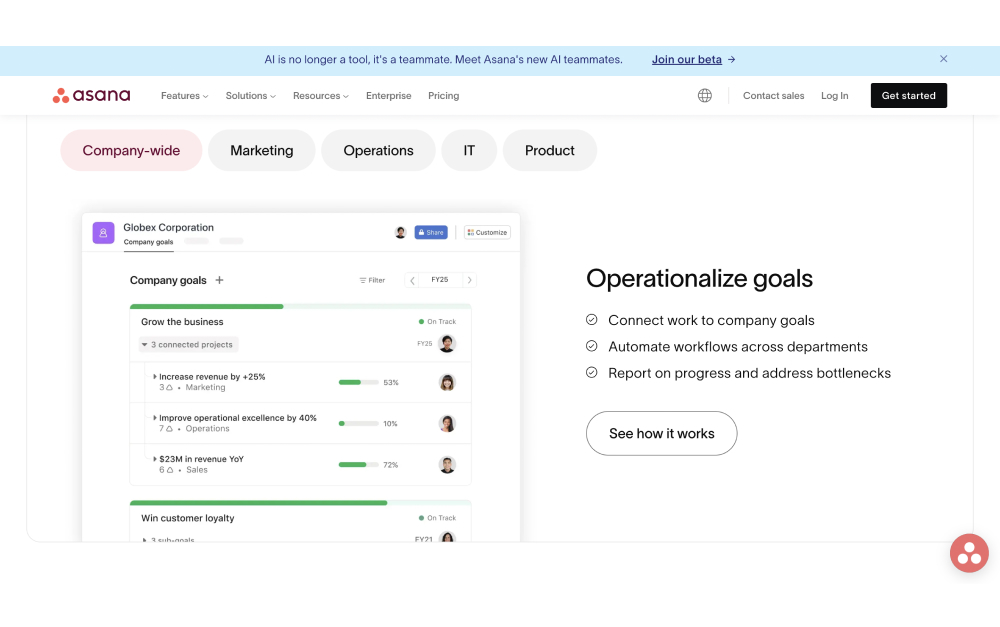
At its core, Asana tracks work as tasks inside projects. Each task carries subtasks, assignees, due dates, custom fields, and dependencies. Projects roll up into portfolios for executive visibility. Goals link company OKRs to the tasks that move them.
The standout feature set is view flexibility. Any project can be displayed as a list, Kanban board, timeline (Gantt), calendar, or workload chart on the same data. Workflow Builder handles no-code automations. Asana AI Studio, which reached general availability on paid plans in mid-2025, lets teams build credit-metered agents that summarize updates and route work.
Integrations cover the obvious stack: Salesforce, Slack, Google Workspace, Microsoft 365, Tableau, Power BI, and 300+ others.
What Trello Is Really Built For
Trello launched in 2011 and was acquired by Atlassian in 2017. It still runs as its own product inside Atlassian's ecosystem, which also includes Jira, Confluence, and Bitbucket. That Atlassian ownership matters more than most comparisons acknowledge.
The product itself is the simplest Kanban in the category. A board holds lists, a list holds cards, a card holds a checklist. Drag a card from "To Do" to "In Progress" to "Done." That is the whole learning curve. New users are productive in under an hour.
On top of the core metaphor, Trello adds Power-Ups (integrations and feature extensions), Butler (built-in automation via natural-language rules), and Workspace-level views on Premium and higher. The integration story is strongest inside Atlassian. If your team already runs on Jira or Confluence, Trello snaps in as a natural sibling.
What Trello is not: a structured PM platform. No Gantt-first timeline, no workload balancing across projects, no executive portfolio rollup, no native Goals framework. Trello's philosophy is that simple beats structured for most teams.
Views, Hierarchy, and Dependencies
This is where the gap is widest. Asana's hierarchy runs Workspace → Team → Project → Task → Subtask, with custom fields, dependencies, and multi-homing (one task in multiple projects). Trello's hierarchy is Workspace → Board → List → Card → Checklist, with no native dependencies, no multi-project tasks, and no required custom fields on the free tier.
For a 10-person team running a handful of projects, this is a feature, not a bug. Trello's simplicity is genuinely valuable. For a 50-person team managing a product roadmap, client projects, and marketing campaigns in parallel, Trello starts to feel underpowered. Asana is built for that scale.
Views underline the difference. Asana gives you five native views on the same data. Trello has boards, with timeline and calendar as Power-Ups on Premium. If your team thinks differently (some Kanban, some list, some Gantt), Asana flexes. If everyone thinks in cards, Trello is faster.
Multi-homing is the other quiet advantage. In Asana, one task can live in multiple projects at once. A design task can appear in the Marketing Launch project AND the Design Ops project without duplication. Trello does not have this. Teams work around it by using Power-Ups like Card Mirror, but the native experience is one card, one board.
"The high-level goal of No Meeting Wednesdays is to ensure that everyone gets a large block of time each week to do focused, heads-down work." - Dustin Moskovitz, Asana co-founder, Tim Ferriss Show
Automation and AI
Automation is where the two products are closer than most comparisons suggest.
Trello's Butler is a no-code rules engine built into every paid plan. You can create rules like "when a card moves to Done, archive it after 7 days" or scheduled rules like a Monday morning standup template. Butler is surprisingly capable for a tool marketed as simple.
Asana's Workflow Builder is the more powerful equivalent, with conditional logic, multi-step approvals, and forms that route to the right person based on field values. Non-technical ops teams can build real automations without scripts.
On AI, the gap is larger. Asana AI Studio lets teams build credit-metered agents that summarize project updates, draft status reports, and route work automatically. Trello's AI is limited to light writing help and basic rule suggestions. If AI-assisted workflow execution matters, Asana is ahead. For most teams that is not yet a buying trigger, but it is a real difference.
Pricing in 2026
The pricing gap is smaller than most comparisons suggest.
Trello Free: Unlimited cards, up to 10 boards per workspace, unlimited Power-Ups, basic automation.
Trello Standard: $5 per user per month (annual). Unlimited boards, advanced checklists, Workspace-level templates.
Trello Premium: $10 per user per month (annual). Timeline, calendar, dashboard views, Workspace commands.
Trello Enterprise: $17.50 per user per month (annual, at scale). SSO, granular permissions, organization-wide controls.
Asana Personal: Free for up to 2 users. Unlimited tasks, list and board views.
Asana Starter: $10.99 per user per month (annual). Unlimited users, timeline view, forms, Workflow Builder, Asana AI Studio Basic.
Asana Advanced: $24.99 per user per month (annual). Adds Goals, Portfolios, workload, time tracking, approvals.
At 5 users, Trello Premium is $600 per year. Asana Starter is $660 per year. Very close. The real jump is Asana Advanced at $1,499 per year for the same 5 users, which unlocks the features most mid-sized teams actually need.
G2 reviewers frequently report a 5-seat minimum on Asana Starter at checkout, even though the pricing page does not show it. Worth verifying before signing up if you are a team of 3 or 4.
Best for: When to Pick Asana
Pick Asana if: your team manages multiple projects with dependencies, and your executives want portfolio rollups and OKR tracking. It also fits if your ops team needs workload views, or if you are planning to scale past 50 people.
Skip Asana if: your workflow is simple Kanban, your team is under 10, or your current pain is "too much tool" rather than "not enough structure." The Starter-to-Advanced price jump is steep. Most of the features that justify Asana over Trello live in Advanced.
Best for: When to Pick Trello
Pick Trello if: simplicity and low learning curve matter most, and your workflow is naturally card-based. It also fits if your team is already on Atlassian (Jira, Confluence, Bitbucket), or you want a genuinely usable free tier. Trello is the right choice when you have been burned by over-engineered PM tools.
Skip Trello if: you need Gantt dependencies across projects, executives want portfolio visibility, or your team will grow past 30 people with complex cross-team work. Trello scales down beautifully and up painfully.
The honest split here is depth versus simplicity. Asana gives you structure for multi step projects and the planning around them. Trello gives you a board you can run in five minutes. Most teams overestimate how much structure they will actually maintain, so start simpler than you think you need.
Yes — that is exactly Rock.
Chat, tasks, and notes in one workspace. Free for small teams.
What If You Also Need Chat?
Asana and Trello are both task-first. Neither includes team messaging. For the doc-side angle on Trello, see our Notion vs Trello head-to-head. Teams that pick either one typically pair it with Slack, Teams, or Discord and accept paying for both.
If chat and tasks are equally important, a workspace that covers both fits better than stitching two tools together. Rock is one option. Each project space has chat, a task board, notes, and files in one view. Messages turn into tasks in one click. Pricing is flat at $89 per month for unlimited users, and clients join shared spaces at no extra cost.
What we do at Rock: we run every client project in one shared space with chat and tasks side by side. A message becomes a task without leaving the conversation. No context-switching between a chat app and a PM tool.
Related Reading
If this comparison narrowed your shortlist but did not close it, a few cluster reads cover the adjacent questions.
Go deeper on Asana. Our honest Asana review covers the 2025 CEO transition, pricing cliff, and stock context.
More alternatives. See our Asana alternatives or Trello alternatives for more options. For Trello compared to the dev-side option, see Trello vs Jira.
ClickUp vs Monday. The ClickUp vs Monday head-to-head covers a different PM decision.
ClickUp vs Asana. The ClickUp vs Asana head-to-head covers the depth vs clarity decision.
ClickUp vs Trello. The ClickUp vs Trello head-to-head covers simplicity vs depth.
Asana vs Monday. The Asana vs Monday head-to-head covers structured PM vs configurable Work OS.
Trello vs Monday. The Trello vs Monday head-to-head covers simple Kanban vs Work OS.
Direct Rock comparisons. See Rock vs Asana and Rock vs Trello.
All task management options. The best task management apps post walks through 10 tools.
"60% of knowledge workers' time is spent on 'work about work,' not the work itself." - Asana Anatomy of Work Index
If you are weighing Asana and Trello but want chat and tasks in one place without paying for both, Rock bundles them in one workspace. One flat price, unlimited users. Get started for free.





